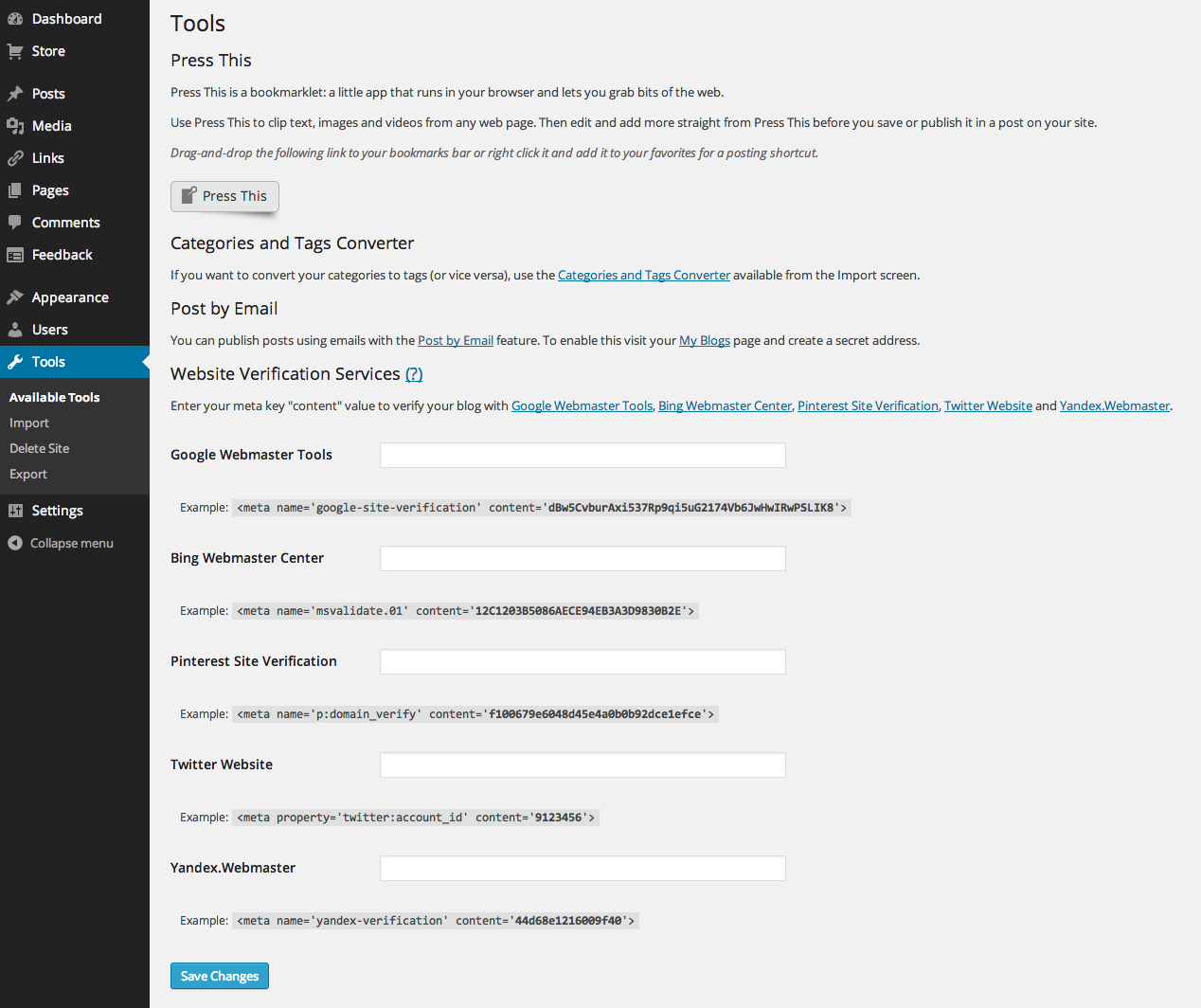
When Website Verification Services is not available under Available Tools….
-
I am the only user for my website and my role is ‘Administrator’ so I assume that when I log in, it is as Admin, not Editor.
So when I log in as Admin and go to Available Tools, ‘Website Verification Services’ isn’t there. All I have under Available Tools is “Press This” & “Categories and Tags Converter”.
I have reviewed the instructions http://en.support.wordpress.com/webmaster-tools/ but it assumes that the Website Verification Services appear under ‘Available Tools’
Does anyone know how I can make Website Verification Services appear in Available Tools?
The blog I need help with is: (visible only to logged in users)
-
-
If you are logged in as selikas and go to this link:
https://selikas.wordpress.com/wp-admin/tools.phpYou should see the following:
https://i.cloudup.com/iq2Za_D3So.pngIf not, please try logging out of WordPress.com, clearing your browser cache, and then log back in. You may also wish to confirm that you have third-party cookies enabled:
http://en.support.wordpress.com/third-party-cookies/If that doesn’t help, please try another browser.
After all of that, you’re still stuck, please take a screenshot and upload it to your media library so I can take a look:


- The topic ‘When Website Verification Services is not available under Available Tools….’ is closed to new replies.
 WordPress.com Forums