

Where are the sharing buttons at the end of my post?
-
On the bottom of my first post – sharing buttons appeared for facebook, twitter, etc. Along with a like button so you could see how many other bloggers had liked your post. That is not appearing on the bottom of my second post. I did some checking with my editing and it appears that I have done everything the same. Help?
The blog I need help with is: (visible only to logged in users)
-
On the bottom of my first post – sharing buttons appeared for facebook, twitter, etc. Along with a like button so you could see how many other bloggers had liked your post. That is not appearing on the bottom of my second post. I did some checking with my editing and it appears that I have done everything the same. Help?
-
Hi there,
Please note that besides the first post you have to click into the post to view the sharing buttons.
I went to this post and found that the sharing buttons were there:
Here’s the screenshot of the sharing buttons:
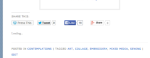
Cheers!
-
Thank you! I actually was able to figure it out – I guess I just need to check that every time I post to make sure they are coming up. Thanks for responding – have a wonderful week:)
-


- The topic ‘Where are the sharing buttons at the end of my post?’ is closed to new replies.
 WordPress.com Forums