

Where do I copy the code to link Google business page to my home page?
-
Hi
I’ve read the posts about google+ and have linked my blog (www.findingyoga.com.au) to my private Google + profile but really just want to link my site with Google+.
Google+ says to do this:
By adding a short line of code to http://www.findingyoga.com.au, you can make your Google+ page eligible to show up on the right hand side of the Google search page for relevant queries and make your Google+ page more discoverable. Learn more
Ask your site’s webmaster to add the following line of code to your site’s homepage:
xxxxx You can also email these instructions to your webmasterI tried putting this in a text widget on the Page Pages option but didn’t seem to work.
Tips greatly appreciated!
Thanks,
RachaelThe blog I need help with is: (visible only to logged in users)
-
Hi Rachael,
I looked into your text widget on your pages and found that it was showing as seen here:
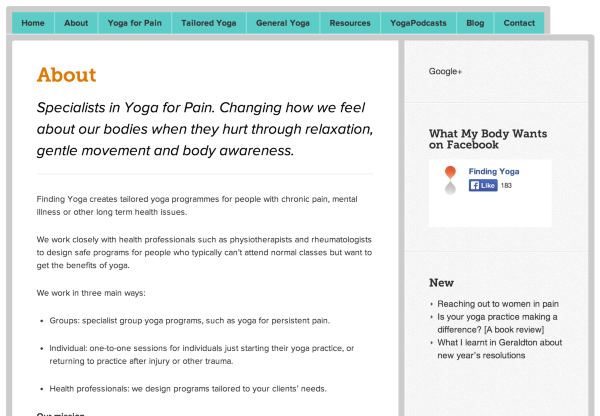
You can see the Google+ link at the top right hand corner. I was able to click on it, and I was taken to your Google+page.
Please note that you set it to only appear on your Page Pages (meaning that it is just a static page). The only page pages you have are: About (all the pages in this menu except Fundraisers), General Yoga, Resources, and Contact. If you want to add this widget to all pages, please do so by going to Appearance > Widgets in your Dashboard.
I noticed that the link is not very visible and difficult to see. It might be better to add a Google+ button through an Image Widget. You can use this image, and set the width and height to 50 and 50. If you want the button bigger just raise the number. For the link URL just put the URL for your Google+ profile page.
If you have any trouble with this, please let me know and I’d be happy to set this up for you!
Cheers!
-
Thanks for this. I hadn’t realised I had done that, so that’s useful to know!
What I wanted to do, though, was to verify to Google+ that I really own findingyoga.com.au so that they will let my Google+ page come up in searches.
To do that they said that I need to add this code
needs to be added to my homepage (which is the code I tried adding to the home page).
When I go to my google+ dashboard now it still says “Do you really own Finding Yoga” and tells me to go back to that step I posted in my first comment.
Thanks heaps,
Rachael -
Hi Rachael,
I think I know what you mean. Can you change the URL on your Google+ profile to:
Please take out the “www.” Then please follow the steps on this page starting from number 3.
Let me know how this works out!


- The topic ‘Where do I copy the code to link Google business page to my home page?’ is closed to new replies.
 WordPress.com Forums
