

Where in the Stay theme can you activate the Home Slider?
-
I am trying to get a few large images for people to click through at the top of my Home page (like the theme thumbnail has on it) and just can’t crack it!
I have tried creating pages with featured images in them and assigning the name of these pages in Customize/Home Slider. Nothing shows up. I have also tried adding a slideshow gallery to the Home First widget area as well as the Primary Sidebar (the sidebar was just a test to see if anything appeared at all anywhere – as opposed to wanting it at the side!) Nothing appears in either position.
Not sure if I ought to be making my front page posts instead and making the top one sticky in order to make this work? However, the Home Slider does specify featured pages rather than posts..
Can anyone help?!
Thanks,
LauraThe blog I need help with is: (visible only to logged in users)
-
Hi Laura,
Have you taken a look at the Stay support page?
https://wordpress.com/themes/stay/
It states that in order to set up the Home page template and Slider you must designate your static Home page to the Home template. So please edit this page: A kitchen interior from our latest project and set the template to Home as seen here:
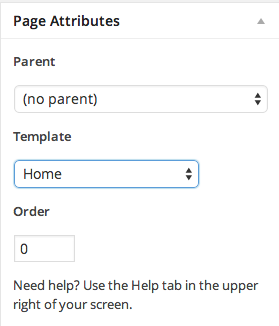
Then you should be set.
Let me know if you have any questions with this!
-
-


- The topic ‘Where in the Stay theme can you activate the Home Slider?’ is closed to new replies.
 WordPress.com Forums