

Where is full CSS?
-
Is there any way for me to access the full CSS for my blog instead of only typing my own revisions? On a WordPress site I manage for work, I have the “Editor” option, but not here.
The blog I need help with is: (visible only to logged in users)
-
Hi there,
It’s definitely possible to access the entire CSS for your theme. WordPress.com does not have the same editor feature as WordPress.org (you can read more about the difference here). However, in Firefox, you can use the “Inspect Element” tool to see the original theme CSS. Just right-click anywhere on the page and click “Insect Element”. Then, click “Style Editor” and find “Static” on the left-hand side as shown here:
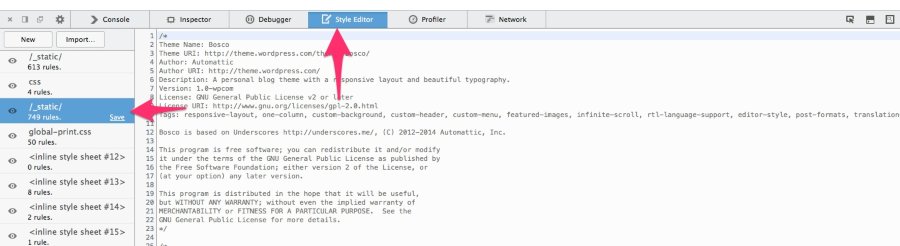
Can you give that a try?


- The topic ‘Where is full CSS?’ is closed to new replies.
 WordPress.com Forums