

Where is my slider?
-
I am not seeing the slider of stories across the top of my site like I expected to see via the theme page. At the moment, it is just placeholder stories on the page. I didn’t add official posts yet, but wanted to see how it would look before generating content. What I am doing wrong in activating the slider block? The site is http://www.centralpawccc.wordpress.com
The blog I need help with is: (visible only to logged in users)
-
Hi,
With the Oxygen theme applied, a post slider may be displayed on a page with the Showcase Template assigned. If you want to display the slider on the front page, then a page with the Showcase Template assigned must be set as the front page.
Instructions for setting up the front page to resemble that of the Oxygen demo may be found in the Oxygen theme guide. See particularly the Showcase Page Template and Featured Slider sections.
-
-
-
Have the posts that you want to be featured in the slider been marked sticky, as specified by the theme guide?
-
The Featured Slider section of the Oxygen theme guide specifies that to be displayed in the slider a post must be marked sticky, and provides a link to the Sticky Posts section of the Post Visibility support page.
-
How do you mark a post as sticky? In previous sites, I tagged a story with the word “featured” but not sure how to set that up as the keyword here.
-
-
How do you mark a post as sticky?
The instructions are in the Sticky Posts section of the Post Visibility support page.
should the slider go in the primary menu?
No.
Also, your featured images are too small. They should be of at least 750 pixels width according to the theme guide. All of the featured images on your posts are 470 pixels wide. The Featured Slider section of the Oxygen theme guide says:
Keep in mind: if you mark a post as Sticky but the featured image is less than 750 pixels wide, then it won’t display in the slider and will still disappear from the river of posts.
-
I cancelled out the pre-loaded posts and added a new post with a large photo. I am still missing something because the slider is still not showing. I am sorry. I am not getting the sticky post option … where can I add a keyword that will allow me to signal which posts should go to the slider?
-
Hi zaktansky,
where can I add a keyword that will allow me to signal which posts should go to the slider?
The Oxygen theme does not use tags to indicate which posts will go to the slider.
I am not getting the sticky post option
When you go to My Site > Blog Posts, and edit a post, you should have an option like the one in this screenshot:
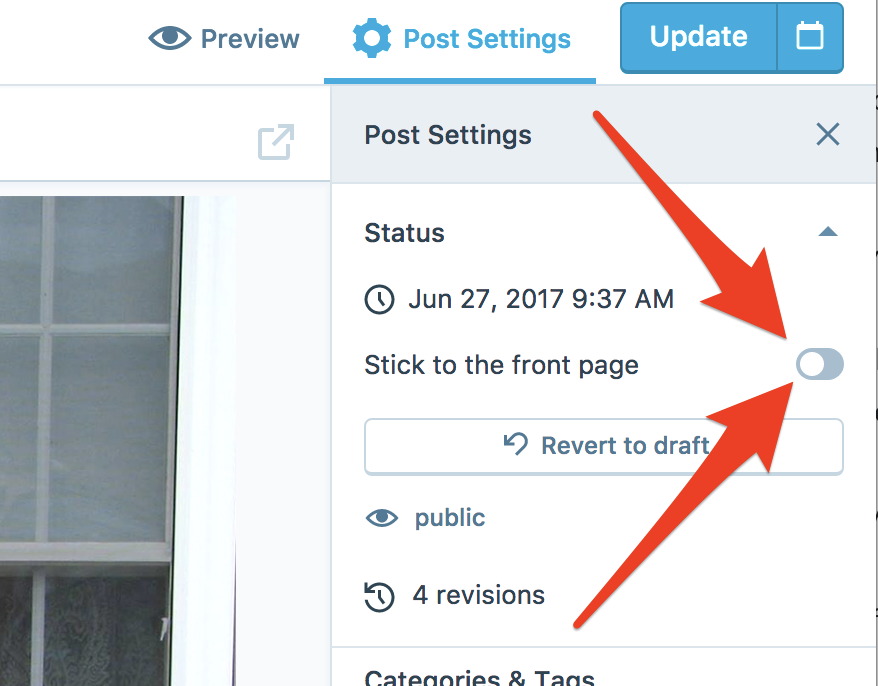
Toggle the switch and press the blue Update button to save the change. That will make the post “sticky” which tells the theme to use it in the slider.
-
-
OK. Next issue. I am sorry for all the trouble. How do I get article listing to populate below my slider in the main area next to the secondary sidebar? I have information in my primary sidebar that I want, including location, contact info and a photo gallery. I have been able to work with the secondary sidebar. But what is the space below the slider called where there are “recent articles” and “more articles?” I’d like to work with that area.
-
-
How do I get article listing to populate below my slider in the main area next to the secondary sidebar? But what is the space below the slider called where there are “recent articles” and “more articles?” I’d like to work with that area.
You only have one post published at the moment, but once you publish more, they will appear in that area. Just don’t mark them as sticky.
I’d actually like to lead off this spot with a larger photo gallery option if possible.
This theme will only display posts in the recent articles and more articles sections. If you like, you can make a post that includes a photo gallery, and that gallery will be viewable once a visitor clicks on the post.
-
-
No, the widgets can only be used in the areas that the theme specifies for widgets.
Have you seen the Dara theme?
https://darademo.wordpress.com/It has a post slider, and also lets you add page content (like a gallery) under the slider.


- The topic ‘Where is my slider?’ is closed to new replies.
 WordPress.com Forums