

Where is the Add New button for adding a new user?
-
I’m trying to add a new user and Help says “To add a new user for your site, click the Add New button at the top of the screen or Add New in the Users menu section.” There is NO such button (I’m using Chrome, but it doesn’t appear in IE either). Why is there no button?
Blog url: http://overautomatedlibrarian.wordpress.com/The blog I need help with is: (visible only to logged in users)
-
-
-
To clarify: I’m not trying to Invite, I’m trying to Add New. The Help says there is an “Add New” button (not Invite) which is not visible. It is not on the Invite screen, either, that I can see. I don’t need to Invite — I need to Add.
Does the “Add New” button show up only when I get a response from an invitation?
Thanks. -
Here’s the documentation for adding new users:
http://en.support.wordpress.com/adding-users/
However, if you’re not asking about the blog given in the URL in your query, andif you’re asking instead about a private blog, then you’ll need to read this instead:
http://en.support.wordpress.com/adding-users/#invite-people-to-view-your-private-blog
-
Well if you’re not trying to invite anyone to your blog then what is it you’re trying to do as you have me baffled. The Add New is as i already told you, Dashboard>Users>Invite New. The button is there whether you add anyone or not.
-
One other thing – as I noted that the URL linked to your name is not a wordpress.com site – is this for a WordPress.com blog? If not, then you are asking on the wrong forum and you should read this:
https://en.forums.wordpress.com/topic/please-read-me-first-before-posting?replies=1
and then ask here instead:
Unfortunately there are differences between the two types of wordpress and we can’t help self-hosted bloggers here.
-
@absurdoldbird cheers for that, now i see why our wires were crossed if it’s not a WP.com blog . I thought i was losing my mind LOL
-
@therattlingdoor – it’s always a good idea to ask first. ;) but actually, this might still not the be answer – we won’t know for sure til the O.P. responds. The trouble is that the URL that is posted below the original query is put there by wordpress.com not the blogger. There is an option to change that but many people who come to these forums don’t know to do that!
And sometimes WordPress.com changes the wording of its links and doesn’t update the help documentation, so you see it might still be something we can help with. We really need more info.
-
Actually, the blog I want to add a user to is http://americandemocracyproject.wordpress.com/
but what WordPress used on the post may look different, or refer to another one of my blogs on WordPress. Since the question applies no matter which, I didn’t bother to change it.
I think I see the problem thanks to absurdoldbird’s comment — I’m taking the Help file ” click the Add New button at the top of the screen or Add New in the Users menu” to refer to an actual button that says “Add New”. Apparently the Help file was not updated to cover the current display (I’m guessing). So, I cannot just Add New, I have to go through the entire Invite process now. I’ll settle for that, then. Thanks for your help, everyone. -
You’re welcome but I’m still wondering if you’re on the right track here. Would you give the URL to the help document you’re looking at? That might help us to advise you further. Because I’m wondering if you’re somehow looking at the Codex documentation instead of the WordPress.com info. This is a screenshot of the Codex (on WordPress.org, which is separate from here):
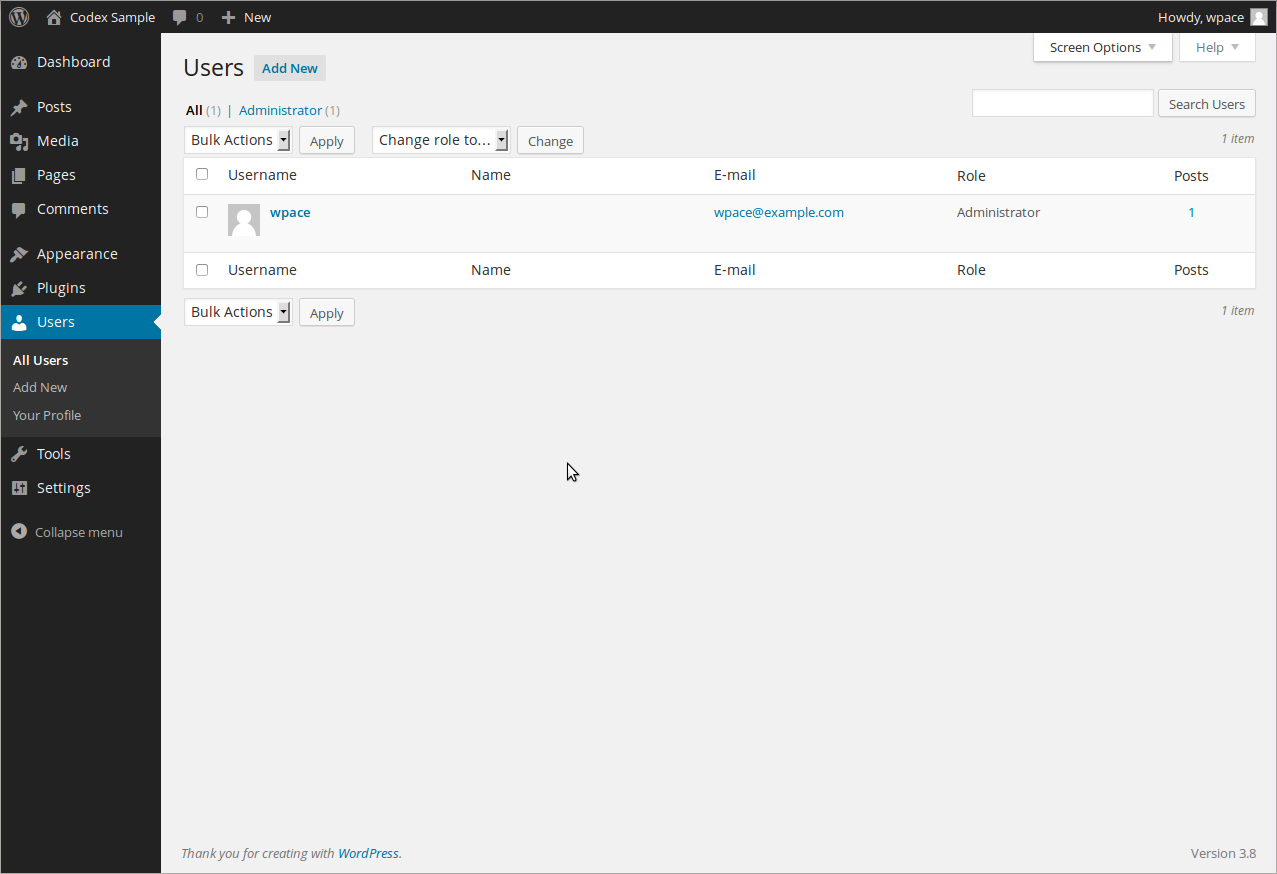
and that definitely does have an ‘add new’ link.
-
http://americandemocracyproject.wordpress.com/wp-admin/users.php
and it’s interesting because your codex link shows the button, but the Help on the users.php (which does not show that button, just one for Invite in the same position) specifically mentions it — that’s the quote I put in my earlier posts.
It would seem that the Help file needs to differentiate between the two versions of the screen.
Thanks! -
I could really use your help solving a similar problem–I do not have the “Invite New” menu selection available on my wordpress.com blog.
I am the administrator and would like to invite a small group of people to subscribe to my blog by entering just their email addresses.
This support thread says there is a command/function to “Invite New” where the blog administrator can enter just the email address:
http://en.support.wordpress.com/adding-users/#invite-people-to-follow-your-blog
The problem is that I don’t have the “Invite New” menu selection available which is documented in that support thread.
The support post shows under Users, there are 4 submenus:
–All Users
–Invite New
–My Profile
–Personal SettingsI don’t have “Invite New.” What I have under Users are just 3 sub-menus:
–All Users
–Add new
–My Profile“Invite New” is not in my menu, and “Add New” requires User Names, passwords, names, and emails, which I don’t have–I only have emails.
How do I get the “Invite New” menu command? Could it be a bug, or some limitation on my template?


- The topic ‘Where is the Add New button for adding a new user?’ is closed to new replies.
 WordPress.com Forums