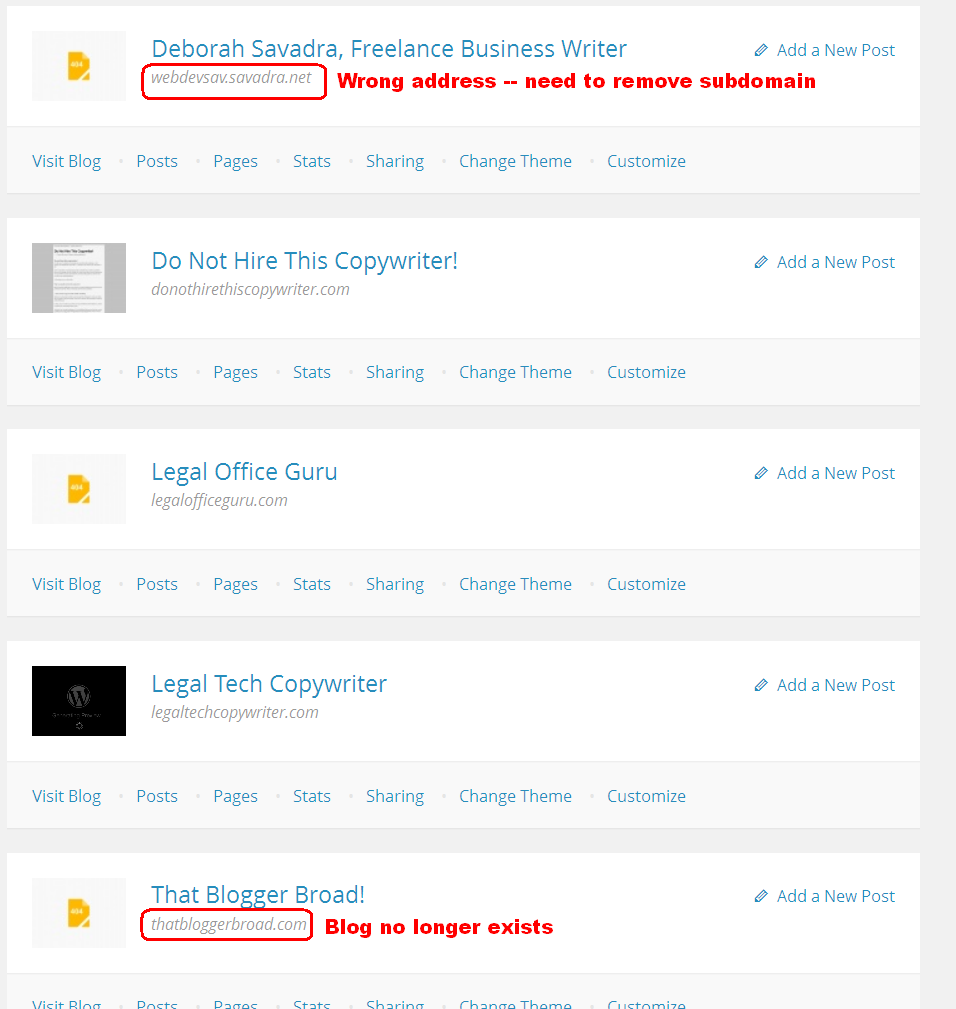
Where is the bleeping "Dashboard"?
-
I’m trying to correct some errors in My Blogs in WordPress.com (http://wordpress.com/my-blogs/) using these instructions: http://en.support.wordpress.com/changing-blog-address/
However, I see NOTHING that resembles the “dashboard” being referred to therein.
If I cannot find the dashboard, how can I change any of the addresses, etc. in My Blogs?
-
If you don’t have a WordPress.com blog, you won’t have a dashboard for it at WordPress.com.
What are the URLs of the blogs you are talking about?
-
Thanks for whatever it is you did. Things are easier, BUT, I can no longer access my dashboard menu. It’s just no longer there. What’s up with that?
-
@grenadejay
Please stop dragging every thread on this issue out of the searchbox and posting the same copy and paste into it. It’s not in anyone’s best interest to do that. Post once into a single thread on any given issue please. -
I apologize, then. I wanted a quick answer, from wherever.
I’ve not gone through all my mails so I can’t be sure anyone’s answered yet.
If you can help, I’d appreciate a response. -
Need to remove “bloggerbroad.com” and change “webdevsav.savadra.net” to remove subdomain from My Blogs listing.
See http://savadra.net/wp-content/uploads/2013/12/wp_com.png for a picture of what I’m seeing on My Blogs and what I’m trying to change. There does not seem to be any facility (menu, etc.) within the My Blogs page for adjusting these pieces of information, which is tremendously frustrating.
-
I’ve just removed the linked blogs from your account. Please let us know if you need any further assistance!
-
Thank you.
I need you to add back http://savadra.net, please. The blog still exists; it just had a now-defunct test subdomain in the address.
Why is adjusting these something that a user is not enabled to do?
-
If you go to the Jetpack page of your self-hosted blog and reconnect to WordPress.com your self-hosted site will automatically be linked to your account.
Why is adjusting these something that a user is not enabled to do?
If the linked blog still exists you can remove it from your WordPress.com account by disconnecting Jetpack.
-
-
-
Your site stats and subscribers are backuped at WordPress.com, therefore it’s safe to disconnect and connect the plugin again.
Looking forward to your reply
-
That did exactly what I thought it would — it wiped out my historical stats so they are no longer available on my site. Thankfully, I have Google Analytics to fall back on.
-
The stats shouldn’t be wiped unless you previously had a different site address (eg logdev.savadra.net) connected to your account. If that’s the case I can move stats to your current linked site.
Looking forward to your reply.
-
Yes, please — they were at webdevsav.savadra.net (see illustration linked in message from Dec. 3rd) and should be at savadra.net
-


- The topic ‘Where is the bleeping "Dashboard"?’ is closed to new replies.
 WordPress.com Forums