

Where is the header option under appearance in twenty 11 theme in dashboard?
-
Hi, I can’t seem to find the header option under the appearance section in dashboard for my twenty eleven theme. My friend who uses the same theme has it, but I don’t. I want to be able to use my custom headers and randomly change them by setting them under the header option, but it’s not under the appearance section on the left hand side of the dashboard. What should I do? Thanks,
Janice.The blog I need help with is: (visible only to logged in users)
-
Hi there!
Just to confirm, you don’t see this when you mouse over Appearance?
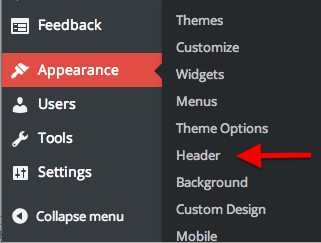
And you don’t see this when you click on Appearance?
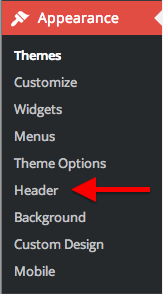
You can also edit your Header through the Customization menu:
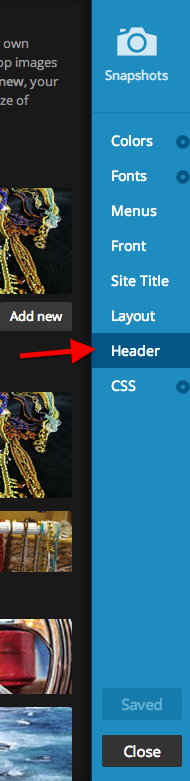
Let me know if you still can’t edit your header from any of those places.
-
No, I don’t see either of the Header options when I click on Appearance. I know I can access Header from the Customization menu, but I can only randomize the given headers at the bottom preset by WordPress, I can’t randomize my own (or not that I know of from customization). If I have the header option from Appearance menu in the Dashboard, my friend who is also using Twenty Eleven can randomize her own headers. Why don’t I see the Header option in the Dashboard under Appearance like my friend can who uses the same theme?
Thanks , Janice. -
I totally understand. I want to get this working correctly for you.
Can you send me a screenshot so I can see what you see? You can simply upload the screenshot to your Media Library, like any other image, and I’ll be able to access it from there. Here are some tips for taking screenshots:
-
I added the screen shot to the media library for janicehengel. As you can see on the left side in the dashboard view, under Appearance there is no “Header” option which appears for others using the Twenty Eleven theme. Thanks, I appreciate all your help.
Janice. -
Okay! I see now. We’re phasing out the Header menu through Appearance. So, you’ll have to make this change in the Customizer.
1. Open the Header menu in your Customizer and open the Header menu.
2. You’ll see an ‘Add New’ button. Go ahead and add all the images you want to rotate as your Header.
3. Once all of them are uploaded, scroll through your uploaded images, at the bottom you’ll see a button that says ‘Randomize X uploaded headers.’ Click on it!
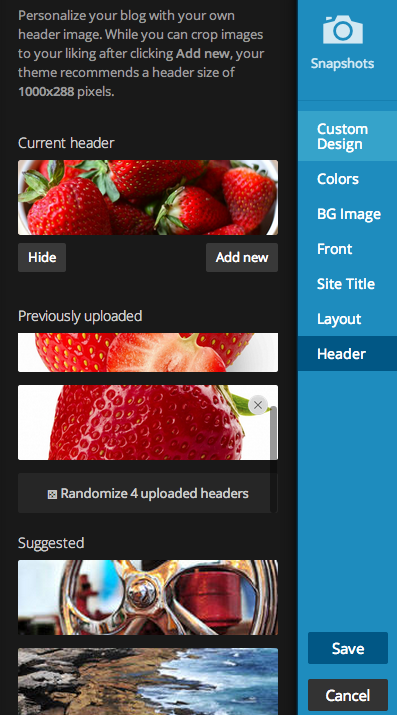
Let me know if you need further help with that!
-
Hi,
This does not work since the randomize the headers are for the headers provided as default by WordPress at the bottom. Previously when the header option was available under Appearance I could randomize my own headers. Now I can’t. It only allows for me to randomize the ones given by WordPress. Why are they phasing it out of the Appearance menu? It is horrible the way it doesn’t work now. This problem should have been so easy to fix if the Header option worked the way it does for my friends’ blog and I don’t understand why if I am using the same theme, I don’t get the option and she does. It doesn’t seem right and I pay $18 a year more for a janicehengel.com domain name.
Janice -
Hi,
I noticed your screen shot and it shows “Randomize 4 uploaded headers” with the strawberries that were personalized headers. On my screen shot, I do not see that underneath my personal headers. I only see it under the 8 presuggested headers provided by WordPress. I placed this screenshot in the media library titled “screen shot header”. Let’s hope we can get a consistent view for everyone using this theme. You really need to pass on this message to WordPress software engineers that the themes should be consistent from one user to another. Thanks. -
Hi Janice!
I’m sorry this has been frustrating. The uploaded headers section has a different scroll bar than the suggested images. So if you put your mouse over your uploaded images and scroll down, it should scroll through all of the images you’ve uploaded and show the Randomize button in the picture below:
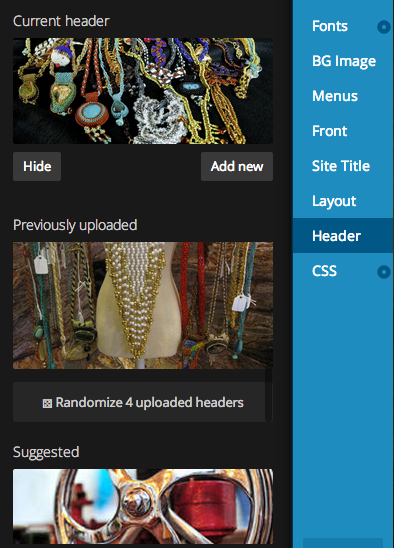
I will definitely pass on that the design is difficult to work with. I definitely missed the separate scroll bars myself when I was first looking at this. Let me know if you have any other feedback that I can pass on!


- The topic ‘Where is the header option under appearance in twenty 11 theme in dashboard?’ is closed to new replies.
 WordPress.com Forums