

Where is the post for Bear showing up?
-
I think i’m almost there. OK – I’ve set up categories for posts. I think I have everything set up correctly, but evidently not. I don’t see when I’m on my web/blog how to see posts. I posted one to Bear. It is published and I can read it when I look at posts when I’m in working on the site. But not when I just log into the site as a person looking at it. What am I missing?
thank you for all your help and all of your patience.
The blog I need help with is: (visible only to logged in users)
-
Hi Suzanne!
Glad I get to help you with this :)
First, a bit about Category pages…this link might clear up a bit of confusion:
catswithmustaches.org/category-pages/
Once you read the document above, you will see that while you created a Page called Bear…it’s a static page. Not a Category Page.
In order to add your Category page to your menu bar, you can add the item to a menu.
The instructions for customizing your menu are here:
Give those instructions a try. Let me know how it works! Looking forward to hearing your results. Thanks!
-
OK – I’ll double check all of that. But I think I did that. Maybe I missed a step. I’ll let you know.
thanks
sue -
OK – I have a menu set up with the categories. I have made Bear a category page. I have a post to Bear and when I look at the post it is showing as a category for Bear. But – I don’t see it anyplace when I look at my site. There is something that I am missing that I’m just not getting. Do I need to make a submenu under Bear in the menu for the posts to show?
thanks
sue -
Hi Sue!
I took a look at your menu. You have a page called Bear there, but not your Category.
I’ll talk you through the process:
- Open your custom menus by clicking below:
https://suzannewgibson.wordpress.com/wp-admin/nav-menus.php?action=edit&menu=2744
- In the left hand column, you’ll see this:

You’ve added Bear from the Pages menu. However, if you want your posts about Bear to appear, you’ll need to click the Categories tab. That will look like this:
- You will click on the category called Bear and add it to your menu.
- Make sure you save your menu.
- Then, you can click the little down arrow in the menu structure for your Bear page (not the category). That will make the page look like this:
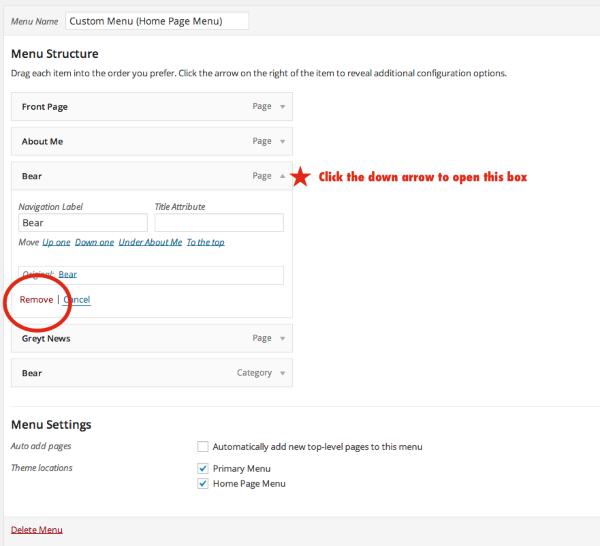
Click Remove to get rid to the Bear page. You don’t need that since you will have the Category Bear in the menu.
- Then, click the Save Menu button in the right corner.
Try that out! Good luck! :)
- Open your custom menus by clicking below:
-
OK – you loose me a little bit with the “https://cloudup.com/ccSz_5peVpf. I don’t see that. But, I think I got it to see it quite in the same way. I did try following your directions to get to the menu. Finally figured it out. So – now I have my post showing up under Bear. Which is what I wanted. However – I had entered a page for Bear with info on it, and now it does not seem to show up when I look at Bear. Just the post shows up. What have I done wrong?
Thanks again for your help.
sue
-
-
Menu is back and all ok. But – my question now is what to do with pages that were entered but not as posts, just as pages. The info for Bear that was entered as a Page does not show up. I like the way Bear and the post displays. I want to do that with my other page – Greyt News. I entered it as a page and not a post. Can I maybe copy the page to a post to make it work? just a thought.
thanks again for putting up with me.
sue
-
Well – I was able to copy the pages to posts and now have everything looking like I want it to. Once I saw what you were saying, and remembered to do all the steps………………..It looks GREYT.
Again, thank you so much for all of your help and your patience. I think I am now off and running……………………well until I screw something else up.
Have a Greyt Merry Christmas!
-
Suzanne,
I just came back from the weekend to find that you figured everything out and are now a WordPress.com expert! This is terrific.
I took a look at your Bear menu item and the category page. It looks wonderful.
Thanks for hanging in there. It’s paid off! Best of luck on the website. Wishing you very happy holidays :)
-
Well, not sure I’m an expert. But I am getting it to do what I want and loving the way the whole thing looks. Hopefully I won’t be bugging you guys much any more. Someone just confirmed a question I had on capacity and pictures so I’m feeling good about the whole thing.
So – again, have a Greyt Merry Christmas and a Greyt Happy New Year.
Thanks again for all of you help.
sue
-
Terrific!
Well, the good news is, that we’re here to help, and we LIKE to help. So don’t be shy :)
Wishing you and yours the very best.


- The topic ‘Where is the post for Bear showing up?’ is closed to new replies.


 WordPress.com Forums