

Where is the "un-do" arrow?
-
Where is the “un-do” arrow?
Where is the “H1” tag?
How do I enter SEO page description?
How do I change font size?Why did I lose my page?
?.The blog I need help with is: (visible only to logged in users)
-
Howdy!
I’ll go through each of these one by one:
Where is the “un-do” arrow?
You can find the Undo an Redo options when using our Visual Editor. The buttons are hidden the 2nd row:
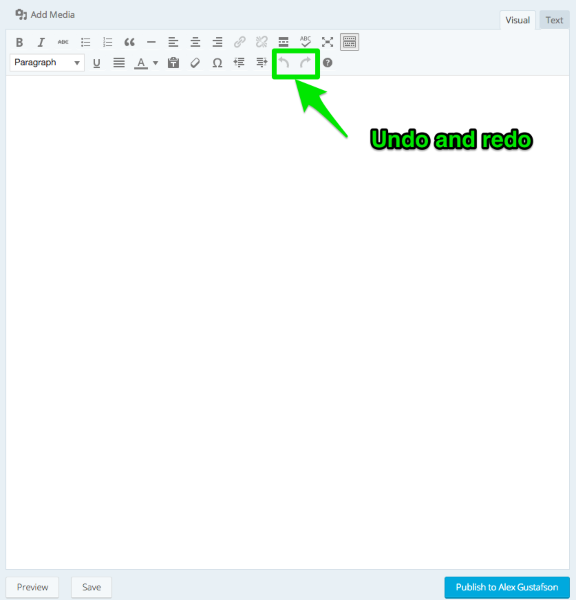
Make sure to click the 2nd row toggle if that row is missing.
Where is the “H1” tag?
These are found in the text style dropdown, also in the 2nd row:
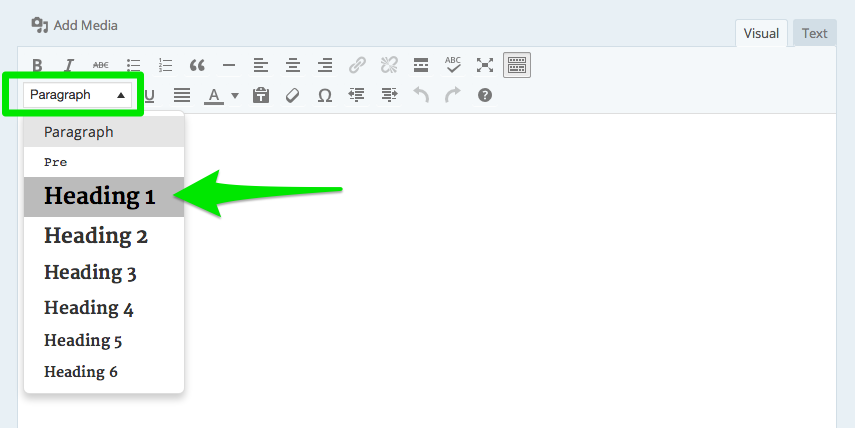
How do I enter SEO page description?
WordPress handles SEO meta-data automatically when you create each page and post.
http://en.support.wordpress.com/search-engines/
How do I change font size?
You can adjust this with each post by selecting various forms of text styles (e.g. paragraph, heading 4, heading 5).
Since you have the Premium plan, you can then adjust the font size of those styles using your blog’s Customizer:
http://en.support.wordpress.com/custom-design/custom-fonts/
Why did I lose my page?
Our new editor does not autosave any draft in progress beyond what is saved in your browser’s local history. You can however, save drafts in progress:
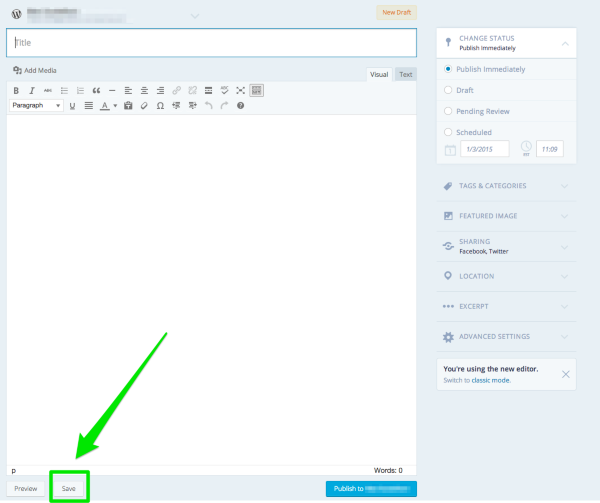
You can find a list of all pages that are published, saved as draft, or trashed in your /wp-admin/ dashboard:
https://ncirfund.wordpress.com/wp-admin/edit.php?post_type=page
If you rely on the autosave feature, you can also still create pages in /wp-admin/ by clicking “Switch to classic mode” in the editor.
-Alex G.


- The topic ‘Where is the "un-do" arrow?’ is closed to new replies.


 WordPress.com Forums