

Where may I upload plugins?
-
Hello WordPress Support Team,
I would like to install a plug in for my current theme, but I cannot find the plug-in menu. How can I access it?
Thank you in advance!
The blog I need help with is: (visible only to logged in users)
-
Hi there!
WordPress.com is a shared hosting environment and, therefore, it’s not possible to install plugins here. Plugins can only be installed on self-hosted WordPress sites. If you’re not sure how WordPress.com differs from self-hosted WordPress sites, this guide gives a good overview:
http://en.support.wordpress.com/com-vs-org/What are you trying to achieve with a plugin? WordPress.com does have a lot of built-in features and there’s a good chance that what you’re looking for is already here. If you let me know what you’re end goal is, I’ll be happy to help you find a solution.
-
Hello siobhyb,
Thank you for letting me know! A shame I can’t use the plug ins, but all I want to do in the Oxygen theme is to change the Gray font to hex color #c33b00. (Since the font in gray can’t be seen against a light yellow background.) I’m also having trouble accessing the css to try and find the code for it as well so I’m wondering if there’s a solution to any of those issues?
Thank you in advance!
-
Hi there!
Since you have the Premium plan, we can make those color changes. No plugins necessary. :)
The gray text I could see on your home page were all widget titles, the date for each post, and the category link on each posts featured image.
This CSS changes all that to your requested color, but then the second bit moves the category links back to their original color because it looked a little off in their gray box. Feel free to use all of this, or just parts as you prefer. :)
/* Adjust Gray Widget Titles and Entry Dates to the requested color */
.widgettitle , .entry-meta a{
	color: #c33b00;
}

/* Adjust category links from requested color back to original color for clarity*/
.entry-meta .cat-links a {
	color: rgba(255, 255, 255, .75);
}
-Alex G.
-
Hello alexjgustafson,
Thank you for the css, works as intended! Though, I’m trying to figure out how to change the header text on pages (like membership, about) to a different color now. The links to pages also turn gray when active. What would the css be like to fix both?
Thank you again in advance!
-
Looks like those page titles are getting the gray (#ccc) color from the class of “entry-title” while being on a Page (instead of a Post):
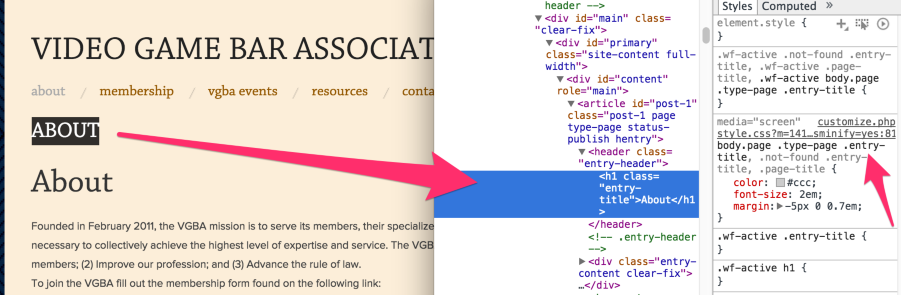
So try this out:
body.page .type-page .entry-title{
	color: #c33b00
}
Similarly, the link for your current page (in the main navigation) gets its gray color from “current_page_item” and “current-menu-item” classes:
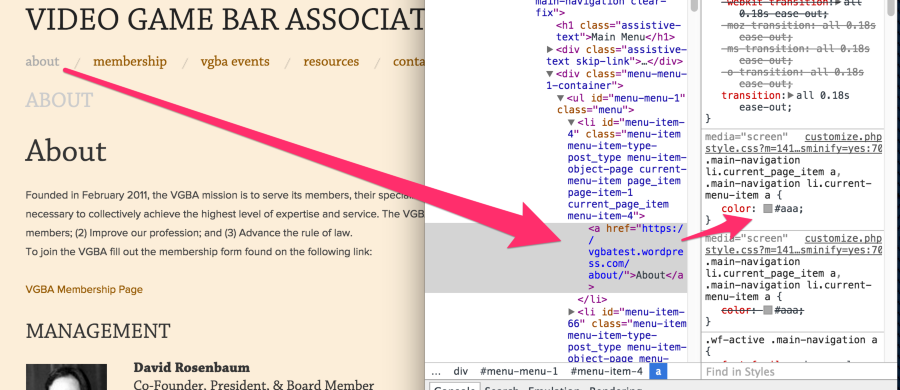
Use this to change that ‘current page’ link’s color:
.main-navigation li.current_page_item a, .main-navigation li.current-menu-item a{
	color: #c33b00
}
The links to pages also turn gray when active. What would the css be like to fix both?
Let’s start by thinking how to change colors to links at all. If we want to change the color of all these links (in the navigation) I started out with this idea:
.site-navigation a{
	color: #fff;
}
But if you add that, you’ll see that it won’t work. Inspect the element and you’ll see another rule is taking priority:

So we’ll use that rule instead. :)
.main-navigation > div > ul > li > a{
	color: #fff;
}
So to change the color only when they’re active (i.e. clicked) or hovered, we’d use the same rule but add the :active and :hover selectors…
.main-navigation > div > ul > li > a:active ,
.main-navigation > div > ul > li > a:hover{
	color: #ff0000;
}
By the way, we have a great new site for folks beginning to learn CSS here:
https://cssworkshop.wordpress.com/
Read through those posts, and you’ll see how to use the Browser Inspectors to find good selectors, like I did above.


- The topic ‘Where may I upload plugins?’ is closed to new replies.
 WordPress.com Forums