

Where's the option to set an image's border thickness in a post?
-
I used to be able to set a border thickness for images within posts using the advanced settings tab on the edit image window, but that option seems to have been removed. Is there another way to do this?
You can see the way that the edit image window used to look here: http://en.support.wordpress.com/images/image-settings/
The blog I need help with is: (visible only to logged in users)
-
It’s fine, I’ve fiddled around with the text editor and managed to get a border by adding: border=””01″
Initially this produced a hideous bright blue border, but (for anyone else who has this problem) just click on the image so it’s selected, then change the colour to whatever you want using the Text Color dropdown.
-
Hi there!
I’m glad you got this sorted out! You are totally correct. You can remove or add the border by inserting border=0px in the HTML as shown here:
<img class="alignleft size-large wp-image-15039" src="URL" alt="Featured Image -- 15038" width="584" height="389" border="0px" />Just adjust the number 0 to how thick you want the border to be.
Let me know if you have any additional questions!
-
-
-
-
Hi there,
Just an update, I have great news.
Our developers have added border and margin options to the Advanced Options as seen in the screenshot below:
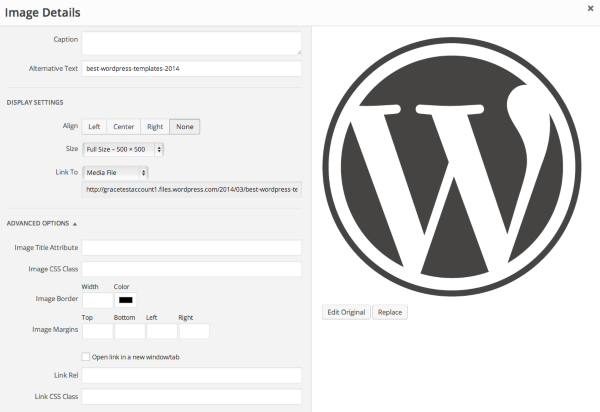
Cheers and Happy Blogging!


- The topic ‘Where's the option to set an image's border thickness in a post?’ is closed to new replies.
 WordPress.com Forums