

Which themes include "Portfolio"
-
I just set up a WordPress site. The first theme I chose, quickly to get started, was “eighties.” I puttered around and found that I could click on a topic called “portfolio” which gave me a large range of editing options. Most notably, I found that this was the only way to try to get additional bloggers included on my site, by sending emails out to invite others to be bloggers. I would like to have at least 2 or 3 other bloggers use my site along with me, and be able to write blogs themselves.
I then went to browse themes, since I wanted a different theme, but for each of the three other themes I tried out (Twenty Fourteen, Matala, Mystique) they did not have the “portfolio” option for editing. Can anyone clue me in, do some themes just not have that, or is it hidden away somewhere that I can’t find it?
I have the basic, free WordPress plan — not the $99 a year plan.
Also, I noticed that some themes worked better on the iphone — again, the “eighties” theme worked fine on iphone (without WordPress App being installed) but the other three, did not work well, as they came out the wrong size on the phone, too small to read (the way any website will come out if you try to view the full site on the phone, rather than thru an app). Does anyone have any tips on this as well, how to know which themes will be usable on an iphone without WordPress App installed? (SInce some viewers may not have the app).
The blog I need help with is: (visible only to logged in users)
-
Hi heartoglad,
Here are some selected themes for you: https://theme.wordpress.com/themes/features/responsive-layout+portfolio/?sort=free
Your selection can be even more accurate if you wish, using the browser at the top of the page.If you want to learn a bit more about the mobile version, please refer to the following support page: https://en.support.wordpress.com/themes/mobile-themes/
Happy blogging!
-
You can add portfolio projects to any theme, but only certain themes have special portfolio templates. A few of the free themes that do are:
– Illustratr
– Espied
– Blask
– ArgentYou can also use the portfolio shortcode in any theme to display portfolio projects.
Themes that adjust automatically to mobile devices are called responsive themes. All our newer themes built in the last couple of years are responsive, but older themes, such as Matala and Mystique, are not.
You can see all our responsive themes here:
Free – https://wordpress.com/themes/filter/responsive-layout/type/free/
Premium – https://wordpress.com/themes/filter/responsive-layout/type/premium/
If you prefer to use an older non-responsive theme, you can activate the separate mobile theme so it’ll still be readable on smaller devices. heliodore gave you the link to read more about that above:
https://en.support.wordpress.com/themes/mobile-themes/Let us know if you have any other questions.
-
Thank you Heliodore for the information about themes with portfolio. Kathrynwp — I was not able to do the custom portfolio activation. The instructions give this —
In your site’s dashboard, go to Settings → Writing → Your Custom Content Types and make sure the “Portfolio Projects” option is checked.
But there is no “YOur custom content types” available in “writing”.
I have another question — I see nowhere to add a contact form to the site. Is that available? I have a second blogger who set up a blog on the site already,and their blog has a contact form option that they were able to put on it, but for some reason, I can’t see that I have an option to add a contact form to my blogs. Is that possible? And/or can I add a contact form page on the site?
-
Sorry — somehow my effort to include a quote in my post got messed up and the entire remaindef of the post came out in the quote box.
-
I discovered how to add a contact form to my posts!
What I now can’t figure out is how to change my site title and subheader on the site. (eg where the title reads GlobalHostingBLogs and “Tell your hosting tales here”. I could do that on the old theme but now that I have changed to TwentyFourteen theme I can’t seem to find it .
Also is there a way to make the title larger? To increase font size?
-
Glad you figured out how to add a contact form.
Both the contact form and portfolio settings are currently only available in the WP Admin dashboard. You’ll find the portfolio setting here:
https://globalhostingblogsdotcom.wordpress.com/wp-admin/options-writing.php
What I now can’t figure out is how to change my site title and subheader on the site. (eg where the title reads GlobalHostingBLogs and “Tell your hosting tales here”.
They’re in the Customizer’s Site Identity panel:
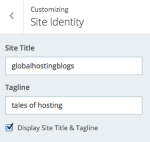
Also is there a way to make the title larger? To increase font size?
You can make size tweaks in the Fonts panel, by clicking Normal size and selecting something else. The option is only available if you choose a specific font other than the theme’s default.
You may make finer-grained size tweaks with Custom CSS, a feature available with the Premium or Business plan.


- The topic ‘Which themes include "Portfolio"’ is closed to new replies.
 WordPress.com Forums