

White Screen with my wordpress.com site
-
I am restarting my old site.
I was using the oxygen theme and decided to try the sequential theme instead – activating it successfully.
From the control panel with my domain name provider I re-directed the old domain (elderdigitalmarketing.com) back at the site again (elderconsultants.wordpress.com) after it had re-directed elsewhere for 18 months.
When I view the published site all see is a white screen.
I tried changing the theme back to oxygen but still get the white screen.
Is there something wrong with my domain mapping?
The blog I need help with is: (visible only to logged in users)
-
Hi. Domain Helper says:
Although elderdigitalmarketing.com has been registered, it is not using WordPress.com nameservers. If your domain is mapped to a self-hosted site, then your configuration may be fine as currently set up. If you wish to host your site at WordPress.com, you will need to update your nameservers as outlined below.
To learn about how to correctly map an existing domain, please see our documentation. If you’re not sure whether you own this domain or not, the WHOIS database record may help you out.
Less Information
We require that your name server configuration include only the following servers or their numeric equivalents:
NS1.WORDPRESS.COM
NS2.WORDPRESS.COM
NS3.WORDPRESS.COM
Your name servers are as follows:NS0.PHASE8.NET
NS1.PHASE8.NET
NS2.PHASE8.NET
If you have access to change the nameservers for this domain, please remove all nameservers not on the required list above.A DNS lookup for your blog returns the following information:
; <<>> DiG 9.8.4-rpz2+rl005.12-P1 <<>> NS elderdigitalmarketing.com
;; global options: +cmd
;; Got answer:
;; ->>HEADER<<- opcode: QUERY, status: NOERROR, id: 10028
;; flags: qr rd ra; QUERY: 1, ANSWER: 3, AUTHORITY: 0, ADDITIONAL: 0;; QUESTION SECTION:
;elderdigitalmarketing.com. IN NS;; ANSWER SECTION:
elderdigitalmarketing.com. 86400 IN NS ns1.phase8.net.
elderdigitalmarketing.com. 86400 IN NS ns2.phase8.net.
elderdigitalmarketing.com. 86400 IN NS ns0.phase8.net.;; Query time: 213 msec
;; SERVER: 127.0.0.1#53(127.0.0.1)
;; WHEN: Wed Apr 8 13:34:29 2015
;; MSG SIZE rcvd: 107 -
Hi there,
Just visited elderdigitalmarketing.com and it’s correctly displaying your content from elderconsultants.wordpress.com:
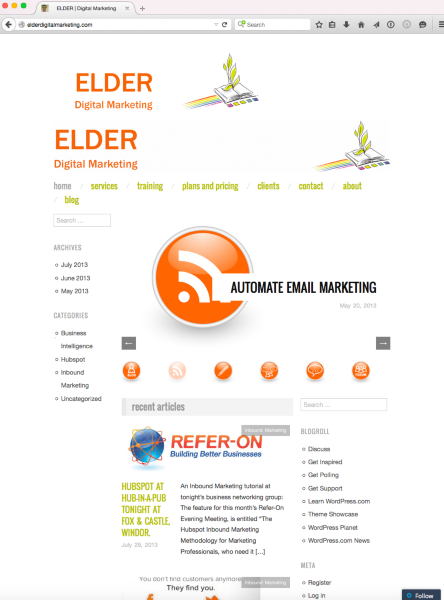
Any DNS changes (like changing name servers from phase8.net to WordPress.com) can take time to take effect fully (sometimes up to 72 hours), and I think that wait time was all that was needed here.
If you’re still seeing the white screen, please try clearing your browser cache and revisiting the site.
Changing the theme on your WordPress.com site doesn’t affect these DNS changes, so feel free to switch back to Sequential if you’d like. :)
-Alex G.
-
Domain Helper and Alex, thank you for the guidance. I did have to change the name servers as per Domain Helpers advice (using help from Names.co.uk my domain name provider) and then wait as per Alex’s note. Even though it did not save properly first time around I did not appear to loose my emails thankfully.
BTW Sequential Theme for wordpress.com seems to be in a class of its own as a free theme. I am setting up an Inbound Marketing website with lots of “calls to action” and forms. What am I missing?
Thanks again
Jonathan -
«Domain helper» is a tool, not a person.
I’m a person, a real person. ;)
You’re welcome. -
Sequential was definitely made with business purposes in mind. The included Button CSS classes are very helpful. It’s one of our newest free themes for business, so that’s why it seems a step up from some other free themes:
Your site is coming along nicely. For documentation on any of Sequential’s fetaures you’d like to add, information is here:
https://wordpress.com/themes/sequential/
But if you have specific things you need help setting up, just let me know. :)
-Alex G.
-
Alex, Thanks for your info.
I swapped to the Goran theme for the header image feature. I believe this is also one of your themes?
Now I have got to use a lot of the Goran functionality I am blown away with the theme(s).
I how no experience of coding yet have been able to implement our “Inbound Marketing” website by myself. The one aspect that I am yet to understand is the role of “Projects” in the Goran theme?
How would I show a “Portfolio” or “Project” in the theme?
Many thanks
Jonathan -
Hi Jonathan,
Think of projects as posts that are kept separate from your normal post feed.
All themes on WordPress.com can use portfolio projects, but some them – like Espied, Illustratr, and Sketch – have more options because they were made with portfolio projects in mind.
To display your portfolio projects in Goran, you’ll need to add a Portfolio Shortcode to the body of one of your normal posts or pages. Here are instructions on how to use that shortcode:
Adding that shortcode onto a page or post will display a portfolio-style listing of all your projects.
-Alex G.
-
Alex, thanks I will explore in due coarse! Not sure how it applies for our business site?
Many thanks
Jonathan


- The topic ‘White Screen with my wordpress.com site’ is closed to new replies.
 WordPress.com Forums