

Why are my links not displaying in Henmingway Rerwritten?
-
Hyperlinks Not Displaying in Hemingway Rewritten As a longtime user of the 2010 theme for various blogs, I am quite used to the process of inserting hyperlinks to webpages around text in my posts. I have just completed the About page for my Hemingway Rewritten-themed blog “Cakewalks and Climbingwalls” with several links visible in the text. When I look at the page in view or externally on the publicly visible website, the links are visible if I pass my mouse over the words, but the hyperlinked words are in the same color as the rest of the text. How can I get the hyperlinked text to display in a different color? And how can I make sure that this happens anytime I insert a hyperlink using the infinity-symbol resembling link function?
The blog I need help with is: (visible only to logged in users)
-
Theme title is Hemingway Rewritten. Blog is cupcakesandclimbingwalls.wordpress.com NOT mchristiangreen
-
Hello there!
You’ve opted to change the color of your background to the same color that is used to create Hemingway Rewritten’s links. Therefore, your links now appear the same as the rest of the text on your site.
To change this, go to Appearance → Customize → Colors in your Dashboard, or CLICK HERE.
Notice that the green you’ve chosen for the background? That is the color your links are, as well. Change that, and your links will pop.
I hope this helps! If you have any other concerns, drop me a note. Thanks much!
-
Thanks, thatrobyn! That gives me a clue as to where to go. I was able to access the link and noticed that there were recommendations of colors that go with the palette I have chosen. I tried almost all of them, but the only one that causes the hyperlinks to pop is a charcoal grey, against which the aqua green shade is visible. On all of the other colors, however, even white, the links are barely visible–they just show up as a fainter version of what’s there. Is the grey background the only one that I can use? Is there any way to change the color of the links? Would be grateful for any advice you could provide!
-
Really strange. When I first accessed through the link provided above, there was a display of about 10 colors said to be in “my palette”–about 3 blues, 3 greens, 2 greys (which looked identical), black, and white. Now when I access it, it gives me two choices of color scheme. One I think is brown and white, the other is the charcoal grey and aqua green that I have now. It looks like there is a way to purchase more options, but are the two that I described the default ones? How is it that I was originally presented with a wider display of colors. If the charcoal grey/aqua green is a default, I am OK with it. Just trying to see what my options are as far as customizing the color of both background and links.
-
Hello again!
The two color schemes are the defaults offered. However, depending on the options given to you by the theme’s developers, you may be able to choose some additional colors. Let’s go back to your customizer:
https://cakewalksandclimbingwalls.wordpress.com/wp-admin/customize.php?
Click Colors.
Instead of clicking on one of the default pallets, click on the background color bar instead:
https://cloudup.com/iYOUFj44dd1The background is a color adjustment you can make without the Custom Design upgrade. If the colors offered to you don’t suit your aesthetic, you can click the “You can also Pick Your Own Color” link.
If you wanted to create a site with an entirely different color scheme/font choice than the two defaults, you would have to add Custom Design.
Please let us know if you have any other questions. Thanks much!
-
Thanks much! You know, the charcoal/aqua combo is now growing on me. Perhaps WordPress theme designers really do know best! But I will keep this in mind if I want to make some changes later on.
-
HELP! Have published the blog and now links are not displaying at all. Am using same text for About page as first blog post on Home page and now no links are visible on either. What to do?
-
Hello there!
I really like that color scheme A LOT :)
I took a look at your site, and all your links seem to be popping. This is what I see:
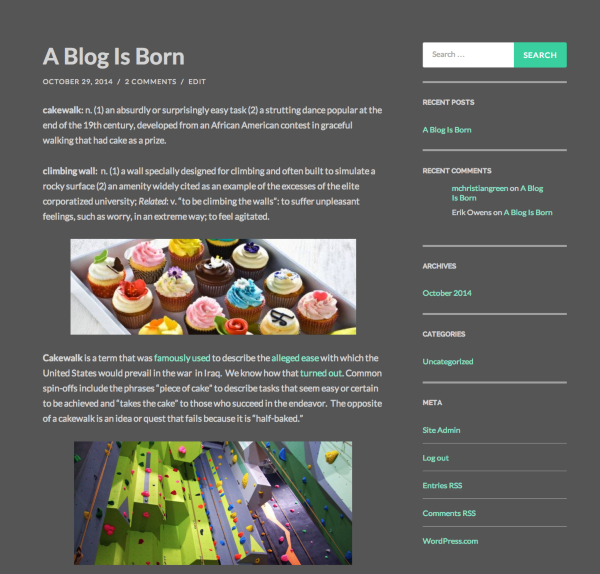
Have you fixed the problem on your own, or are you still not seeing your links?
If you’re still having the same issue, please clear your browser’s cookies and cache, and take another look.
Looking forward to hearing from you. Thanks very much.
-
Yes. I don’t know what was happening. It looked like they weren’t displaying, so I went into Customize again and clicked on the color scheme for both pages and the links were back!
-
Ok, I won’t look a gift horse in the mouth :) Your site is looking lovely.
If I can help with anything else, let me know. Thank you!
-
My philosophy exactly. Many thanks, again, for your help and your compliments to the site!
-
-
Help! Trying to insert Tubechop video into Hemingway Rewritten. Have read too many online articles and none work.
Blog is cakewalksandclimingwalls.com
Embed code for Tubechop is:
Link from Tubechop is:
http://www.tubechop.com/watch/3985002
Sorry for using reply to inquire. Support site is very hard to find at WordPress. Will try to reinsert there.
Seem very difficult to insert video into WordPress. Way too many different pieces of advice on web. This should be easy! Please help!
M. Christian Green, JD/PhD
Senior Fellow, Center for the Study of Law and Religion
http://cslr.law.emory.edu/people/person/name/greenBook Review Editor, Journal of Law and Religion
http://cslr.law.emory.edu/publications-lectures/journal-of-law-and-religion/Website
http://mchristiangreen.comLinkedIn
http://www.linkedin.com/in/mchristiangreenTwitter


- The topic ‘Why are my links not displaying in Henmingway Rerwritten?’ is closed to new replies.
 WordPress.com Forums