Why are my photos squished now?
-
My photos look fine while writing my posts and inserting them, but when they are published they look squashed. This was never a problem before, and I have done nothing differently. It’s really the landscape format I have trouble with; the portrait formats look fine.
The blog I need help with is: (visible only to logged in users)
-
I’m not sure what you mean by “squashed”. When I go to your blog, everything looks okay. Could you explain what you mean in a little more detail?
You might also wish to review the following support thread, as it may be related to your issue:
https://en.forums.wordpress.com/topic/photos-have-become-small-and-off-centered?replies=222 -
I’m sorry, I meant while I’m attempting to make a new post. The ones on the blog are fine, but now that I’m trying to insert them into a new post (one that’s not finished yet), and I preview or publish it, it compresses the image into the frame for the caption, even though I have tried changing both the size of the image and the area of the caption. I haven’t changed the way I format new posts, so I’m not sure why it looks this way.
-
There is no content in this blog http://audreysmithnaturequest.wordpress.com/
Please post the URL of the blog you are referring to. -
Sorry, it’s the other one: http://audreysnaturequestphotography.wordpress.com It’s not the content currently on the site, it’s the new stuff I’m trying to write and include photos with. The text is fine, of course, but landscape format photos are being compressed down into the caption box size, though I’ve tried extending it like I always did.
-
If you have entered a caption for the image in your media library, that caption will be retained when you use the image again. You can edit it out if you wish.
If that’s not the issue, I’m afraid I’m still a little confused, and it might help if you could take a few screenshots and upload them to your media library for me to review:
-
Okay, it’s in my media library. Thanks, I had never done a screenshot before: learned something new! Labeled “Screenshot1.”
-
Thanks for the screenshot. Now I understand what you mean.
It’s interesting in that the image shows full width in the editor window but compressed in the preview, and I’m not sure why that’s happening.
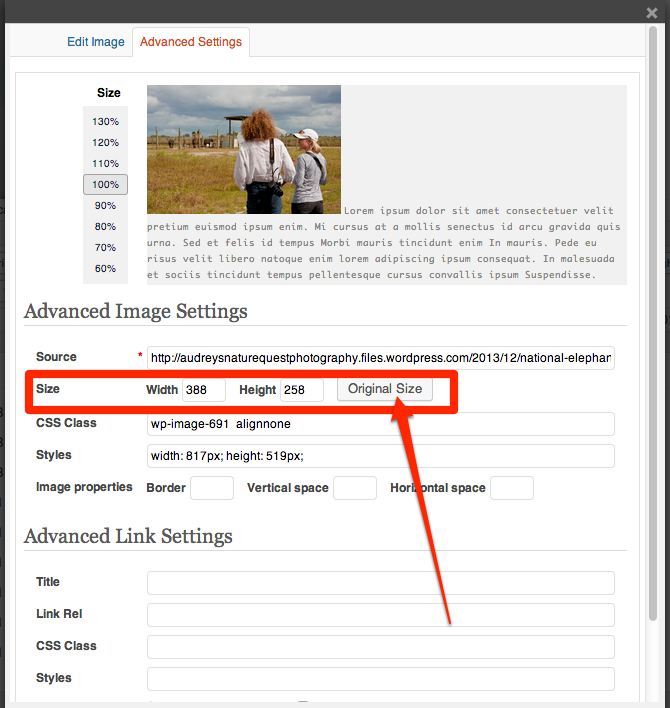
Could you try something? Go to the image in your draft post and click on it so the editor box appears in the upper left hand corner. You’ll get an Edit Settings panel. Click on Advanced Settings and try to set image to original size, and see what happens then.
Here’s where I mean:
https://i.cloudup.com/1v8YKRsbE8.pngLet me know if that resolves your issue or not, and if not, I’ll look at other things.
-
Yes, it worked! I didn’t use that box, I was using the image info when I uploaded it, and it was saying Original Size, so I didn’t even think about that little separate Edit box. Thanks! I really appreciate it, it was driving me batty!
-


- The topic ‘Why are my photos squished now?’ is closed to new replies.
 WordPress.com Forums