

Why aren't my links showing
-
I have entered links through the add link button but they are not showing up. I’ve checked and they should be visible as in the links manager section. I’m new to wordpress and trying to get to grips with it. The links appear in the editing section with what looks like the correct code which is automatically produced but then when I go to view post they aren’t there. I’ve had to manually add a link in the text which doesn’t look great. Hoping someone can help.
Thanks!
The blog I need help with is: (visible only to logged in users)
-
Hi there!
You should be able to add a link following the instructions here:
http://en.support.wordpress.com/links/#creating-links
If you’re still having trouble, could you point me to a post where you’re experiencing an issue? I’ll be happy to take a look!
-
Hi,
Thank you. Yes that’s exactly the way I did it – as shown. I want links at the end of all my posts, as each post will be related to items for sale. The code is there on all of them now but when I view the post it’s not appearing….really odd.
Thanks for offering to help out with this.
-
Hi!
I’m checking out a recent post here:
https://cabinet49.wordpress.com/wp-admin/post.php?post=86&action=edit
Currently, I do not see a link at the bottom of the post. When you’re adding the link, are you trying to hyperlink text or images?
-
-
As I said it’s all thee in the editing mode and correctly formatted (as it does it automatically for you on the add link icon). But it’s just not there in view mode…
-
Hi!
Are you referring to the Etsy link seen here?

If so, it looks like that link is displaying correctly on your blog post here:

Is that the link you are referring to? Currently, I do not see any additional links within your blog post. If that isn’t the link you’re referring to, could you please pass along the URL you’re trying to link to so I can test it out?
-
Hi,
I ended up using the add media link and it worked from there. The links I used via the add link button still do not appear so you wont be able to see them (as I can’t) – only on the editing mode are they there in full but as I say on the view mode they don’t appear.
It’s ebay links and etsy links. I’ll probably just carry on adding them this way as it works ok – just a shame the other more obvious method isn’t working…
Thank you.
-
Hi!
I want to make sure this is working properly! I don’t want you to need to develop a workaround. When you add a link to your page, can you confirm that you’re seeing this screen?
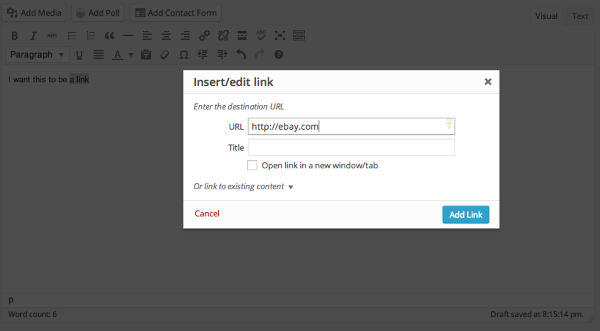
When you click “Add Link” at the bottom of that pop-up, is it not adding the link to your post or does the link just disappear when you attempt to publish the post/page?


- The topic ‘Why aren't my links showing’ is closed to new replies.


 WordPress.com Forums