

Why aren't your links working correctly on my blog?
-
My blog is http://bemuzin.com
What is going on?
Once again NONE of my tags are working even though I haven’t touched my settings. For example http://bemuzin. com/2014/10/07/drug-runner-part-2 i do a search on the tags I used and my post does not appear in any search results. This is occurring on all my recent posts.
Second problem – when I click my photo icon in the upper right corner which is supposed to give me links to things like ‘help and support’ NONE of the links work!!
The blog I need help with is: (visible only to logged in users)
-
Hi there,
It looks like your posts are appearing under the correct tags within the Reader on my side. However, one of your tags (Baby Boomer) is actually labelled “Baby-Boomer-2” on your site as shown in the URL here:
http://bemuzin.com/tag/baby-boomer-2/
Here’s a snapshot of how your posts appear in the Reader when I search for “Baby-Boomer-2”:
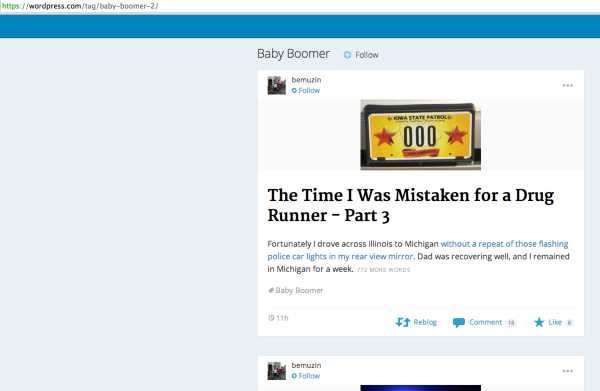
The “2” is normally added to the end of the URL if you have created duplicate tags sometime in the past.
To fix this, you should be able to create a new tag “baby boomer” and it will be assigned the base URL bemuzin.com/tag/baby-boomer. Then, you’ll need to assign it to all of your posts:
Can you give that a try?
when I click my photo icon in the upper right corner which is supposed to give me links to things like ‘help and support’ NONE of the links work!!
Are you referring to this menu shown here?

When you click “Help” from that menu, you should be directed to http://en.support.wordpress.com/. Can you let me know if this isn’t working on your side?
-
Thanks for tag info. That helps.
On my 2nd issue – my answer is “yes and no” !
When I first sign on and click my avatar in the upper right corner, one of the selections is “help and support” . When I click on that link, nothing happens.
If i’m in my dashboard screen and click on that same avatar, one of the selections now says “help” instead of “help and support”. This link works correctly. Weird.
I’m now having an additional problem. My normal routine is to click on my reader, read a post, click on the back arrow in upper left corner to take me back to reader where I can click another post to read.
The back arrow is no longer working properly. After signing on, I click on my reader, read a post, click on the back arrow in upper left and I get a blank screen with only the automattic.com showing in the URL. No matter what I do, either nothing happens or I end up back at the screen where I have to re-enter my password.
Thank you for your help!!
-
Howdy Sammy,
Please see below:
When I first sign on and click my avatar in the upper right corner, one of the selections is “help and support” . When I click on that link, nothing happens.
That’s odd. The link you mention takes me to the following page:
On your site, the link appears dead (doesn’t take you anywhere). Correct?
I’m now having an additional problem. My normal routine is to click on my reader, read a post, click on the back arrow in upper left corner to take me back to reader where I can click another post to read.
The back arrow is no longer working properly.
I tried to reproduce this without any luck. Here’s a screencast of my experience just to be sure we’re referring to the same things:
When you say you’re using the back button, are you being directed off the WordPress.com Reader to the individual site when you’re reading the post and then clicking “Back” to go back to WordPress.com?
-
Let’s go back to my tag problem. I deleted the baby boomer tag with the -2 in the URL. This deleted the tag from all posts.
Then I added a Baby Boomer tag. But it is still showing up in the slug with the -2 at the end even though I deleted the original tag before adding a new one. What is the meaning of that slug and How can I edit the slug to get rid of the -2? That’s where the problem is.
I reassigned the tag to a post to try it, but it still doesn’t appear when I use Baby Boomer as a search parameter.
I’m sorry to be a nuisance.
As for the “back button” problem not working, I can’t be the only one with this problem because it isn’t working properly in either windows or mac. Let’s just try to solve the above Tag issue and I’ll deal with the rest of it later.
I DO appreciate your help.
-
I believe the tag issue is a result of a category also using the same slug. On the page here, you’ll notice that you have a category also with the baby-boomer slug:
https://bemuzin.wordpress.com/wp-admin/edit-tags.php?taxonomy=category
Can you try changing the slug of that category to “baby-boomers”? Just hover your mouse over the name and click “Quick Edit”. Changing the name to Baby Boomers should change the slug. Then, head over to your Tag page here:
https://bemuzin.wordpress.com/wp-admin/edit-tags.php?taxonomy=post_tag
Click ‘Quick Edit” underneath the Baby Boomer tag and then click “Update”. Since the category is no longer using the baby-boomer slug, the tag should be assigned to baby-boomer, not baby-boomer-2.
Can you give that a try?
-
I’m going to remove the Baby Boomer category altogether and see if the tag then works.
I still don’t understand why that quit working when it has worked fine until a few days ago.
Now I have an even bigger problem. When I click on “My Blogs” then click on my blogname “Bemuzin” all of a sudden tonight, the published posts (8 of them) from 8/20/14 through 9/15/14 are not showing up.
If I click on “dashboard” and “all posts” they show up as being published but they have disappeared if someone clicks on my blog and scrolls through my prior posts!
I don’t know whether WordPress has been making overall software changes, or making changes to the theme I am using, but something is seriously wrong because this is the third or fourth problem I’ve noticed in the last few days.
Please tell me if there are software glitches that are causing these problems for others besides me because it doesn’t make sense that I’m the only one suddenly having so many problems.
I’m very frustrated right now. Not with you, but certainly with the miscues happening to my blog.
-
I’m going to remove the Baby Boomer category altogether and see if the tag then works.
It looks like that worked! The slug for your baby boomer tag now reads “baby-boomer” without a “2” or anything at the end.
If I click on “dashboard” and “all posts” they show up as being published but they have disappeared if someone clicks on my blog and scrolls through my prior posts!
I see what you mean here. I think this might be an issue with how infinite scroll (which loads posts as you scroll farther down the page) is loading additional posts. Can you try turning off infinite scroll here?
https://bemuzin.wordpress.com/wp-admin/options-reading.php
Just uncheck the option for “Scroll Infinitely”. Then, can you let me know if the posts appear in the correct order as you scroll through and click “Older Posts”?
I realize this isn’t a permanent solution (turning off infinite scroll), but I’d like to confirm that this is the actual location of the issue!
-
Yes, thank you. I unchecked “infinite scroll” and the missing posts have re-appeared.
You are a good detective!
-
Update to my message last night.
Hooray! The WordPress gurus must have been ‘futzing’ with some fixes because two of my other problems now seem to be corrected.
I think, for now, that concludes both my problems and my frustration. I hope I wasn’t too hard on you because I do try to remember it’s not you generous helpers who are creating the snafus!
Thank you, Jeremy, for your assistance, time and patience.
Onward and upward!
-
Hey Sammy,
Great! I’m glad unchecking infinite scroll worked. I’m still looking into why this is occurring with infinite scroll in the first place. I’ll get back to you as soon as I know more!
-


- The topic ‘Why aren't your links working correctly on my blog?’ is closed to new replies.
 WordPress.com Forums