

Why Can I NOT change Visibility To PUBLIC?
-
When I log in under either of two passowrds/users, I can create a document on my wordpress site but after I change, what starts off as password protected, to PUBLIC and click OK, when next saved it changes to password protected again! Why is it doing this?
The blog I need help with is: (visible only to logged in users)
-
Hi there!
That sounds really frustrating! Can you give me a link to a post that won’t change to public?
Also, you’re publishing the post as password protected first, correct? Then going back in and editing to make it public?
-
Here is the LINK: http://nyipa.org/2013/12/19/director-login-5/
HERE IS A PREVIEW link of another one I created: http://nyipadotorg.wordpress.com/?p=622&preview=true
When I log it and create a post, it AUTOMATICALLY creates a password protected document! I NEVER select password protected. Then when I change it to unprotected,, public, and save it, it reverts to protected.
EVEN MORE BIZARRE when I clicked on the HOME button on my wordpress site, it opened the router log-in page on my home network (several times reliably)
I THINK I FIGURE OUT THIS WEIRD ISSUE!!! I turned OFF LAST-PASS Which is an automatic log-in for your password protected websites. it is a browser extension for Chrome and has worked very well for several months. Since turning it off, I am now able to change the article to Public and it does not revert.
You may wish to have your staff verify this and if so Notify Last-Pass that they will screw up your clients use of your product, unless they fix whatever is the issue. I am not certain of this but it worked so far.
Dr Joe Ross
-
Hi there!
It sounds like the link associated with your WordPress.com account in LastPass may have been slightly too broad in its scope. A couple of my colleagues who use LastPass tested it out and they weren’t able to reproduce the issue.
Can you check what the URL associated with your WordPress.com login is?
-
I deleted a bunch of logins on Last Pass earlier in an effort to remedy this issue. then I finally turned off last pass.
I turned it back on this evening and tried it and so far no issues. So perhaps I removed the Password issue by accident. I deleted all passwords for WordPress.com
Regarding your request for a url, I am Not sure what URL you are looking for but this is what I was opening when I got the issue: https://nyipadotorg.wordpress.com, when creating a new document.
what still bothers me is that when I clicked the HOME button on my JanrSsor.com it took me to my Router Log-in on my home lan!
If I see this happen again, I will be more careful to document everything, especially before I delete anything , and get back to you.
dr Ross
-
I deleted all passwords for WordPress.com
This is what would have done it. Basically, in order for a password manager like LastPass to identify when to autofill your login information, the manager will save a URL alongside the login info. You can see this in the editor panel (I had my colleague grab a screenshot for you, since I use 1Password, not LastPass.):
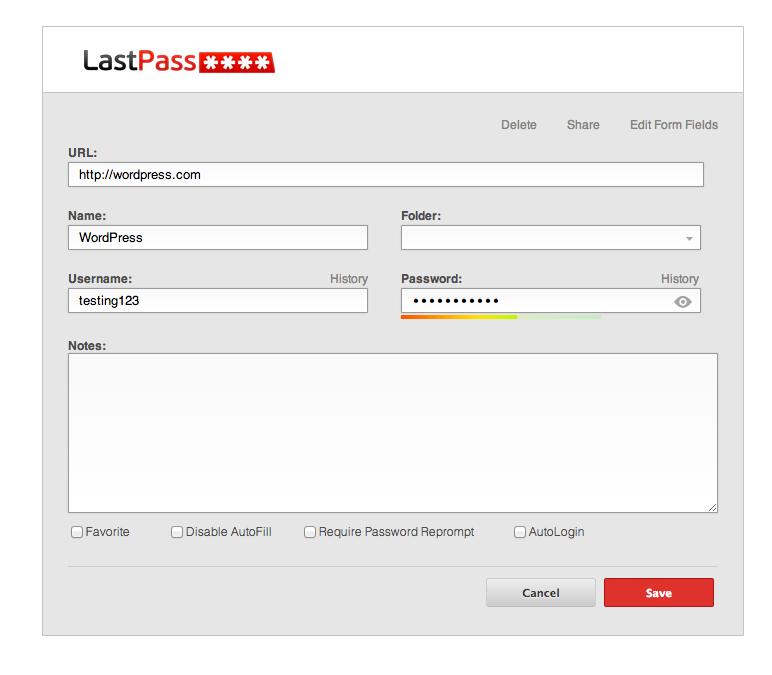
It sounds like you may have had a password saved with a generic WordPress.com URL and the field “post_password” set to autofill.
If that’s confusing, just ignore it and let us know if you see this happen again!
what still bothers me is that when I clicked the HOME button on my JanrSsor.com it took me to my Router Log-in on my home lan!
I don’t see a Home button at janrssor.com. Did you remove this? Or did you just mean that you clicked on the site title? I don’t see any broken links there currently.
Let me know if I can help with anything else!


- The topic ‘Why Can I NOT change Visibility To PUBLIC?’ is closed to new replies.
 WordPress.com Forums