

Why can't I adjust the image size up in small increments like I used to?
-
You have changed the edit images feature! I used to be able to go into advanced settings and resize the image in the draft post (typically 300×199) to something larger (like 360×240). That feature isn’t there anymore – I can only downsize – and choosing “large” instead of “medium” for the image makes it larger than I’d like. What gives? Also, when I preview the draft post with the altered image, I’m just getting the title, not a display of the image.
The blog I need help with is: (visible only to logged in users)
-
Hi there,
You can still do this by going to into edit the post and clicking on the image you want to scale down. Then click on the pencil to edit it. Once you are there, click on “Edit Image” on the right side as seen here:
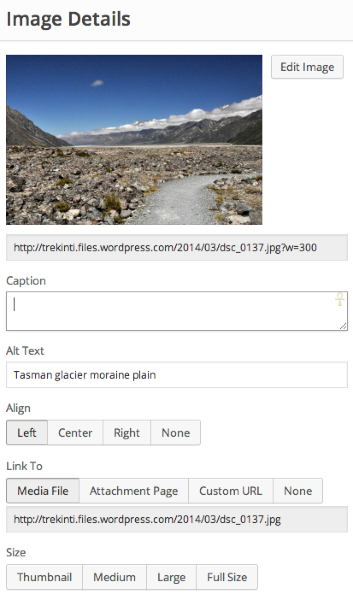
After that on the right hand side click on Scale Image and it will look like this:
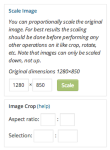
You can change the original dimensions and click on Scale. Click back and then update the image!
You should be set!
Cheers!
-
Hi Grace! Thanks for the help, but if you’ll note from original question, I’m trying to scale the image up, not down. I used to be able to do this, and was able to increase the size that a single image occupied on the post, making it bigger by any amount I wanted (typically 20% or 33%). Now I can only make it smaller (and I would never want to do that!).
So, is there a way to scale a single image up, now?
Ron
-
You can just increase the number when you hit go into Scale the image.
So if it’s say 500 x 800. Just change the 500 to say 600 and it will proportionally change the height as well.
-
Hi Grace! Thanks for the help, but I’m trying to scale the image up, not down. I used to be able to do this, now it seems
-
-
Grace,
I try what you suggest but it doesn’t seem to work. First, the site edit instructions for scaling says it only works when you scale down. Second, when I scale up (say, by 20%, pretty modest) I get a red exclamation point there at the scale button. Third, the “Edit Image” page then says “Unable to create new image.” Forth, when I hit “Back” and then “Update”, there is actually no change at all in the post in preview.Please let me know what I’m doing wrong.
Thanks!
Ron
-
Hi Ron,
Sorry that was my mistake. You can not scale the image up – only down. If you want to scale it up, please upload a larger image.
So sorry for the inconvenience!
-
Hi Grace,
Thanks for the quick response. My problem is that I used to be able to make the image size larger within a post, and larger by any scaling factor I wanted. That seems to have gone away with the latest change within WordPress. Is that right?Are we having a semantics problem, by the way? I just want to make the image physically larger on the post page; for me, your suggestion to “upload a larger image” would result in an image with higher resolution, but it would still go into the post the same size. There is a good chance that I am missing something here!
Thanks!
Ron
-
Hi Grace,
All is OK! I found the “Custom Size” button and can now adjust the image as before.Many thanks for the help.
Ron
-
Sounds great!
There was an update made in that a lot of our Advanced features were brought back. You can stayed tuned for updates here:


- The topic ‘Why can't I adjust the image size up in small increments like I used to?’ is closed to new replies.


 WordPress.com Forums