

Why cant I change the font size of the header of each post?
-
Why cant I change the font size of the header of each post? I can only change the font size of the body text and of the top of the Web site, but now the font on the header of each post is bigger than the others!
The blog I need help with is: (visible only to logged in users)
-
Hi there,
It looks like you have some custom font sizes enabled under Appearance -> Customize -> Fonts. Changing the sizing of the “Headings” font should change the size of the post titles. Did you want to set a different font size of the post titles as opposed to changing both the site title and post title?
-
I reset to non custom and the title of my first post is MUCH larger than the title of my second post. How can I make everything homogeneous?
Also the view on the monitor for the entire blog has huge text. Why cant it be “more normal” (ie smaller) as in other blogs I see?
Thanks for your help!
Migs -
Hi Migs,
It looks like we’re back to the default font. Please see my answers below:
I reset to non custom and the title of my first post is MUCH larger than the title of my second post. How can I make everything homogeneous?
Currently, the two post titles are the same size on my side as shown here:
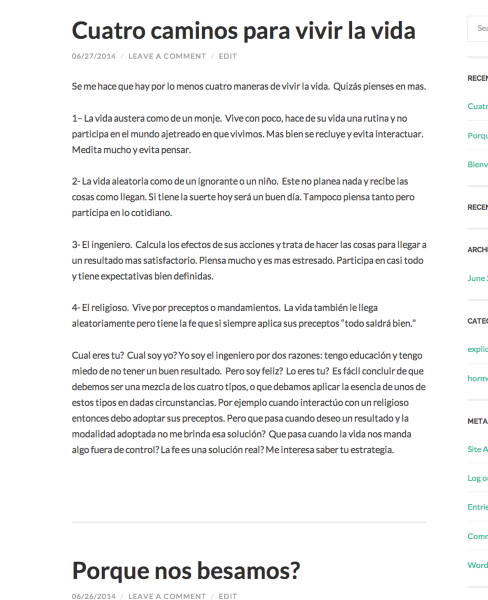
Are they displaying different sizes on your side?
Also the view on the monitor for the entire blog has huge text. Why cant it be “more normal” (ie smaller) as in other blogs I see?
Currently, the font sizing appears normal on my side and similar to the theme demo shown here:
http://hemingwayrewrittendemo.wordpress.com/
However, if you want to decrease the font size, the easiest way would be through the custom fonts as explained here:
http://en.support.wordpress.com/custom-design/custom-fonts/#adjusting-font-size-and-style
Can you let me know if you’re experiencing something different with the post titles?


- The topic ‘Why cant I change the font size of the header of each post?’ is closed to new replies.
 WordPress.com Forums