

Why can't I choose "slideshow" for my photos anymore?
-
I used to always use the “slideshow” option for my blog photos, but now, when I go to create a gallery, it no longer gives me that option. It will only let me do columns of pictures, which I do not like. This seems to have changed in the last month. Can you help me get the slideshow function back?
Thank you!
The blog I need help with is: (visible only to logged in users)
-
Hi there,
I visited the most recent gallery on your site and went to the “Edit Gallery” icon as explained here:
http://en.support.wordpress.com/images/gallery/#editing-a-gallery-or-slideshow
I was able to see the slideshow option under the gallery type as shown here:
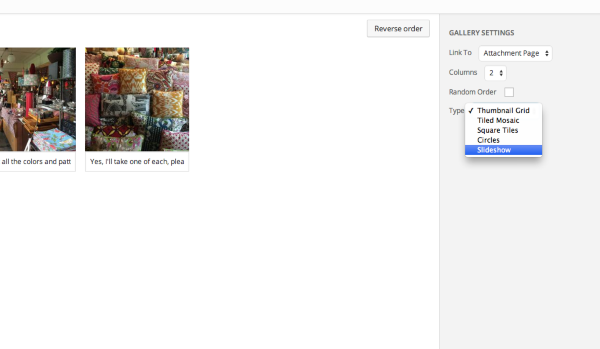
Can you give that a try?
-
When I go to the gallery page, it does not give me an option for “type.” What I see on your screen shot is what my page used to look like, but now, under “random order” there are no other options available. (I tried to screenshot mine, but can’t get it to paste here.)
-
Hey Michelle,
Can you let me know what specific gallery you’re looking at (the title of the post for instance)? I just want to make sure we’re looking at the same thing.
Also, if possible, could you take a screenshot following the instructions here?
Then, just upload it to your Media Library so I can take a look?
-
Sure!
For now, I am looking at “A Broken Butt…” From the editing page, I cannot actually see my photos. Where they are, the coding says the following, but I am not able to click/open it.
[gallery columns="2" ids="2518,2519,2520,2521,2522,2523,2524,2525"]I’ve uploaded a screenshot of the gallery page I get.
Thank for your help with this. I never had any issues making a slideshow until the WordPress formatting changed a bit back in June.
-
Hey Michelle,
Can you try clicking over the Visual Editor as shown here?

It sounds like you’re in the Text Editor now from your description. You’ll want to be in the Visual Editor to edit galleries!
-
-
Hey Michelle,
That’s odd. From this line, you’re describing the Text Editor:
From the editing page, I cannot actually see my photos. Where they are, the coding says the following, but I am not able to click/open it.
[gallery columns="2" ids="2518,2519,2520,2521,2522,2523,2524,2525"]Here’s what that looks like on my side for your post:
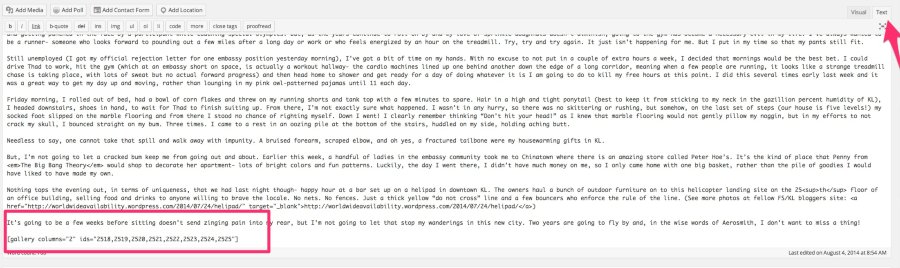
On the other hand, when I click over to the Visual Editor, I can see the individual images:
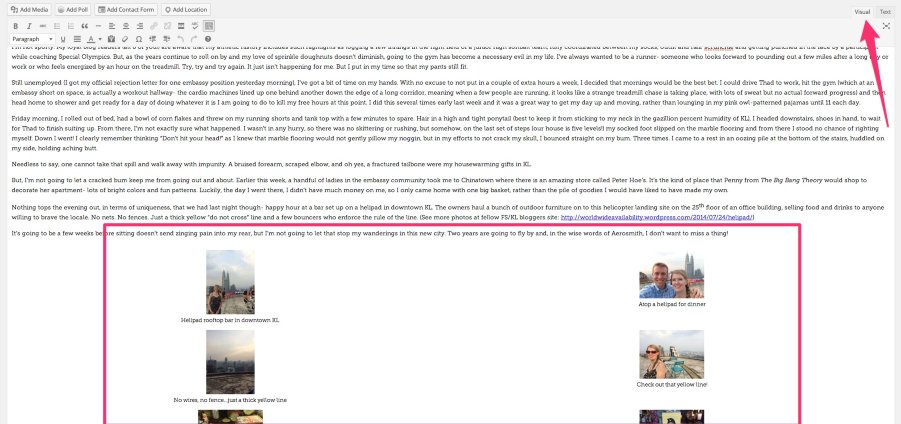
Is that the same kind of screen you’re seeing on your side or are you seeing something different?
Also, have you tried another browser like Google Chrome? I just want to see if this is a local problem with Firefox or something larger!
-
Hi again!
No, I don’t see the pictures in “visual editor” at all. I have to go to “preview” post to see the actual photos. When I switch between visual and text, I see the same bit of coding where the photos go.
I tried opening in Chrome and got the same results. (I initially thought this might be the issue as well.)
I added screenshots of my “visual” and “text” view screens.
-
Ah! Thanks for including those screenshots. That was going to be my next question. It looks like you’re using the WordPress.com editor at wordpress.com/post. We’re still perfecting the gallery display there.
In the meantime, you should find all of the functionality for galleries if you view the post in your Dashboard here:
https://insearchoftheendofthesidewalk.wordpress.com/wp-admin/edit.php?post_type=post
If you click “Edit” underneath any of the posts there, you should find that you can edit the type of gallery, and you should also see the image preview in the Visual view. Can you give that a try?
-
Yes! That seems to have been the problem all along. Once went to posting from the dashboard, I could once again see the photo gallery options.
I know it was a whole lot of back and forth for what turned out to be a pretty simple solution. Thanks for sticking with me!! :)
-Michelle
-
Wonderful Michelle! I’m glad we were able to get this figured out. Please let me know if you need anything else.


- The topic ‘Why can't I choose "slideshow" for my photos anymore?’ is closed to new replies.
 WordPress.com Forums