

Why can't I embed Soundcloud?
-
Good day,
I am having trouble with an embedding a link, and I don’t know what the problem is.
I placed this link: http://soundcloud.com/mattforrestvoiceworks/voice-audio
…into my latest blog post, but instead of embedding it, all I end up with is a link to Soundcloud that takes the reader out of my blog. I don’t have it linked in my editor (as I said, I’ve done this before with Soundcloud and not had any issues) – so I don’t know why this is a problem yet my previous posts embedding Soundcloud aren’t. If you click this link to see my current post: http://mattforrest.wordpress.com/2014/04/15/national-poetry-month-how-voiceover-websites-helped-me-write-poetry/ you’ll see that it is just a link, However, this previous post looks fine: http://mattforrest.wordpress.com/2013/03/01/poetry-friday-stone-kicking/
The thing is, both of these are set up in the editor exactly the same – unlinked! So why is one embedded and the other isn’t?
Thanks for any help,
MattThe blog I need help with is: (visible only to logged in users)
-
Hi Matt,
I see what you are talking about! When I first embedded the link it was wrapped around p tags in the Text Editor. This is why the SoundCloud player was not embedding correctly. However, once I removed it, it embedded just fine as seen here:
This is what it should look like in the text editor:
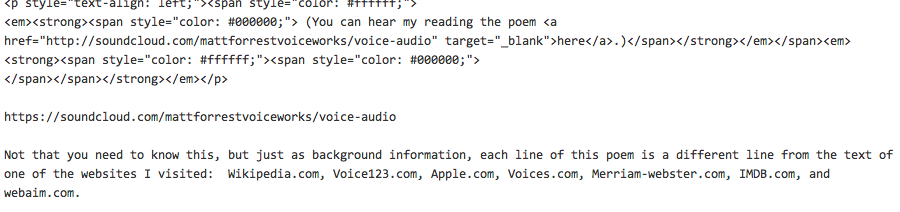
and this is how it would publish:
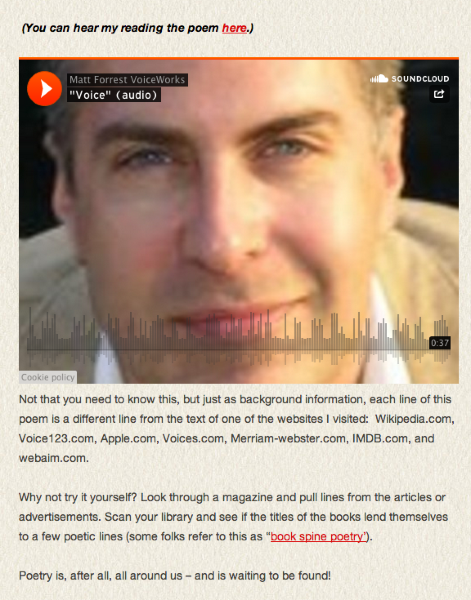
Just a note, none of this was published. Please check the draft revisions and you can see the changes there as well.
It is a different format than the first player you added, but you can change this using this support guide:
http://en.support.wordpress.com/audio/soundcloud-audio-player/
Let me know if you have any questions with this!
-
Thanks, Grace. I’m still not sure what happened, though, as I never used the text editor. I simply pasted the link into my blog post and made sure it was unlinked (just as I had done previously). I never use the text editor because I don’t know HTML. Why would the previous post work, but not this one?
Matt
-
Hi Matt,
After looking at it, it seems like maybe the post was copied and pasted from a Word-type Document?
Sometimes when that is done it can create really messy HTML and cause issues like this. This is why we highly recommend drafting up posts within the editor.
Here’s a way to use Microsoft Word cleanly:
If you have any questions with that let me know!
-
I only used MS Word to paste the poem I had shared – and I did that in the visual editor. For the link, I simply copied the Soundcloud link from the Soundcloud webpage and pasted it into the visual editor, then made sure it was unlinked. Like I said, I’ve done this same thing many times before and never had issues.
-
Yes. It can depend on where you were pasting the Soundcloud link. Because I saw where you added the link before, and it was wrapped in p tags. Just as it says in the support doc – not all formatting will carry over cleanly, so you may need to tweak some settings, which is what we had to do.
Sometimes it can depend on if you put in the link in first before you paste in the poem, or after. It can also depend where you paste it in and if you decide to move it around within the post. But, it’s really difficult to troubleshoot it at this point after the fact. To avoid any of these issues, I highly recommend drafting up the post within the editor, or just check that there are no tags before and after the link you put in. That’s all it takes.
-
Well, thanks again for the help, I do appreciate your time. Unfortunately, if I understand correctly, what you’re saying is, I need to use the text editor – something with which I am wholly unfamiliar – in order to simply share a link. I’ll try to make note of that for future posts; but I still wish I knew why, after nearly two years of using WordPress, this has never before been an issue.
-
No you do not need to if you are drafting your post in the Visual Editor to begin with. If you are copying/pasting from Microsoft Word, it might be necessary.
-
-


- The topic ‘Why can't I embed Soundcloud?’ is closed to new replies.
 WordPress.com Forums