

Why can't I paste a few comments about the photos I want to post?
-
This afternoon, I thought about changing the theme of my blog. I changed my mind and stuck with the same theme. I then uploaded a few photos for my next post. However, when I attempted to paste my template description of the type of flowers I’m posting, it no longer pastes my comments. I tried to copy and paste several times with the same results, nothing.
I’ve been using the same descriptions to all my flower photos that I’ve been posting on WordPress for a couple of years without any problem, until today. I logged off of WordPress, went to my AT&T homepage and deleted my cache of cookies and browsing history and then logged off-line.
I went back online to WordPress and attempted once again to paste the flower description and again the comments do not paste.
Any advice?
StevenThe blog I need help with is: (visible only to logged in users)
-
Hi there. Could you please tell me what browser and version you are using? https://www.whatismybrowser.com/ Have you tried this using a different browser? http://browsehappy.com/
Also, are you copying the text from a word processor/text editor, or from a website?
-
I run Windows 7 and use Firefox, version 30 for my browser. The text I am attempting to paste is my own creation, using Works Word Processor.
Before I started this response, I thought lets try to new post to see if I can copy and paste. I titled and created a draft post, but when I attempted to paste a description of the flowers, as I have always done, I could not get a cursor.
I then noticed that the two tabs, Visual & Text, along the Add Media line, was set for Visual. Once I clicked on Text, I got a cursor and then was able to paste my comments. I went back to my original post, clicked on Text and was again able to paste my comments.
I’ve posted nearly 300 posts in the past few years and never had to do this step before. I now know what to check for.
Thanks for replying to my request for help!!!
-
@kokkieh
@stevenspring
Staff have made changes to the editor again. There are others with the same issue. I’m tagging all such threads with “editor issues” and “modlook” for Staff intervention. -
@timethief
I was thinking that might be the case. Pasting, galleries, and a whole bunch of stuff are going haywire since yesterday. -
I have another question. I noticed a while back that my posts to Facebook only shows up on my “homepage” but not my personal page. Usually, I just share them to my own timeline. Shouldn’t it get posted to my timeline as well?
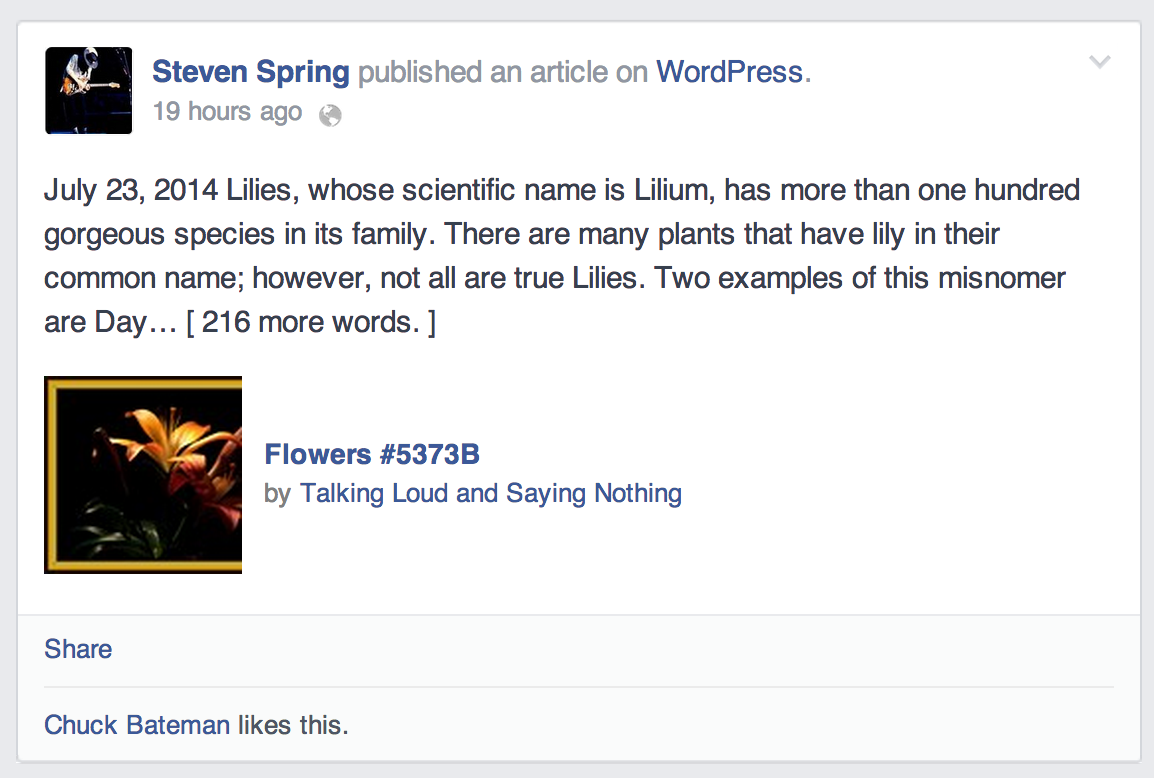
Also, it seems like the format of the posts are a little different. Under the title of the post, it says “by my post name.” However, it lists another blogger’s site. One with a very similar name, but it’s not mine. I tried to edit it, but Facebook will not let me.
Any advice?
-
Hey Steven!
A few users have made similar complaints about pasting text into the post editor. Our developers have taken care of it, and you should be able to write comments on your pictures from now on.
About the Facebook problem, have you tried connecting your personal Facebook page to your blog? You may add another connection by going to Settings -> Sharing in your admin panel:
And clicking on “Add New”. In the popup window, select the desired page and click “OK”. When you publish a new post, it should be shared on the Facebook page as well.
Can you explain a bit about the by-line problem? I can see the name of your blog appearing in the shared post, and not someone else’s.
Looking forward to your reply. Thanks!
-
@druesome
Regarding the Facebook by-line issue:I know of another user who has a similar problem. The thread is here if you want to check if they might be related: https://en.forums.wordpress.com/topic/facebook-linkshare?replies=4#post-1956239
-
Druesome,
Regarding the first problem I have with my posts appearing on Facebook, I have my WordPress page connected to my Facebook page. I even tried disconnecting, then reconnecting to two. My WordPress posts do get posted to my Facebook home page, but not to my own timeline. In the past, I always thought it did so.
About the second problem, when my WordPress posts appear on Facebook, it lists them as “by Talking Loud And Saying Nothing.” The title of my blog is TalkingLoudAndSayingNothing, and the address is TalkingLoudAndSayingNothingParts3And4.WordPress.com. I assume we both had the same idea, basing our blogs on the old James Brown song Talking Loud And Saying Nothing, Parts 1 & 2. When I click on the “by Talking Loud And Saying Nothing” on Facebook, I am taken to the wrong blog site.
The first problem is not much of one, as all I have to do is to share the post to my timeline. The second problem can cause much confusion to my Facebook friends.
-
Thanks for clearing that up!
I’m seeing the problem now and it appears to be a caching issue on Facebook’s end.
This might be resolved by removing the WordPress.com app from your Facebook account. To do this, click on the down-facing arrow on the top right of the Facebook website and click on Settings.
On the left menu, click on Apps. From the list, look for the WordPress app and click on the “X” to remove it.
Then go back to Settings > Sharing in your dashboard to reconnect Facebook.
http://talkingloudandsayingnothingparts3and4.wordpress.com/wp-admin/options-general.php?page=sharing
Try making another test post and let me know what happens. Cheers!
-
For the record, I started having this problem on 7/29/14. Yesterday I couldn’t copy a URL from YouTube (I tried probably eight times and even went to other YouTube videos to make sure the first one wasn’t somehow blocked from copying ) into a WordPress post and today I can’t copy anything I’ve tried.
-
@melaniekillingervowell
You can find the main thread on the pasting issues here. Some suggestions in that thread might work for you as well: https://en.forums.wordpress.com/topic/paste-text-broken-visual-editor?replies=40 -
@melaniekillingervowell: It’s a known issue and we are currently working on getting that fixed. In the meantime, can you try pasting the Youtube URL by switching to Text mode and pressing CTRL+V on your keyboard? Some users have found this method more effective.
Very sorry about the inconvenience this has caused!


- The topic ‘Why can't I paste a few comments about the photos I want to post?’ is closed to new replies.
 WordPress.com Forums