

Why can't I publish a new page?
-
Greetings!
I am having difficulty publishing new pages on our website. All my created pages are stuck in “draft” mode and there is no option to publish them on the pages screen. I have tried deleting the pages and starting over…but it only allows one page to be published, our “about” page. Thank you for your help! I hope it’s a simple solution.
Kindly,
AdrienThe blog I need help with is: (visible only to logged in users)
-
Hi Adrien,
I went into your page title “Future” and was able to find the Publish button in the Publish module as seen here:
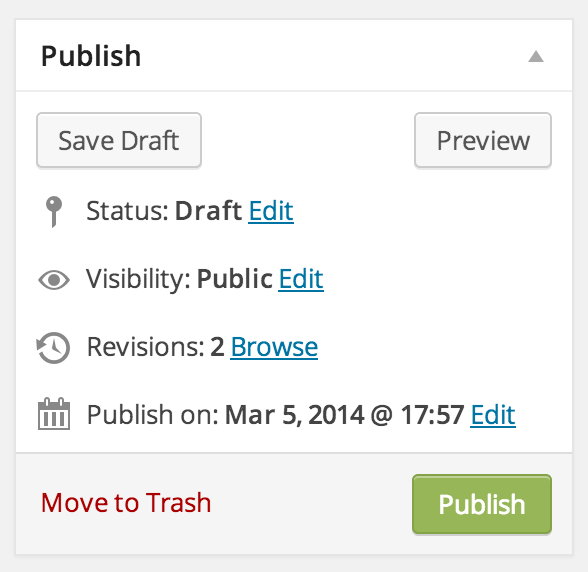
Is this not showing up for you? Please go into “Edit” the post and the module should appear on the right hand side of the page.
If it’s not there can you please try clearing out your cache and cookies using the guide below?
If that still does not work, can you take a screenshot of your page when you are editing with the missing Publish button and upload that to your Media > Library page? I will take a further look.
Thank you!
-
Hi Grace!
Thanks so much for your help. I followed your instructions above and cleared my cache and cookies. Twice. For a split second when I loaded one of my pages to “edit” to access the publish module, the button that said “publish” was there. It was immediately replaced by “Save as Draft” as it remains in the screen shot I posted to my library. You said you were able to publish our “future” page, on my computer it still remains as a draft. Any input you can send my way would be so great!! Thanks again, talk soon.
Kindly,
Adrien -
Hi Adrien,
It looks like you did not confirm your email address as it states at the top of your Dashboard. Please check your spam folder to see if the confirmation email is there.
If you already clicked the confirmation link, but it is still not confirming please let me know and we can work on getting you manually confirmed!
Sorry about the inconvenience!
-
Hello Again!
I do remember having issues confirming my email address when we first purchased our domain, template etc. I guess I forgot all about it. When I hit “resend email” in the confirmation box it doesn’t show up. This could be the explanation! What is our next step to manually confirm our account? Thanks for being so patient with me, I’m a bit of a dinosaur with technology :)
Kindly,
Adrien -
Hi Adrien,
I have responded to you privately. Please check your email and respond from there if you have any questions.


- The topic ‘Why can't I publish a new page?’ is closed to new replies.


 WordPress.com Forums