

Why can't I see my admin bar and why am I getting 404 Error messages?
-
Hi again, I replied yesterday and poof today it’s all gone again. I turned on computer and used bookmark to get to blog and the Admin bar with stat graph was there. I wrote a post. Went to preview it and got the 404 error message. Tried twice including saving draft and trying to preview it from the pages of posts (which I was only able to get to by logging in through https://pbenjay.wordpress/admin) still no preview. So I published the post and then clicked on home and no Admin bar! Please continue to help me.
Thanks
Lori -
Hi Lori,
I’m sorry for the delay getting back to you about this. Can you please check to see if you have third-party cookies enabled in your browser? If you’re not sure how, you can check in the “Checking your browser…” section near the top of this page: Preview Problems and Third Party Cookies
Please let me know what it says there, and I can continue helping you with this issue.
-
Hi Sorry I’ve been away from my blog and email for a few days. I did go to where directed and it had been checked NOT to allow 3rd parties etc. I didn’t read your email carefully because when I saw that I changed it to allow and to have computer ask me if I would allow once for each website. I’m now going to try logging on thru my bookmark – I’ll tell you what happens. It didn’t work. So then I tried https://pbenjay.wordpress.com and no admin bar. Then I tried https://pbenjay.wordpress.com/login and I got the dashboard page showing the stat graph in the upper left corner, but when I clicked on Pbenjay blog also upper left corner I got the home page no admin. This is happening on the MAC – at my office on a PC last week, I logged onto the blog using a “favorite” and got the home page WITH the admin bar.
Lori -
Monday morning: Last night I changed the 3rd party setting. At one point but not at first blog came up with admin bar _ I may have done the HTTP thing. Just posted a blog, unable to preview. Is there something I can do with the MAC to fix that? I went online to see and there were downloads to fix it BUT afraid to do so unless it came from APPLE.
Lori -
Hi Lori,
You mentioned that you made some changes to your third-party cookie settings. Can you go back to the Preview Problems and Third Party Cookies page and tell me what it says under “Checking your browser…” there?
Also, can you please make sure that regular cookies (not just third-party cookies) are also allowed in your browser? You can check to see if they are enabled here: http://supportdetails.com/
-
-
First question: Cookies and other website data: REMOVE ALL WEBSITE DATA. Beneath that, 1,269 websites stored data.
BLOCK COOKIES AND OTHER WEBSITE DATA: I checked NEVER
LIMIT WEBSITE ACCESS TO LOCATION SERVICES: Prompt for each website Once A Day or One Time Only or Deny without Prompting. I checked ONE TIME ONLY.
WEBSITE TRACKING: Ask websites not to track me
WEB SEARCH: Prevent Search Engines from providing suggestions. -
Second question – where it said COOKIES – it said enabled.
Are we trying to solve both issues? No preview – get 404 Error message and ONLY if I log in through HTTPS login and NOT my bookmark,do I mostly get an Admin bar but with a question mark in a blue circle where the stat graph used to be. AND if I leave the page like to copy my link onto Facebook and then go back, the admin bar is gone. I can’t edit, reply to a comment under my own pbenjay. -
Hi there,
Yep, we’re trying to solve both issues. I believe the two are being caused by the same thing, so we just need to pinpoint what’s causing it.
Can you please try disabling any Safari extensions or add-ons that you have in your browser? Once they are disabled, you can try again to log in to WordPress.com and see if the problem is resolved. (If it is, it’s likely that one of the extensions or add-ons is interfering. You can turn them back on one-by-one until you find the culprit.)
If that doesn’t make a difference, please let me know.
-
Hi I am SO confused, really, I can’t imagine what is going on. And this is going to be the dumbest comment you have gotten all year – I don’t believe I have any extensions and I don’t know what an add-on would be. If you can give me a couple of examples I will check to see if I have them. AND NOW i decided to go to Firefox and type in the blog address AND the blog came up with the Admin bar and the stats graph! There is no lock icon in the address bar like sometimes appears when I log in using https://pbenjay.wordpress/login. Does any of this make sense? I’m sure I tried Firefox before and it didn’t work like it did tonight.
Lori -
Hey Lori,
So, to recap, the admin bar is now working in Firefox, but you’re still experiencing issues in Safari. Is that correct?
To find out if you have any add-ons on Safari, navigate to Safari -> Preferences -> Extensions. You can disable them all using the toggle here:
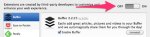
Can you let me know if you see anything there?
-
I am traveling and in 2 hrs will get on Mac amd try. Also I will try Firefox again to confirm. Afraid if I navigate away and come back the
Admin dissppears. If I LOGIN on Safari I can get dashboard page with stats graph but when I click on my title or icon in upper left brings me to home page with bar but no graph. If I post when I publish the bar is gone and I can’t access EDIT.
Lori -
I am traveling and in 2 hrs will get on Mac amd try. Also I will try Firefox again to confirm. Afraid if I navigate away and come back the
Admin dissppears. If I LOGIN on Safari I can get dashboard page with stats graph but when I click on my title or icon in upper left brings me to home page with bar but no graph. If I post when I publish the bar is gone and I can’t access EDIT.
Lori -
Hi Lori,
I understand. Can you also take a screenshot of your window while you’re viewing your site in Safari when the admin bar isn’t showing up? Please just upload that screenshot to your Media Library using the Dashboard -> Media -> Add New link.
-
First off, I went to the cloud up site and all I saw was a static picture of what I guess was to be an extension. Couldn’t do anything with it so I went to Safari, Preferences and uninstalled NYTimes, Ebay manager, zemanta and twitter. Not sure how to check for ADD-Ons.
Secondly, I went to bookmark icon and clicked on my blog. Home page with no admin bar showing. Don’t know how to take a screen shot with MAC. I saved file as a web archive which should have text and pics. I then went to Media Library Add New and chose file, hit upload and twice received message saying there were an error in the upload. -
Hi Jeremy, It’s Tuesday morning, I went to Firefox and typed in my blog address and it came up perfect with the graph. I used the bookmark on Safari and blog came with admin bar but not stats graph just a question mark. It seems like removing those extensions did something. I will have to write a post and see if I can preview, I will try making a test post.
-
I’m back it’s 10:00am I just made a test post with a photo and got the 404 error message. Now that I have removed my extensions I’m not sure what it will be without them. Did I lose my NY Times online subscription? Will my posts still go out to Twitter?
Thanks
Lori -
Howdy Lori,
First off, I went to the cloud up site and all I saw was a static picture of what I guess was to be an extension. Couldn’t do anything with it so I went to Safari, Preferences and uninstalled NYTimes, Ebay manager, zemanta and twitter. Not sure how to check for ADD-Ons.
You’re correct – the CloudUp link was just a screenshot to demonstrate the link I was referring to. It’s not actionable in that you cannot click on the link to change your settings. You would need to navigate to the actual settings on your computer.
Secondly, I went to bookmark icon and clicked on my blog. Home page with no admin bar showing. Don’t know how to take a screen shot with MAC. I saved file as a web archive which should have text and pics. I then went to Media Library Add New and chose file, hit upload and twice received message saying there were an error in the upload.
Instructions on taking a screenshot can be found here:
Can you give that a go?
Now that I have removed my extensions I’m not sure what it will be without them. Did I lose my NY Times online subscription? Will my posts still go out to Twitter?
I don’t think this is an extension-related issue. Provided you just disabled (not deleted) them, it should be a fairly quick process to reinstate them. Just navigate to Safari -> Preferences -> Extensions and toggle the extensions back on.
Let me know once you’ve uploaded the screenshot so I can take a look!
-
I will do so later re:screenshot however I sent another email about seeing the admin bar but did test preview and it was n/g
Lori -
Hey Lori!
I’m back it’s 10:00am I just made a test post with a photo and got the 404 error message.
Can you let me know what post you received this on? Also, if I understand correctly, you created the test post and then tried to preview it only to receive a 404. Is that correct?


- The topic ‘Why can't I see my admin bar and why am I getting 404 Error messages?’ is closed to new replies.
 WordPress.com Forums