why did the text editor change a link i entered?
-
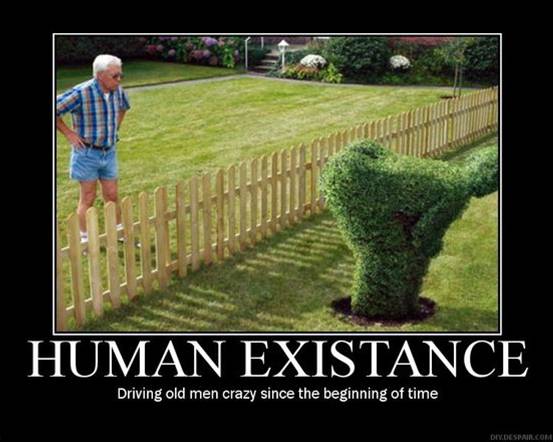
in the post http://roseglace.wordpress.com/2014/09/25/trimming-2014/, there is a link near the bottom on the words “would have been”. when entered — in both the visual and text editors — this link was entered as
http://3.bp.blogspot.com/_BInidS3BYa8/TAUa-fr6gVI/AAAAAAAADkY/yWz97_fu8TI/s1600/motivation,+human+existence.jpg but in published post it appears as http://roseglace.files.wordpress.com/2014/09/663ce-motivationhumanexistence.jpg and a copy of the image appeared in my media library.why did the text editor save something other than what i asked it to? how do i make it stop?
The blog I need help with is: (visible only to logged in users)
-
Hello there!
It sounds as if you added the image via the Add Media button. If you enter an image by entering a URL via the Add Media button, it gets uploaded to your media library . Then, a link is created to your WordPress.com image file, rather than the outside file.
If you’d like, try to add the link by pasting it into the Text tab in your content editor, and it should remain the same.
Let me know how that works out for you. Thanks much!
-
> It sounds as if you added the image via the Add Media button.
i did not. if iuse the visual editor and use the add/edit link button, the link appears to be added correctly — if i use the add/edit link button it looks right. but if i update it and push ‘view post’ the link that’s actually in the page is a link to my media library.
i haven’t used the text editor today. i’ll try that now.
-
in the text editor i deleted the incorrect href, added the correct one and clicked ‘update’. it still looked fine. i clicked ‘view post’ and the link is incorrect. i went back into the text editor and the link had changed to the incorrect value.
-
-
i found another example: in the post ‘ponying’ (http://roseglace.wordpress.com/2014/09/05/ponying/ ) there is a link on the word ‘this’ that was entered as a link to http://2.bp.blogspot.com/-i_jtpDqZjLw/TnW2fMXcKlI/AAAAAAAAAUc/D4PiieVrQuY/s1600/02607_Metal+Domed+Barrette_LFW_hair_london+fashion+week+hair.jpg
but is now a link to http://roseglace.files.wordpress.com/2014/09/5c61b-02607_metaldomedbarrette_lfw_hair_londonfashionweekhair.jpg -
Hi there!
I’ve spoken to our developers here. This is actually not an error. Rather, it’s an automatic response to adding a blogspot image link to a WordPress.com post. There’s not a work around if you’re linked an image from Blogger. WordPress will include that image in your Media Library, and your post and/or page should load well. Let me know if that’s not the case.
If this is interfering with the functionality of your site, or if you have other concerns, please drop me a line. I’m happy to help you further. Looking forward to hearing from you. Thanks very much.
-
i’m interested to know where this is documented. i’m also interested to know where i could find a COMPLETE list of EVERY situation where wordpress will alter the content and intent of what users write WITHOUT TELLING THEM.
-
Hi again,
i’m interested to know where this is documented.
Certainly! That information can be found here:
http://en.support.wordpress.com/images/uploading-images/#insert-an-image-from-the-webIf you have other specific concerns, I’m very happy to answer them! Just let me know and I can help out.
-
i’ve seen that page but it appears to me to be saying this will happen for images _inserted_ into a post from sites “such as Blogger”. several things:
– in my cases, the images were not inserted into a post — they were linked to – so this documentation does not appear to apply.
– it does not enumerate WHICH sites are to be stolen from or suggest where a list of such sites might be found.
it doesn’t say why, but i suppose i’m not supposed to know that. fine. in addition, it does not provide a list of cases where wordpress believes that it’s appropriate to alter my content. it does strongly imply that such cases exist.
wordpress clearly does not want me to link to content on blogspot.com (which, by the way, i did not know was blogger until five minutes ago). okay. i can work around that; the links in question have been removed and i won’t do it again for as long as my blog exists at wordpress.com. but in the future every single time that user input is changed in any way — no matter how small — there should be clear, unambiguous and immediate feedback that it has happened and why.
-
Ok, thanks for the feedback.
We actually have that setup because broken image links from Blogger were causing images to appear broken on some of our user’s sites. The intent was to protect your site and keep things looking great even if things changed on another server. Nothing is being stolen. We don’t own a single bit of your content. It’s all yours, even if it’s housed on our servers.
Is there something in the documentation that you think would make things clearer for future users? We definitely want our support documentation to represent what we’re doing here!
Thanks :)
-
> Nothing is being stolen.
i disagree. a copy is being made of someone else’s content and being made to appear with a URL that suggests that it is mine, that i am taking credit for it. it is entirely plausible that someone would look at it and think that i was claiming that it is mine — i would need to insert a disclaimer to the effect that the target of this link was obtained from joe smith at blogspot.com. that disclaimer is explicitly implied if the link points to blogspot.com but is necessary if it does not.
> Is there something in the documentation that you think would make >things clearer for future users?
i don’t claim to have crossed every t and dotted every i, but something like:
“if you attempt to embed or link to content on some web sites (an up to date list of the web sites and kinds of content affected can be found at X) then that content will be copied to your media library, will be charged against your disk quota (? i didnt verify this) and will appear with a URL pointing to you; you should insert a statement renouncing copyright and ownership to any material thus affected….”
the current documentation does not, to my mind, cover links, does not state explicitly what is affected and does not cover the appearance of ownership that may be caused by this process.
really, it should be covered in the documentation AND in the post editor — if i am entering something that will be changed behind the scenese, then i should be told. immediately. this part is not a documentation issue, it belongs in the code of the post editor.
-
i disagree. a copy is being made of someone else’s content and being made to appear with a URL that suggests that it is mine, that i am taking credit for it. it is entirely plausible that someone would look at it and think that i was claiming that it is mine — i would need to insert a disclaimer to the effect that the target of this link was obtained from joe smith at blogspot.com. that disclaimer is explicitly implied if the link points to blogspot.com but is necessary if it does not.
Aha! That is absolutely true. An excellent point. I didn’t realize it wasn’t your own image.
Of course, you would have to credit the image no matter what server it was on — ours, theirs, a third-part server, etc. As long as you’re using someone else’s media, it should be credited. But, that is a really good addition to the image support doc. I will also mention it to our staff here. Thanks!
Also, thanks very much for your thoughts on the documentation. I’m going to review the image support docs and see what I can do to clarify. I’d like to help folks avoid confusion in the future.
It might sound silly, but I really do appreciate that you’ve contributed ideas to the WordPress.com community. That’s very cool.
Thanks again.


- The topic ‘why did the text editor change a link i entered?’ is closed to new replies.
 WordPress.com Forums