

why do the pictures on my blog not change?
-
I have the free theme Ideation and Intent. It has pictures from previous posts. But those pictures haven’t changed since I picked this theme. I thought they would continue to update with new blogs, but they are at least 6 posts behind.
The blog I need help with is: (visible only to logged in users)
-
Hi Will,
Are you talking about the Home page display as seen here:
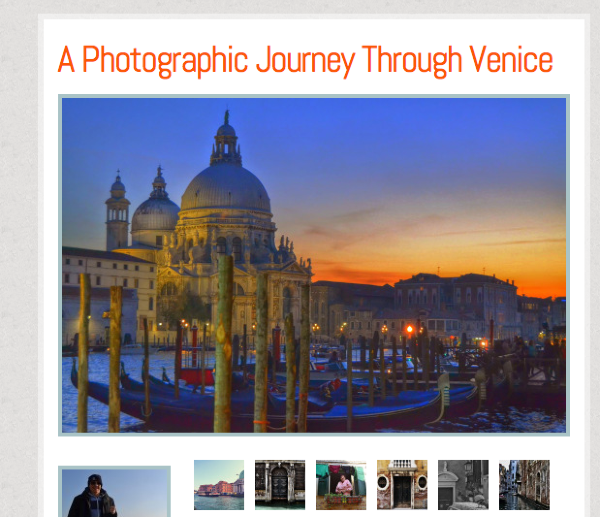
It looks like it has updated to your most recent post: A Photographic Journey Through Venice.
If that’s not what you mean please let me know!
-
No, I mean to the right of new posts. The new post is shown, and the old photos, from old posts appear to the right of the post and to the left of the sidebar widgets…essentially in the middle of the page, (under heading: PHOTOS) they aren’t changing. I thought they would keep updating as I put on more posts, but they are the same ones as before.
Thanks
-
Ah, I see what you mean. So after some more research please note that Featured Images will not show up in the Photos sidebar – neither will the very first post as it is featured right next to it.
So, the only posts that should show up ahead of the Cortina D’Ampezzo ~ Fancy Hotels and Cute Dogs post are:
Poffabro ~ Origins of Me
and
EATing in Bologna ~ It’s Famous for a Reason
I’m still trying to figure out why they aren’t showing up as the images within the post are attached to the post. Can you tell me exactly how you inserted the images into the post?
Did you upload them into the Media > Library first and then add them to the post?
or
Did you add the images to the post when you were drafting up the post – meaning that they were not in your Media > Library before making the post?
Also, did you attach the images to the post after the post was published?
Thank you!
-
I always upload into the media library first, then insert them into the post where they need to be. All the pictures are still in my library now. After I have all the photos where they should be in the writing part, and added a featured image, title and tags and categories etc…then I publish… I thought it would just change and update itself automatically.
-
Thanks for the information. I have reported this to our developers for review. We will contact you as soon as possible.
Cheers!
-
Hi there,
We are currently looking into this. It would be helpful to know exactly which editor you are using. Currently there is the classic editor that you can reach from here:
https://eatingandtravelingdotcom.wordpress.com/wp-admin/post-new.php
or the new editor from here:
Also, can you try resaving this post:
Poffabro ~ Origins of Me
Just add a space and remove it, then Update. I’m wondering if that may retrigger a change and add the photos to your sidebar.
If that doesn’t work can you try deleting and then re-inserting an image from that same post?
Sorry for the inconvenience!
Thank you!
-
Yes, I use the new wordpress.com/post site. I like it. It’s easier.
I updated the EATing in Bologna post. Nothing changed. I deleted and changed the pictures…but nothing.
I’m confused. You agree that it should be a rolling page of old photos not the ones that were there when I changed themes correct?? Is there a function on the dashboard I should try?? -
Thanks for the info! So yes, it looks like there is a bug in which if the new editor is used, the theme does not work like it should with the classic editor.
This has been reported to our theme team. It may not be addressed right away so please use the classic editor as a workaround until this can be reviewed. Once I hear of any updates I will let you know as soon as possible.
I’m so sorry about the inconvenience.
-
OK, so, if I use the old editor, the problem won’t exist?? How long do you anticipate before the bug can be fixed? Just an estimate…I won’t hold you to a date. :)
-
I honestly don’t know. Sometimes it takes a couple hours, and sometimes it can take weeks/months depending on fix. Once theme team looks into it, they will let me know.
Sorry I couldn’t provide you any more details, but once I hear back I’ll let you know asap!


- The topic ‘why do the pictures on my blog not change?’ is closed to new replies.
 WordPress.com Forums