

Why does my new blog say you are currently browsing the archives
-
I have the Contempt theme. I set up a blog on a page I created with a custom menu. When I visit the blog, it says in the upper right corner that “You are currently browsing the Book blog archives.” It’s not an archive – it’s the main blog page. How do I remove this notice?
The blog I need help with is: (visible only to logged in users)
-
Currently, on your custom menu, you have a Category page custom link in the menu bar titled “Book Blog”. To remove that notice, you’ll want to use the Book Blog page instead since that is the page set to display blog posts in your Reading settings. So, follow these two steps:
- Remove the Book Blog custom link from your menu
- In its place, add the “Book Blog” page instead
I’ve created a screenshot to demonstrate here:
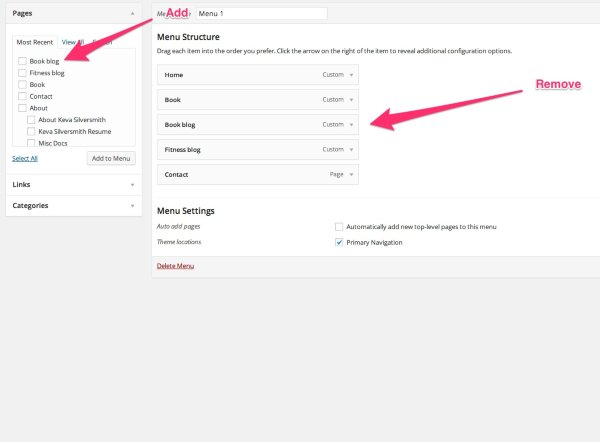
Let me know if that works for what you’re looking to do!
-
-


- The topic ‘Why does my new blog say you are currently browsing the archives’ is closed to new replies.


 WordPress.com Forums