

Why does the HTML code for creating columns, or a table, appear on the page?
-
When I use HTML code to try to create columns in the body of the home page, the actual code appears on the page. The same thing happens when I try to create a table within the body of the home page. Why is the code visible, and how do I prevent that?
Thanks!The blog I need help with is: (visible only to logged in users)
-
<div style=”width:40%;padding: 0 10px 0 0;float:left;”>
Is your pet…
…Anxious, hyper-active, high-strung, or stressed?
…Recovering from injury or illness?</div><div style=”width:40%;padding: 0 10px 0 0;float:right;”>
Reiki can help…
…make pets relaxed and comfortable.
…support the body and mind’s natural ability to heal.
</div> -
Hello there!
I took a look at your site. I am not seeing any HTML published on your pages. Is this something you’ve been able to fix on your own? If so…great! If not, and I can help further, please let me know.
If it’s still occurring, send me a screenshot, so I can better understand the issue. You can simply upload the screenshot to your Media Library, like any other image, and I’ll be able to access it from there. Just let me know when there’s something I should look at.
The page at the following link has some helpful tips for taking screenshots:
Please let us know if you have any other questions. Thanks much!
-
Thank you for your reply. I deleted the page yesterday because I did not want the code showing, but I recreated the page today and made a screenshot of it before I deleted the page again. The screenshot is now in my Media Library. I would appreciate any advice your could offer. Thank you for your help.
-
Hi there,
I actually do need access to your code to correct it. Could you add it again, but don’t delete it? You can save it as a draft so your readers can’t see/access it.
The screenshot I need is the image of your page displaying the error. You can simply click Preview to show me what the page would look like if published, and take your screenshot from there.
Thanks much.
-
Hi,
I created a test page with the code and saved it as a draft, previewed the page, took a screenshot, then added the screenshot to my media library. I hope that is what you needed. I used the HTML code that I obtained from the WordPress help section.
Thanks very much for your help.
Carol
-
Hi Carol!
This makes perfect sense now. Thank you so much for the draft and the image.
Your HTML is correct, but you’ve placed it in the wrong tab in your editor (as illustrated in the link below):
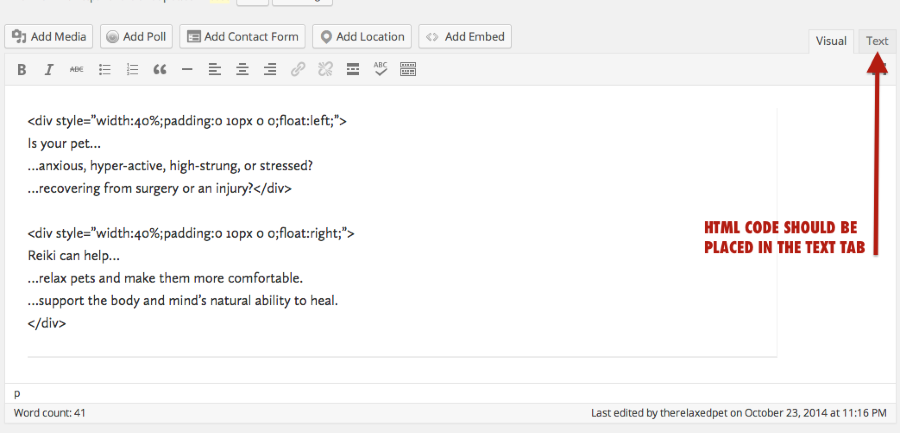
Cut everything from your Visual tab, and paste it into the Tex tab.
That should do the trick! If I can help in any other way, please drop me a line. Cheers :)
-
Hi,Thank you very much for your help. That makes perfect sense to put the HTML code in the Text tab. I'm new to WordPress, so I'm still in the learning mode. With your help, I was able to make the columns. Thanks! I did have some problems, however, in that when I would make a change and then go in to view the page, and something else would change (that I did not change), i.e., with spacing. So I would go back in and make that change, then view the page and something else (again with spacing) would change. I tried to put in breaks or , but that didn't seem to help much – often I would go in to view the page only to find the HTML code gone. I always hit “update” after making changes, so I'm not sure what was happening. I finally got the alignment and spacing pretty much the way I wanted it, but it took awhile. I am concerned that at any time, the problem may repeat. Any thoughts on what I might have been doing wrong?
Thank you for your help! I appreciate it!
Carol -
Please help! I made one slight spelling correction to my home page this morning and it threw the alignment all off in the two columns in the body of the home page. I go in and try to correct that specific alignment issue and then it throws something else off. I try to put breaks in
and it takes them out; and text gets bunched up. This is happening over, and over, and over. I’ve been working on this for over an hour and am getting extremely frustrated. Can you please help me understand what I am doing wrong?
Thanks! -
Hello there!
I took a look at your site, and the test draft page, but am not seeing the problematic code. The front page looks lovely in my browser. Could you point me to the problem?
It sounds as if you might benefit from the help of a table/column generator. If you use the correct formatting of your HTML, if should be flexible enough to handle changes to your text without ruining the layout. I suggest creating a table with NO borders with a free web app like this one:
http://www.quackit.com/html/html_table_generator.cfm
You can copy and paste the code right into your Text tab. Then, adjust the text in your Visual tab.
Give that a try, save the draft, and if it’s not working, I can take a look at it.
I tried to put in breaks or , but that didn’t seem to help much – often I would go in to view the page only to find the HTML code gone.
It is possible the code wasn’t quite right so it was stripped from the page. It’s hard for me to say without seeing it.
One thing that may help is the list of revisions you’ve made to your pages:
https://therelaxedpet.wordpress.com/wp-admin/post.php?post=9&action=editScroll down until you see Revisions and you can see how each time you clicked Update, your content changed. Maybe you can trace the HTML problem backward with that tool. Let me know!
Looking forward to hearing from you. Thanks very much.
-
Hi,
Thanks for suggesting the table/column generator. I’ve been playing around with it but I can’t quite seem to come up with the right numbers I should be using for the cell spacing and cell padding. Do you have any suggested guidelines for those two categories?
Thank you!
Carol -
Hi,
After much thought I have decided to skip the column format; it just doesn't seem to be working for me and I can't invest any more time in it, and I don't want to take up any more of your time either. I appreciate all your help trying to get this problem fixed.
Thank you!Carol -
Carol,
Thanks for letting me know. Sorry the column HTML didn’t work out for you. If I can help with anything else layout-wise, please do drop me a line.
All the best!
-


- The topic ‘Why does the HTML code for creating columns, or a table, appear on the page?’ is closed to new replies.
 WordPress.com Forums