Why has WordPress unilaterally reformatted my posts and how can this be fixed?!
-
With the new design now being used by WordPress, my unpublished posts have suddenly been reformatted. This is NOT in any sense an improvement. Paragraphs have been run together. Headings are scattered at random across the text. Readability has greatly diminished. I’m left with the job of cleaning up this mess!!!
The blog I need help with is: (visible only to logged in users)
-
-
I’m sorry for any inconvenience you’re experiencing.
However, I just took a look at a couple of your scheduled posts, and I’m not seeing any reformatting issues.
Could you direct me to a specific post where you are experiencing this issue, and perhaps show me with a screenshot where things are being reformatted? From there, I’d be happy to look into this further.
Instructions on how to take a screenshot are here:
http://en.support.wordpress.com/make-a-screenshot/You can then upload the screenshot to your media library so I can review it. Thanks!
-
You will find this alteration at the following addresses:
http://alawyersprayers.com/2015/01/04/in-defense-of-god/
and
http://avoicereclaimed.com/2014/07/06/breached-defenses/ (already posted before the formatting errors first appeared)
The problem was present at http://alawyersprayers.com/?p=4251&preview=true, however, I corrected it manually. I have not checked all posts.
I’d appreciate anything you can do for me.
-
Okay, I see what you’re referring to now, particularly in http://avoicereclaimed.com/2014/07/06/breached-defenses/
If you switch between the visual and text editor without saving the draft first, sometimes paragraph breaks will be stripped out. My best guess is that this is what happened to you here.
At any rate, once this has happened, the only way to resolve it once it’s happened is to manually add breaks where you need them to be.
One way to do this quickly would be to open up the post in the Text editor and copying the entire post to a word processor that allows for search and replace. You can search for
<strong>and replace it with</p> <p> <strong>. Make sure the first paragraph starts with<p>and the last one ends with</p>. Then paste the new code into the Text editor and update the post.Another option would be to go into the Visual editor and add returns everywhere you want a paragraph break, and then update the post.
-
-
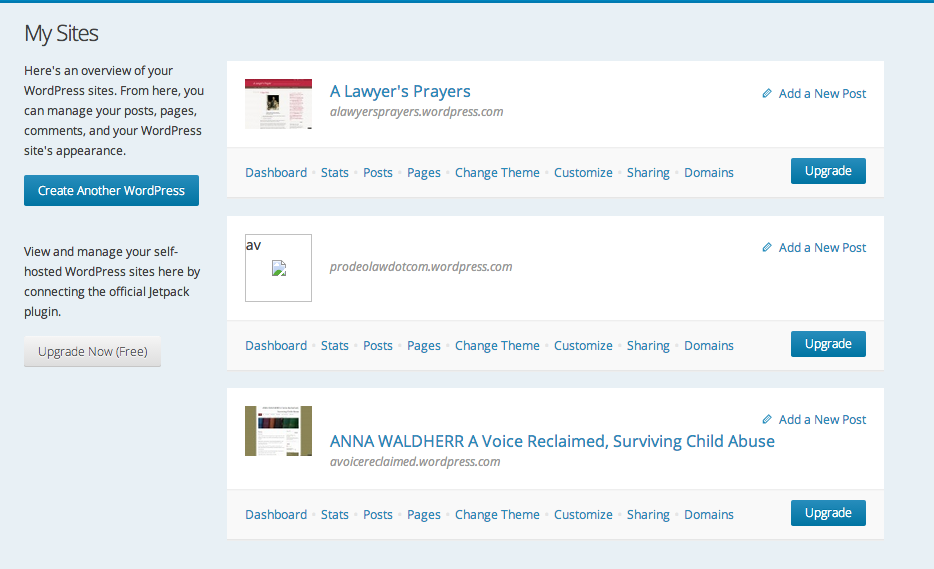
The new look by WordPress, it seems, was only a problem at the page My Blogs. This page, it turned out, allowed access to both my blogs w/ the original dashboard and formatting of individual posts still in place there.
Now that My Blogs has been renamed My Sites by WordPress it only allows access to one of my blogs. When the post or page w/i the key on the right of the screen is tapped, only A Lawyer’s Prayers appears on the screen. Please, advise how to access A Voice Reclaimed. Thanks!
-
PLEASE, REOPEN THIS ISSUE.
The reformatting issue continues to be a problem despite scrupulous attention on my part to saving the drafts. I cannot access one of my blogs at all. Posts lead only to the message “Server cannot be located”.
I realize WordPress is changing its appearance. I assume the difficulty is due to that. Is there at least a temporary fix? How long will this face change take?
-
It looks like the domain prodeolaw.com expired, but the primary domain was never set back to prodeolawdotcom.wordpress.com. I’ve just fixed that for you. Your custom domain is available to register again, if you would like to do so. Instructions for how to do that are here:
As far as your post formatting is concerned, I’d like to get a little more information from you.
How are you composing your posts? Are you pasting in text from another source, or writing everything from scratch on WordPress.com?
Are you composing them in the editor here:
https://wordpress.com/post/Or are you using the full Dashboard editor, such as this:
https://avoicereclaimed.wordpress.com/wp-admin/post-new.php?post_type=post ?Or are you using a mobile device, posting by email, or some other process?
-
Pro Deo Law should now be defunct. It was succeeded by A Lawyer’s Prayers, and will not be revived. I’m sorry if I did not make that clear. My other active blog is A Voice Reclaimed.
To answer your questions:
I generally create a “new post” by naming, saving, and scheduling it, then copy content in from a Word document. I have used both the editor and dashboard editor for this.
I then edit the text over a period of days or weeks, going back and forth between Visual and Text views, sometimes adding media, but saving throughout.
I draft posts from my laptop, sometimes scheduling them weeks in advance.
Since WordPress began changing its appearance, the My Sites page has not been consistently available. Instead, an empty page appears w/ a Manage Blog menu on the right and Support, etc. links at the bottom. When the post or page link from Manage Blog is selected, posts and pages from A Lawyer’s Prayers do generally appear. Sometimes, however, the message “server cannot be located” appears instead. A Voice Reclaimed posts and pages never appear.
I am not certain that it’s relevant, but the Preview and View Post buttons do not always work on the new WordPress posts page (aqua). And when I italicize text it does not consistently respond (often appearing to do the reverse).
As for reformatting, the paragraphs and headings of posts seem to be lost at random on the new WordPress posts page (aqua), w/ text simply run together. See, for instance, https://wordpress.com/post/52976210/4555/. This happens to documents that have already been saved (often multiple times), and sometimes already published. I have though found if I can somehow reach the dashboard and version of my post there, the paragraphs, headings, and breaks re-appear.
It is extremely frustrating and an enormous waste of time. Any help would be greatly appreciated.
-
On the formatting issue, it sounds like it could be due to your pasting from Microsoft Word. You should be able to directly post from MS Word into WordPress.com without losing formatting, but depending on what formatting you had in the Word doc, it’s possible something is happening.
You can try the following to see if either of these things help sort this out:
1) Try pasting the content into a new Dashboard editor post window, save as Draft, and then view the post in the Text tab. If you have any extra formatting code there, that could be the issue. When you switch back to Visual, however, you should also still see whatever formatting was there when you saved it. If not, that was the issue I mentioned earlier.
2) Try using the Paste as Text option in the post editor to see if that helps fix this issue:
http://en.support.wordpress.com/visual-editor/#pasting-text
In regard to your second issue, when you go to “My Sites” in the blue menu, you should see something like this:
https://i.cloudup.com/y1ubQGTjfK.png(disregard the second site as it looks like the image isn’t loading)
Both of your sites should be visible there. Since it sounds like you’re having issues with several of the menu options, you might double-check that you have third-party cookies enabled: http://en.support.wordpress.com/third-party-cookies/ . You might also try logging out of WordPress.com, clearing your browser cache and WordPress.com cookies, and then logging back in to see if that helps. Both of these things could actually help with the first issue as well.
http://en.support.wordpress.com/browser-issues/#clearing-your-browser-cache


- The topic ‘Why has WordPress unilaterally reformatted my posts and how can this be fixed?!’ is closed to new replies.


 WordPress.com Forums