

why i can`t access my editor?
-
I can`t see my EDIT button to can edit my css blog.
I purchased the premium plan and I am in the trial period, could be this the problem?The blog I need help with is: (visible only to logged in users)
-
To edit your CSS, you’ll need to visit your site Customizer:
https://0nemoment.wordpress.com/wp-admin/customize.php?url=https%3A%2F%2F0nemoment.wordpress.com%2F
Once there, select the ‘CSS’ tab and there will be a text editor where you can enter CSS.
-
for example I want to put facebook comments box. To can do that says to insert some code in BODY, I cannot see my EDIT tab from wpADMIN/appearance !
-
It sounds like you’re following instructions for using the WordPress.org software on a self-hosted site. To clear up any confusion, WordPress.com and WordPress.org are two different entities.
On WordPress.com, we have some restrictions on what code can be added to sites, because all WordPress.com sites are in the same shared environment.
The feature you describe sounds like Facebook’s ‘Comments’ social plugin. This embed code requires javascript tags that we do not allow to be used on WordPress.com sites.
You can however add these Facebook integrations to your site:
-
I was trying to play with another one wordpress.com blog to discover the platform and there I was trying again the trial version for 15 days for premium plan. There I could access the EDIT panel and I could see all the parts of the CSS.
anyway , I have just bought the premium plan and I need to change some things, but I will move it on my own domain so is ok to keep it on wordpress.com or is better to move it on wordpress.org? -
Hi again,
I was trying to play with another one wordpress.com blog to discover the platform and there I was trying again the trial version for 15 days for premium plan. There I could access the EDIT panel and I could see all the parts of the CSS.
Clicking Edit to see your theme’s CSS sounds like this option:
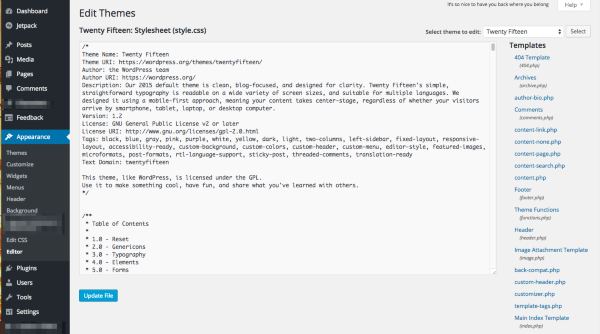
That is only available on self-hosted sites, running the WordPress software (available at WordPress.org). This editing is not allowed on WordPress.com, even with the premium plan. You can still add your own CSS on top of your theme using Custom CSS. But that still won’t allow you to use the Facebook Comments plugin code.
anyway , I have just bought the premium plan and I need to change some things, but I will move it on my own domain so is ok to keep it on wordpress.com or is better to move it on wordpress.org?
Your mapping is all set on the WordPress.com side, but your domain’s name servers aren’t pointing to WordPress.com. You can view the current name servers on this page:
http://en.support.wordpress.com/domain-helper/?host=unmoment.ro
You’ll need to update the name servers with the registrar where you purchased the domain. This article explains how:
http://en.support.wordpress.com/domain-mapping/map-existing-domain/
The name servers for WordPress.com are:
NS1.WORDPRESS.COM
NS2.WORDPRESS.COM
NS3.WORDPRESS.COM
If you can’t find how to change them at your registrar’s settings, that support link includes an example email you can send to your registrar for assistance.
Once you have updated the name servers, it may take up to 72 hours for the domain to be pointed to your WordPress.com site.
If you decide to use a self-hosted site instead, we recommend other hosts for WordPress here:
Just let me know before June 30, so I can cancel and refund your Premium plan.
-Alex G.
-
thank you a lot for your answers.And is not pointing because I don`t have a host. Today I am waiting for an answer from someone who gives me a host for my wordpress.
here is something strange because last time when I wanted to try it they were asking me for 89£ and I could see https://cloudup.com/c5NFNI2TB9H ! and now I paid around 69£.
and I am very sure that I did it on wordpress.
http://www.jus7d0it.wordpress.comI just could access on my Dashboard->appearences->edit !
I just canceled because I chose a different name as you saw : 0nemoment.wordpress.comI am still asking please, after I point my wordpress to my domain, I will be able to change from FTP some settings ?
as I told you to add the Facebook’s ‘Comments’ social plugin ? -
The closest thing we’ve ever had available to that view on WordPress.com is the /wp-admin/ Edit CSS page:
https://0nemoment.wordpress.com/wp-admin/themes.php?page=editcss
But it’s never had the original theme’s CSS available for editing, you can only add another layer of CSS. And you can still do that there, or in the Customizer:
https://en.support.wordpress.com/custom-design/editing-css/
As the Customizer has become more commonly-used, we just removed that link from /wp-admin/ for clarity.
I am still asking please, after I point my wordpress to my domain, I will be able to change from FTP some settings ?
We do not provide FTP access on WordPress.com, even after mapping the domain to us.
If you want FTP access, you’re best off starting a new hosting account with a recommended provider and installing the free WordPress software from WordPress.org onto that hosting account.
You can then move the content of your WordPress.com site onto your self-hosted site:
https://en.support.wordpress.com/moving-a-blog/
as I told you to add the Facebook’s ‘Comments’ social plugin ?
This will also not work on a WordPress.com site. But you can add this code on a self-hosted site.
-
thank you a lot. I just decided to keep my blog on wordpress.com . today i made the big decision and I moved it on my domain.
my problem is that I see that the statistics now they don`t count my visitators on my domain wich is unmoment.ro is still counting just if i go on my blog with 0nemoment.wordpress.com !
can you help me with this too please? -
On WordPress.com hosting, all sites keep that *.wordpress.com web address, and that where we run the WordPress software, your media files, etc. Think of it like the ‘engine’ of the site.
Your domain mapping gets put on top of that free web address. Your reader never need to even see the 0nemoment.wordpress.com because it will always just redirect to the same page on unmoment.ro.
Now, it sounds like you might be asking specifically about the site picker:
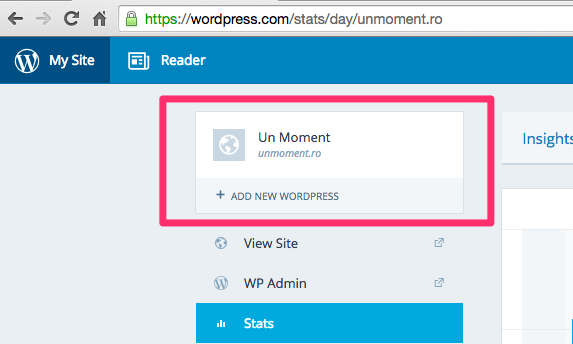
If you still see 0nemoment.wordpress.com there instead of unmoment.ro, it’s likely just a javascript issue because your browser was previously displaying that free address. The domain will switch in after a couple days. I think clearing your browser cache, logging out, and logging in will force it as well.
-
is seems to be ok now! i have another question…
wordpress.com do not alout to add adsense on the blog? -
Advertising services like Adsense are not allowed on WordPress.com. For full details, please see:
http://wordpress.com/types-of-blogs/
We do have an advertising program called WordAds, which you can read more about joining here:
-
don`t worry.
Someone helped me and I changed it on wordpress.org . I will cancel the profile and I will keep it there. Thank you a lot.


- The topic ‘why i can`t access my editor?’ is closed to new replies.
 WordPress.com Forums