Why is everything screwy?1?!?!
-
Pretty much everything is going wrong with my blog. WHY!?!? I don’t like these forums, they are useless to me. I WANT TO TALK PERSONALLY WITH SOMEONE FROM THE SUPPORT STAFF.
The blog I need help with is: (visible only to logged in users)
-
I don’t have any issues accessing this blog http://homeplatedontmove.wordpress.com/ using FF29 and IE 11 and I do not see anything at all that’s unusual, except for the fact that all the font is italicized. Specifically, what is it that you need help with?
Speak up here please as there is no phone support. Only those with the Business Upgrade have live chat support.
http://store.wordpress.com/premium-upgrades/wordpress-business/
http://en.support.wordpress.com/live-chat/This is a peer support forum where Staff and Volunteers work together cooperatively to provide WordPress.com support. Emailing support means it takes longer to get an answer than posting to the support forums does.
Volunteers answer the majority of all support questions and when we cannot provide support we tag threads for Staff assistance.
We are happy to answer your WordPress.COM questions right here in this thread. Please simply post exactly what you need help with into this thread, knowing there’s rarely ever a question posted here that has not already been asked and answered.
-
-
The answer is that you have an open HTML tag that you need to locate and close.
This is the italics tag indicating start italics
<em>
This is the italics tag indicating stop italics
</em>Italics do not suddenly overtake posts unless
(1) content has been imported into the blog
(2) the blogger has been copying and pasting content from elsewhere, without using the correct icon in Row 2 of the visual editor http://en.support.wordpress.com/visual-editor/#pasting-text
(3) or the blogger has copied and pasted invalid HTML into a text widget or left an HTML tag open
After you go here and enable this > Settings > Writing
Formatting
_ WordPress should correct invalidly nested XHTML automatically
“save changes”See here for sorting this out > http://wpbtips.wordpress.com/2012/05/19/sidebar-at-the-bottom-and-related-issues/
-
I’m sorry, I don’t know what any of this means. I feel really dumb because I’m going to the support links you suggested and I can’t understand any of it.
-
Dashboard > Settings > Writing
go here http://homeplatedontmove.wordpress.com/wp-admin/options-writing.phpand enable this
Formatting
_ WordPress should correct invalidly nested XHTML automatically
“save changes” -
My dashboard or tool bar or whatever it is doesn’t look like it normally does. All the buttons say gibberish or just symbols.
-
Okay that’s weird. I’ll tag this thread for a Staff follow-up. Please subscribe to the thread so you are notified when they respond and please be patient while waiting.
-
OK, how do I subscribe to the thread? You have to understand that I’m a complete neophyte when it comes to this stuff, and I feel bad for all the dumb questions. Thank you for your help and patience.
-
Under each comment box you see this:
_Notify me of followup posts via e-mailIn the sidebar of this thread you see:
Subscribe to Topic -
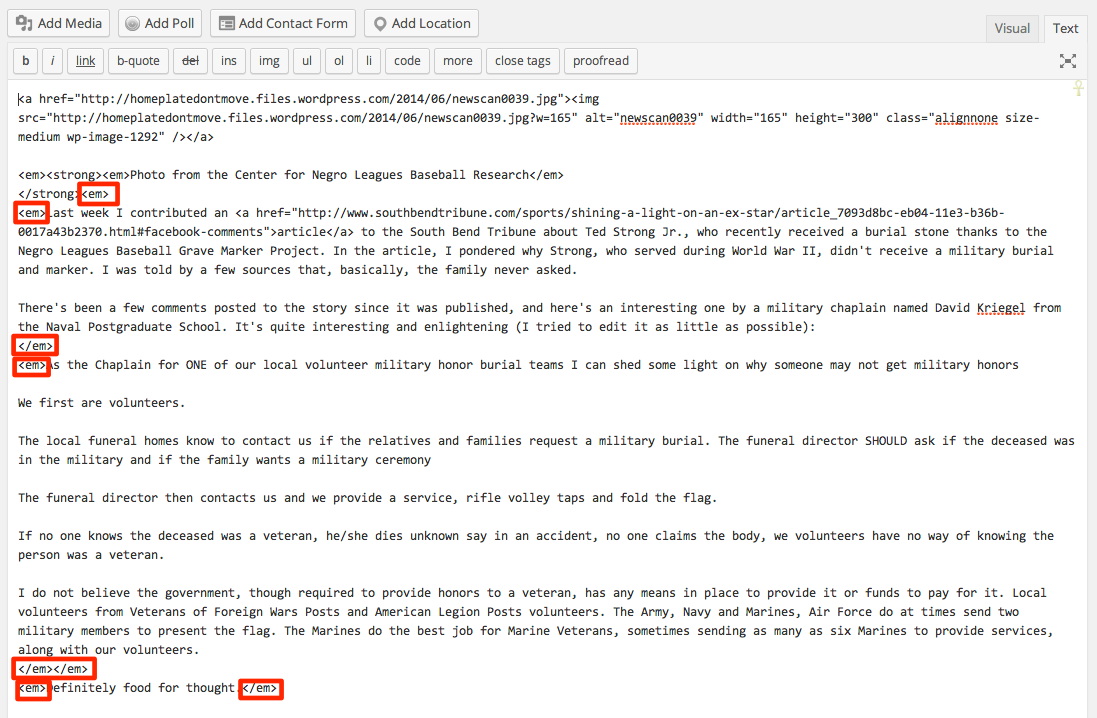
For whatever reason, you seem to be making some of your text italic. This is easiest viewed under the Text editor for each of your posts.
Each time there’s an < em > tag (em is short for emphasis, and is what indicates italic styling) the formatting is turned on. Each time there’s a close tag that looks like < /e> the styling is turned off.
Here’s a screenshot of your post in the Text editor, to explain what I mean:
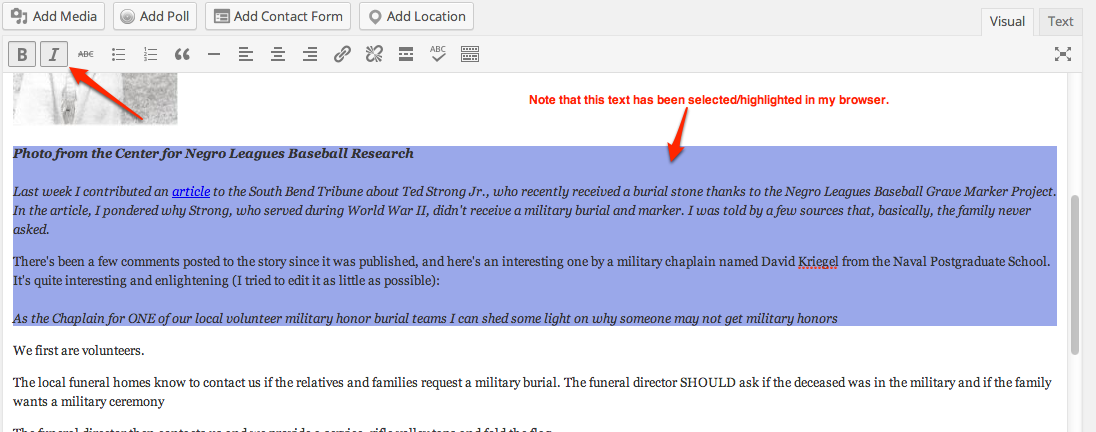
https://i.cloudup.com/2RLAv-ohuA.pngYou can go into your posts, select the italic text in your Visual Editor, and click the i button to turn it off:
-
Could this be because I’m using an outdated browser? I’m using an ancient (i.e. five-plus years old) Mac and the Safari version that came with it.
-
Anything’s possible, but it really looks like you just need to clean up the formatting on your posts as the italic formatting HTML code has been added and just needs to be removed.
-
OK, I’ll try that. I need to take a break right now. I’m getting edgy. But to give you an example of why I’m confused, the buttons above this very response bar read “strong,” “em,” “link,” “quote,” “ul,” “ol,” “li,” “code” and “close,” none of which makes any sense to me.
-
OK, now it doesn’t seem to be letting me even log out. I click log out and the page just refreshes.
-
You’re looking at the HTML formatting tags in the Text Editor. You don’t need to modify anything there, but instead just turn off Italics in your Visual editor, as I showed in my second screenshot.
-
I actually now think there’s something seriously wrong with my computer, I can’t log in to my yahoo mail.
-
I would recommend shutting down your browser and restarting to see if that helps. If not, you may want to restart your computer. Again, I don’t think that has anything to do with your posts on WordPress.com but it may help with your overall issues with your connections.
-
Hi it’s me again. I apologize I haven’t gotten back to you for a few days. My email and computer were acting goofy. I’m back on my blog, and the same thing is happening — on my dashboard, all the buttons and tabs just have gibberish on them that I can’t understand. I think I accidentally did something to change the format of the dashboard, and now I can’t get it back to normal.
-
I’m also using another computer, a much newer PC, and the same is happening that was going on using my older Mac.


- The topic ‘Why is everything screwy?1?!?!’ is closed to new replies.
 WordPress.com Forums