

Why is my CSS not rendering properly?
-
Hi,
I am using a theme with a premium design upgrade. I do not have the mobile theme enabled, but it is a responsive theme. I noticed that on my mobile phone using a 3G network, the browser does render the CSS edits I have made. The device is not capable of using a 4G network, so I don’t know what the results would be in that case, however, it does render properly when connected to wifi.
This is a concern to me because I would like everyone to view my website the way I intended it to look, and with so many people using mobile devices, I am wondering whether it is rendering properly for many of my visitors.
Is there any way to solve this problem?
Thank you.
The blog I need help with is: (visible only to logged in users)
-
Hi!
Currently, your site appears to be rendering correctly on mobile devices on my side as shown here:
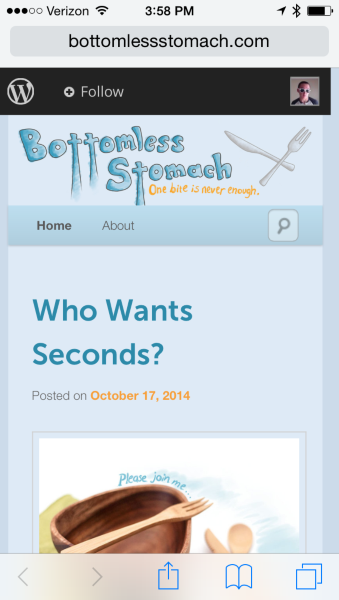
Can you let me know specifically what element of your site you’re having trouble with?
-
Yes, that image does look correct. Was that captured with a device NOT connected to wifi? And was it on a 3G or 4G network?
The elements that do not display correctly on my 3G device are ALL of my CSS edits: link colors, background color behind the body text etc. But only when disconnected from wifi.
-
Hi!
I just retested this on both LTE and 3G with the same result. Here’s a 3G snapshot:
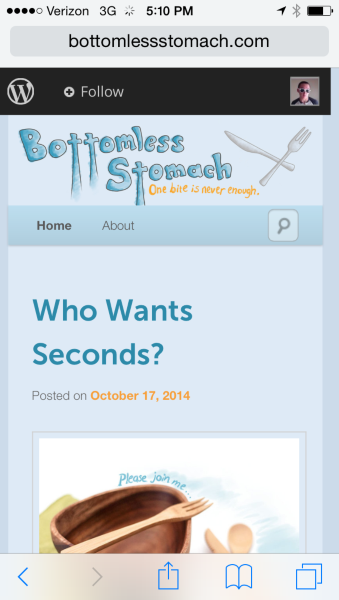
The connection shouldn’t affect how the CSS is rendering. Could you capture a screenshot of how the site is appearing on your side and upload it to your Media Library?
-
-
Hi,
Can you try clearing the cache on your phone? If you’re on an iPhone, this can be done under Settings -> Safari -> Clear History and Website Data.
-
Hello,
Yes, I cleared everything and it made no difference. I asked my friend to test it on his phone too, and it was displaying incorrectly on his browser as well. He doesn’t have an iPhone, but he’s also using Virgin Mobile.Just to verify, when you tested it, did you access the blog by typing the url into your device’s web browser? If it is accessed through the wordpress or Facebook apps, it displays correctly.
-
Hi again,
I also just had my neighbor test it on her cell phone browser as well. She disconnected it from wifi, and the blog was not displaying properly on her device either.We then tested it on her tablet connected to wifi, and it displayed correctly. This issue (as far as my tests) seems to be related to cellular data…
-
Hi,
I am typing the URL directly into the browser (Safari), not using the WordPress app. I’ve even made sure the cache was clear on my phone prior to entering the URL, but I’m still seeing the same (correct) page.
Since the site appears correctly when served up through the WordPress and Facebook apps, I don’t think this is a connection issue. Has everyone you’ve asked to load your site been using Safari?
-
Hi,
Interesting…
Neither of the people I asked were using iPhones or Safari. They were both using whatever browser was included on their phones.I even had one of them test it by switching from 4G to wifi, and just like mine, the site was displaying correctly on his wifi connection as well.
-
Perhaps this is a specific browser/phone issue. Do you know what kind of phone/browser they were using?
-
I’m not sure, but It doesn’t seem to be specific to any sort of browser or phone, seeing as how it is happening on my iPhone using Safari as well as two non-Safari browsers…
-
-
Sorry, here’s the url for the forum:
https://en.forums.wordpress.com/topic/custom-css-not-working-over-3g-is-working-over-wifi?replies=13 -
Hi!
The solution mentioned in that thread are all cache-related, which we’ve already explored. Could you let me know what cell provider you’re using?
-
-
Howdy!
Jeremey asked me to take a look at this since I have Virgin Mobile as well. :)
I could immediately reproduce the issue:
https://cloudup.com/cHUoMwJEi2RSince we suspected this issue was specific to Virgin Mobile / Sprint, I used a traceroute application to see how the connection was being treated. I could see that at some point the connection was timing out when it hit servers being run by Telia:
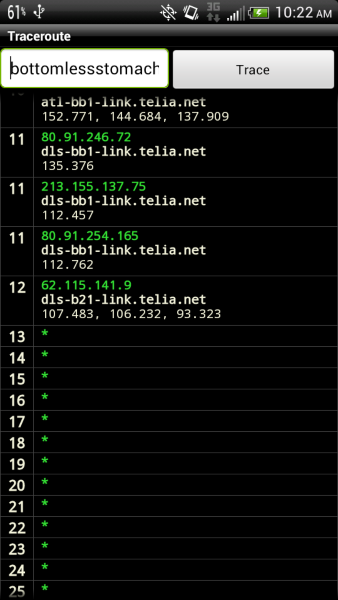
I continued testing some of our servers with the traceroute, but had one instance of the traceroute to your site running really smoothly. This time Virgin Mobile was pointing me to a different set of servers:

I refreshed my browser and your custom CSS was loaded:

This leads me to believe that some of the servers Virgin Mobile points users through aren’t loading all resources from WordPress.com correctly.
Unfortunately we’ll need to contact Virgin mobile to really get at the root of this and have them check out those servers. Would you mind contacting their support, and sending them a link to this forum thread? One of their system administrators may be able to check out the servers in that traceroute and clear this up for the future.
Let me know what they say and I’m happy to continue investigating on my end as well.
Best,
-Alex G.
-
Hi Alex,
First of all, thank you for taking the time to investigate this issue.I have some questions, as I am concerned about people seeing my blog the way I intent it to look, especially when I have taken the time to adjust the custom CSS. :-)
-Is this issue specific to only Virgin Mobile/Sprint? In other words, people on AT&T/T-Mobile etc can see my blog correctly on their cellular networks?
-Is this issue specific to only MY blog, or does Virgin Mobile render ALL WordPress Blogs with custom CSS improperly?
Also, as I said, I greatly appreciate you taking the time to dig deeper into this, but I honestly don’t understand all of the technical information you gave me. In order to communicate the issue and get it resolved as efficiently as possible, I feel it would be best for you to contact Virgin Mobile and explain everything to them. Since they are also your cellular provider, would you please be so kind as to reach out tho them and then keep in touch with me about this?
Thanks so much!
-
Howdy!
Great questions. So here’s the underlying issue: WordPress.com blogs have different resources hosted by different servers all around the country. Some of these are to make sure things load fast, some are backups, etc etc.
Whenever something’s not loading, like your Custom CSS in this case, it’s because the connection to that server is breaking somewhere. A miscommunication, if you will. In this case my phone could send a message to all the servers requesting your posts and pages, all your images, all the cool interactive stuff that WordPress.com does for you… but the server that held the Custom CSS didn’t hear my “Hey, do you have any custom CSS stuff?” when my phone asked it.
The reason was because of that break in the Telia servers. When I tried again, for whatever reason at that moment the Virgin Mobile network sent my request for information from my phone through a different set of networks — and this time I got all the information.
Theoretically, this could’ve happened even on a home connection — but mobile data changes what networks its grab information more often because you’re literally on the move and people are changing how much information is requested more often.
I couldn’t guarantee you here that this issue would never come up on Verizon/ATT or iPhone vs. Android… other than we did track down this particular instance that appeared to only occur on Virgin Mobile (which we could infer would also affect Sprint).
It’s honestly beyond both your control as the webmaster and our control as the webhost, and it’s not really Virgin Mobile’s ‘fault’ per se, but rather they can better track down where that communication broke down. Does that make sense?
The issue likely affected a lot of various types of information that ran through those Telia servers, not just visitors to your site specifically. It just happened to affect your site today. :)
Best,
-Alex G.
-
Hi,
Thanks, for explaining, though I’m not sure if you addressed all of my questions.I don’t understand completely: is this issue of the CSS not loading properly over this particular network isolated to only MY WordPress blog, or does it affect others as well? Is there any way to test this?
Also, I just want to make sure you understand that this did not just affect my site “today,” as you mentioned, but I first noticed it last Wednesday, and it has consistently not loaded properly ever since over 3G.
Lastly, I asked if you wouldn’t mind contacting Virgin Mobile about this instead of me, since you are the expert. I would greatly appreciate that. Will you please do that for me?
I understand that there may be no simple solution to this, but I really need some help with the trouble shooting process, as having my blog look a certain way is very important to me…especially since I paid for the upgrade to allow me to edit the custom CSS.
Thank you.


- The topic ‘Why is my CSS not rendering properly?’ is closed to new replies.
 WordPress.com Forums