

Why is the gallery slideshow not displaying?
-
I have added a gallery to my page, with the type set as slideshow. But the gallery only displays as thumbnails, not as a slideshow. In fact, no options have any effect on how the gallery is displayed; it only appears as thumbnails. How can I get the gallery to display properly?
The blog I need help with is: (visible only to logged in users)
-
Hi Milo,
I took a look at this page: http://richardmkearney.com/bio/ and I found that you added the gallery inside a table. Is there a reason for this?
If you insert the gallery and remove the table tags the slideshow will appear. This support guide will help you get this set up:
http://en.support.wordpress.com/images/gallery/
Let me know if you have any questions with this!
-
I have deleted the table that contained the gallery, and the gallery is still not showing a slideshow, or still any other type of gallery other than the thumbnails. Please advise.
-
Hi Milo,
I have deleted the table that contained the gallery, and the gallery is still not showing a slideshow, or still any other type of gallery other than the thumbnails. Please advise.
It looks like the gallery is still inside a table, that’s likely why you’re having trouble. Here’s what I see:
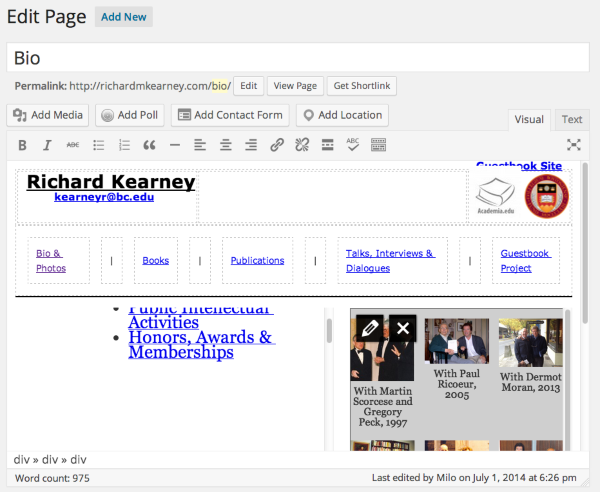
I would recommend putting the gallery on a separate page, maybe separate Bio and Photos, or perhaps removing the 2-column portion of the table from that page and putting the text or slideshow above and below each other.
You could start new pages as a draft and copy over the information you need without the tables, then make the page live when it’s ready :)
-
Actually, you may note that in the bottom left corner, the editor details that the gallery is a div nested inside two other divs, not a table element. Also, I have created a new page called “gallery” with only a gallery on it, and this still will not show anything other than a thumbnail gallery.
-
I have created a new page called “gallery” with only a gallery on it, and this still will not show anything other than a thumbnail gallery.
I checked this one, and it seems to be working here. If you’re not seeing the slideshow there either, it may be worth trying in another browser to see if that’s the issue.
http://richardmkearney.com/gallery/
It looks like you have a very specific design in mind, but I would encourage you to consider not using a nested layout, at least for the body text.
You could instead put the text into the Edit box for that page directly so that it’s responsive on various screen sizes and allows features like the gallery to function normally. If the columns are a requirement for your layout, there is a guide to using CSS to create columns here that might be helpful:
http://vip.wordpress.com/documentation/how-to-create-columns-in-posts/
I hope this helps!
Best,
Evan
-
So the gallery does display properly in the gallery page, but when moved into the bio page, where I initially wanted it, it still won’t show properly. I thought it may be an issue with it’s default width being too wide, but it is never loaded as a slideshow in the first place, so I couldn’t affect the width in CSS by using the .slideshow class.
It looks to me like I am using a very similar method for the columns in my HTML, but the gallery will still not appear as a slideshow on the page that I need it to. -
Hi Milo,
I have done some testing and was able to get a sample slideshow working within your page structure, but there seems to be some conflict in the code on your site or page that’s preventing the slideshow from loading. I’m still looking into this. :)
-
Here’s what I would recommend: copy the code from the Text tab of your page out and into a brand new page and save that as a draft, then take a look at the preview to be sure it’s showing up the way you intend.
I tested this and was able to recreate your page with the working slideshow. Assuming that works you can unpublish the other page (or delete it).
I’m not sure why the existing page refuses to load the slideshow, but in the meantime recreating it should allow you to continue developing your site. Sorry for the trouble!


- The topic ‘Why is the gallery slideshow not displaying?’ is closed to new replies.
 WordPress.com Forums