

Why no photo on my FB post about my blog post
-
Why isn’t there a photo showing up on FB as it usually does when I include a link to my blog?
The blog I need help with is: (visible only to logged in users)
-
Hello there, Valorie!
I took a look at your latest post:
It appears as if the image you’ve added is too small to be “seen” by Facebook.
Your image should be at least 200×200 pixels in both width and height. Your image is 186×271. Not quite large enough.
In the future, if you make sure your image sizes are larger, they should appear properly on Facebook.
I hope this helps! If you have any other concerns, drop me a note. Thanks much!
-
-
Hey Valorie,
Thanks for your note! Could you please send me a screenshot that displays your Facebook post? Then, I can better troubleshoot your issue.
You can simply upload the screenshot to your Media Library, like any other image, and I’ll be able to access it from there.
The page at the following link has some helpful tips for taking screenshots:
Just let me know when there’s something I should look at.
Looking forward to hearing from you. Thanks very much.
-
Thanks, I uploaded it to FB using the url pasted in from the browser, and then it showed the photo, but it reverted back to the old small photo. I guess the short link goes back to the original post even after you revise it?
-
Hey there!
I reran the debugger for you. Then, I clicked the Facebook sharing button underneath your latest post on your site. This is what I see now:
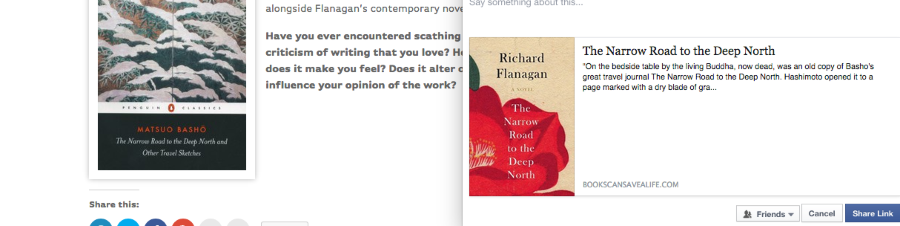
It appears to be showing the updated version of your image.
Two suggestions:
- Clear your browser’s cache using the instructions below:
- The next time you run the debugger, try it with the .wordpress.com site name, as well as the custom URL.
That should do the trick! If I can help in any other way, please drop me a line. Cheers :)
- Clear your browser’s cache using the instructions below:


- The topic ‘Why no photo on my FB post about my blog post’ is closed to new replies.
 WordPress.com Forums