

Why won't background image go away? I can't remove it or restore default.
-
I uploaded a new background image which is too big. I resized it but it wouldn’t replace. I then tried to restore the default but that won’t work either. Please help – thanks!
The blog I need help with is: (visible only to logged in users)
-
Hi Kelly!
It looks like the background image set here is currently appearing on your site:
https://brooklynfoodtours.wordpress.com/wp-admin/themes.php?page=custom-background
Here’s a screenshot of what I’m seeing:
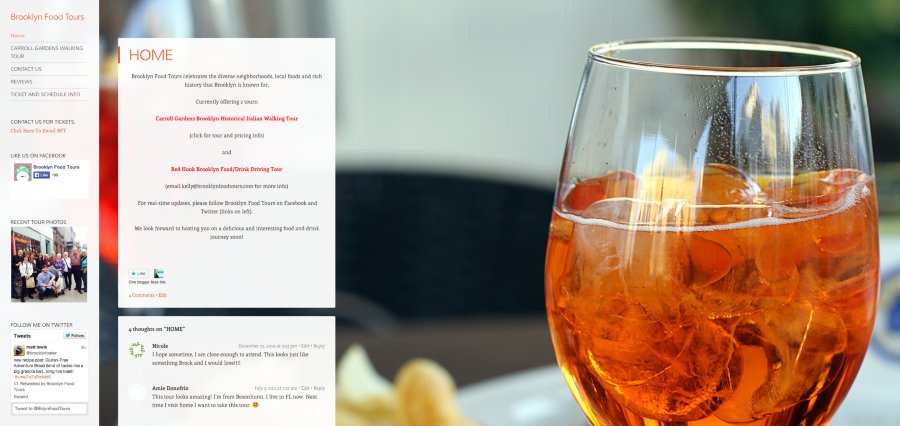
If you would like, you can use the “Remove Background Image” from that page to disable the current background. Can you give that a try?
-
Thanks Jeremy. I restored the default successfully (that’s the liquor on the rocks shot). However, I reviewed the specs and tried to re-upload a background shot on the home page. I KNOW the pixels are within the limit but it’s showing up as a huge macro blow up. The background of the shot I’m trying to post is brick (with a bottle in front) and if you go to site you will see an EXTREME close up of brick. I can’t figure it out!! Thanks again.
-
Hey Kelly,
It looks like the issue here is the size of the uploaded image. Since the image is so small, it’s automatically getting blown up to fit the size of the site. Can you try uploading an image that is at least 1600px wide?
-
Sure – I just re-uploaded the original image from the camera. Have a look, it’s even worse. The dimensions of this photo are 1362 × 2998.
-
Hi Jeremy – I suspect now that the proportions of that shot (tall, skinny rectangle) are problematic – I now have a photo up that’s a more traditional wide rectangle and it looks better, I’ll keep that in mind for future. Thanks for your assistance.
-
Hi Kelly,
Ah – that definitely makes sense. If the image is too tall and narrow, the width will be skewed in an attempt to fill the blog page. The image in the demo is 2000 x 1333 so it seems like an image around 2:1 should work well.
Let me know if you need anything else!
-
Actually while I have you…throughout my site I say to email me for more info. How can I make that email address an active link so that all they need to do is click it? and it will open an email form in their email program? (I don’t want to use the “contact form”.) Thanks Jeremy!
-
Hey Kelly,
You can do this using the following link code:
<a href="mailto:(email visible only to moderators and staff)?Subject=Hello%20again" target="_blank">Send me an email!</a>The subject portion is completely optional so you could do this instead:
<a href="mailto:(email visible only to moderators and staff)" target="_blank">Send me an email!</a>Can you give that a try?
-
Sorry Jeremy – I can’t figure it out – it keeps linking to a page that says “Page Not Found.”
Here’s what I’m entering in the URL box:
-
Hey Kelly,
That’s odd – the link is working correctly on my side. When I click the link, it opens up Apple’s Mail, which is my default mail application. Just to be clear, when you click the link, it opens up another page on your blog with a “Page Not Found” error?
-
What link are you clicking Jeremy? Do you mean the one that’s in the left on the navigation bar? if so, yes I know that one works, I set it up years ago as a widget.
What won’t work is within the body of information on the actual page. Where I give info about tours and I say “for more info email Kelly@BrooklynFoodTours”. I’m highlighting the email address, clicking on the hyperlink button and attempting to put in the code you gave me – which I cut and pasted in my last email to you – and that’s when it opens a “Page Not Found” error.
Did that help?
-
Hey Kelly,
I understand. Sorry for the mix-up! I went ahead and added a link to your email address on your contact page here:
http://brooklynfoodtours.com/contact-us/
Can you give that a look as an example? One note, it may be easier to insert the link in the text editor. The format for this would be:
<a href="mailto:EMAIL">youremailhere</a>Can you give the link on the Contact page a try and let me know if it’s working on your side?
-
Ahhh….perfect! I cut and pasted what you did on my contact page and tried it on other parts of the site and it works! Thank you so much! :-)
-


- The topic ‘Why won't background image go away? I can't remove it or restore default.’ is closed to new replies.
 WordPress.com Forums