

Why won't the paragraph split work????
-
Hi everyone
can anyone please tell me why the paragraph that ends with ‘die hard fans like myself’ refuses to end and another paragraph begins like it does underneath?
Its driving me mad as I am trying everything to fix it…can anyone help please?
Also is it me, or does the ‘F’ in the first sentence of the first para look bold..? It looks like it does but I cannot seem to fix it..:(
Help please lol – thanks
https://sharonharveywriter.wordpress.com/2015/06/06/terence-donovan-as-doug-willis-in-neighbours/
The blog I need help with is: (visible only to logged in users)
-
Hi,
can anyone please tell me why the paragraph that ends with ‘die hard fans like myself’ refuses to end and another paragraph begins like it does underneath?
I was unable to find the phrase “die hard fans like myself,” in the linked article. Could you locate it more precisely?
Also is it me, or does the ‘F’ in the first sentence of the first para look bold..? It looks like it does but I cannot seem to fix it..:(
The entire first word of that paragraph has a different color, as does the word “then!” at the end of paragraph 3, and the word “affair” in paragraph 9.
-
Oh my goodness, that doesn’t show at my end :O….it must look awful :( I don’t understand why…..:(
As for the paragraph I refer too…try from the beginning of the paragraph…’Alarm bells began ringing’
-
I mean those three words are a different shade of black. They are dark black, whereas the rest of the text is lighter, almost gray. I thought I’d find color tags in the HTML after copying and pasting those words, but I didn’t. So I don’t have an explanation for those anomalies.
Re: the spacing issue location, thanks. Have you tried simply hitting the return key after
especially for die hard fans like myself.
and then saving that change? The return key should give a double space there. That worked for me.
-
No me neither :s
< Re: the spacing issue location, thanks. Have you tried simply hitting the return key after
especially for die hard fans like myself.
and then saving that change? The return key should give a double space there. That worked for me.>
Nope, tried that several time…and in the admin part where you make changes it works perfectly but not on the main site where you and i can view :s and I have NO idea why and its most frustrating…..
Another quick question, why when I try and print…all I get is the words and pics – and link to the pics ie http etc… and nothing else like the actually site…try this link to see if you can see what I mean.
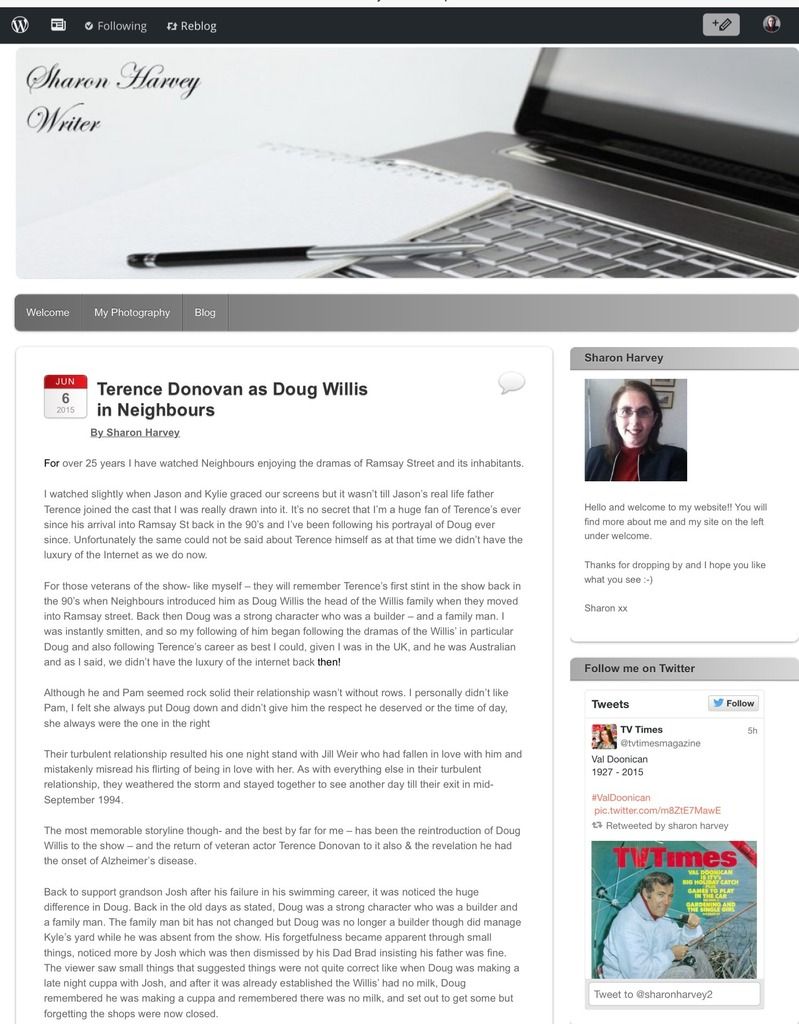
All I am seeing is this:
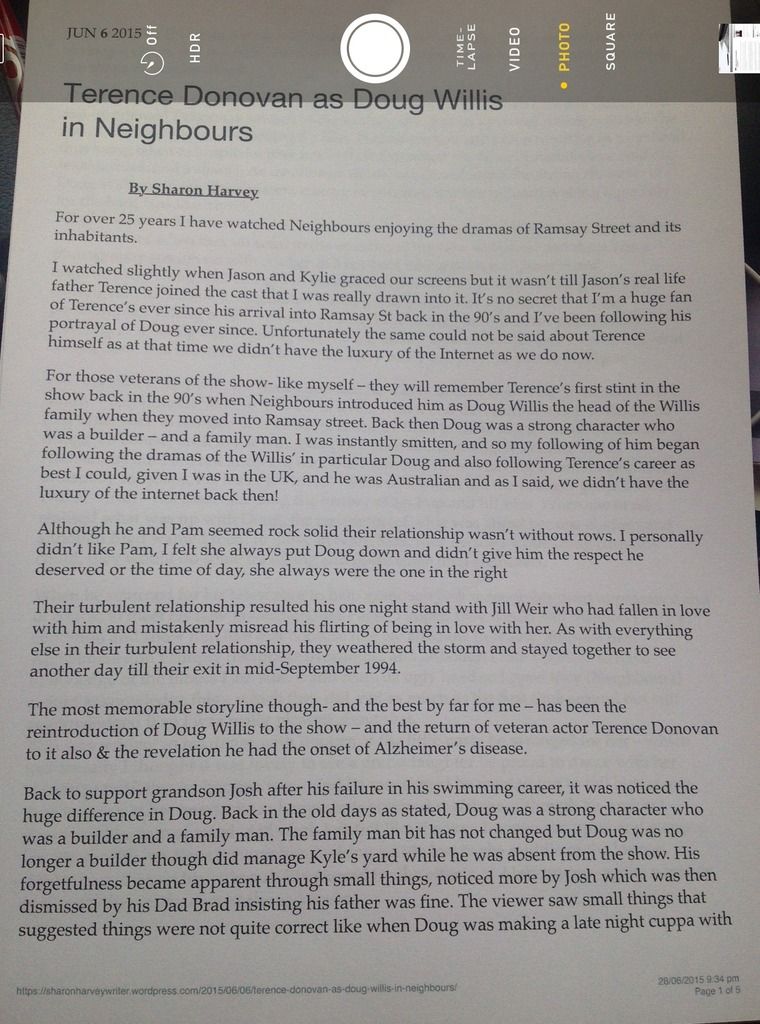
Hope they show up.
-
Nope, tried that several time…and in the admin part where you make changes it works perfectly but not on the main site where you and i can view :s and I have NO idea why and its most frustrating…..
I’ll tag the topic for staff attention. Please wait for staff to respond.
Another quick question, why when I try and print…all I get is the words and pics – and link to the pics ie http etc… and nothing else like the actually site..
I don’t have any experience printing from WordPress.com sites, but it seems reasonable that if you send a command to print a post, the result will basically just include the title, and content of the post, and perhaps the date and author. It seems that you’re wanting to include the entire content of a page, including header, menu, post, and sidebar content. Whether or not this can be done might depend in part upon the printer being used, its settings, as well as the device being used to view the page, and the browser and its settings. I’ll defer this issue to someone more informed in that realm.
-
Ok thanks…I have tried printing the same article from a different site & it printed perfectly, including all the site content and graphic.
-
You’re welcome. Perhaps I misunderstood. Was it just the images within the article, and the graphics in the post format (date format with background, comment bubble, etc.) that were missing in the first case?
-
Hopefully you will see what I am aiming for in this screenshot.
[URL=http://s9.photobucket.com/user/SharonHarvey2/media/835C1755-0B9E-4F32-999B-543566A3AE69_zpseoaz6yb6.jpg.html][IMG]http://i9.photobucket.com/albums/a55/SharonHarvey2/835C1755-0B9E-4F32-999B-543566A3AE69_zpseoaz6yb6.jpg[/IMG][/URL]
-
-
Hi there,
Let’s see if we can get these questions answered :)
Also is it me, or does the ‘F’ in the first sentence of the first para look bold..? It looks like it does but I cannot seem to fix it..:(
As Doc mentioned, the word “For” as well as the word “Then!” have the color of black selected. You can see the code you a span which sets the color have:
<span style="color:#000000;">For</span>Screenshot: https://cloudup.com/ibZ4nMds5pd
To set the color back to the default, highlight the text then click on the text color tool and select the “x” (no color) item. You could also go into the text/HTML mode and remove the text starting with < span …. and ending with </ span > leaving just the word “For”
Here is our documentation on the text color.
https://en.support.wordpress.com/visual-editor/#text-colorcan anyone please tell me why the paragraph that ends with ‘die hard fans like myself’ refuses to end and another paragraph begins like it does underneath?
For some reason, perhaps you copied from another place, maybe there was a ghost character, you got a < br > in the code instead of an < p > You can see that in this Screenshot: https://cloudup.com/iifc0AkLYhB
The simplest way to fix this would be to go into the Text/HTML mode and replace:
<br>
with
</p><p>I have tried printing the same article from a different site & it printed perfectly, including all the site content and graphic.
We do remove the styles of your site on print. We do this by loading what is called a stylesheet just for print. This is considered best practice as content is consumed differently on the web than in print. If we didn’t do this you would have to print the header and footer on each pages waisting ink and paper.
You can also see sites like Time.com will do the same thing when you click Print.
While this is not something you can turn off, some other options would be to take a screenshot of the page or perhaps copy the text into a word processor (like Microsoft Word/Libre Office) and add your header and footer back in.
-
Hi :D
Oh thank you for that…its driven me bonkers so its nice that someone knows where I am going wrong now :)
yes, I have to admit, I dont know if it was after Music Doc mentioned it, I looked in the admin section and html bit I think it was, but couldn’t find anything to trigger off a ‘that doesn’t look right’ so was flummoxed.
I have followed your screen cap pic…and I hit the default text button itself, and I THINK its worked :D **Fingers crossed**!!
However…the paragraph I mentioned above still does not alter, so I am stuck with how to alter that…any idea..?
Ok…on to the print problem…I understand what you say…and while I understand now that problem…is that the reason that while the photos show, I get a very annoying caption underneath that reads :
‘http (so on and so on)….I take it I cannot get rid of that?
So….I assume what I have to do is take a copy of the image of my header…and also the photos and hopefully the proper caption of the photo will then appear?
Thanks again, and I look forward to hearing from you further in regards to further resolving the final problem.
-
I have followed your screen cap pic…and I hit the default text button itself, and I THINK its worked :D **Fingers crossed**!!
Looks like you’re almost there. You still have the “!” after “then” in black. You can use the same steps and highlight just the “!” for this.
However…the paragraph I mentioned above still does not alter, so I am stuck with how to alter that…any idea..?
I took another look, we may need to get more aggressive. Visit the post and then click the HTML/TEXT mode and wrap the paragraph in
<p>... Paragraph here </p>
It will look like this screenshot when you’re done: https://cloudup.com/ioEtHZUF5YiAs to why, it looks like you may have pasted your content in from a text editor. This can sometimes lead to strange formatting issue like this. One option is to paste the content in using the “Paste as Text” button then add the formatting later.
Ok…on to the print problem…I understand what you say…and while I understand now that problem…is that the reason that while the photos show, I get a very annoying caption underneath that reads :
The reason for adding the link to the image is unlike online, the user can’t click the image to be taken to the full image. By providing the link/URL the printer knows where to find the images in the future.
‘http (so on and so on)….I take it I cannot get rid of that?
One thing to try would be to remove the link to the full image when the visitor clicks on the image. You can do this in the Attachment Display Settings: https://en.support.wordpress.com/images/image-settings/#attachment-display-settings
-
Hi there, we’re re-opening this thread:
It was in regards to the paragraph problem i had, I got to the screen cap part but am stuck as to how to continue.
Let us know how you’re stuck / what is happening, and we’ll go from there. Thanks!
-
Hello! :-), many thanks for reopening this thread. Can I just explain the reason for it being left so long to reply, hence maybe the reason for locking it – inactive for so long?
I went on holiday, returned and then went down with a bug.
Ok…I’ve got to where BDukes showed me in her helpful screencap…but I cannot see any indication in the menu as to where I put those P tag things 😕 and I don’t really want to be pressing any button incase I wreck my writing set up.
-
Ah, I hope you’re feeling better :)
So where were we then? It looks like you’ve removed the extra-black “For” thing and you’ve just got to get some extra space between your paragraphs.
I actually pulled up this article in an editor, and here’s what I saw using the HTML / Text tab:
https://cloudup.com/cGZkXlKcSWrNotice how there’s no extra space there between “die hard fans like myself.” and the next line?
You may be able to just add it in there now, without even worrying about “p” tags. Want to give that a try now?
-
Hi there :-)
Yes thank you, I am.
Yes, BDukes and I resolved that issue…but yes, what you pointed out was the problem currently being sorted…
Well….how did you do that? 😯 I was so ready to prove you wrong and say ‘No 😕 tried that and it does not work…’ but….it seems too, though I keep expecting to return to the page and find it hasn’t!!!! Here’s the link again…has it stayed a separate paragraph lol..looked twice and it had but daren’t check again!!!!😝
https://sharonharveywriter.wordpress.com/terence-donovan-as-doug-willis-in-neighbours/
-
-
Thank you so very much :D..so why didn’t that work the first time around?
Also…just so I know, and it that part will be resolved, what got me stuck on BDukes screencap…where was the P part that I could not find?
-
Oh I think she was wanting you to add paragraph tags actually, so that would explain why you couldn’t find them.
There are two ways to create new paragraphs: with the paragraph tags Brooke mentioned, or by just hitting enter between your blocks of text, which tells WordPress you want a new paragraph. The second way is just easier in my opinion :) If it’s helpful, though, we do have a beginning HTML tutorial as well as some advanced HTML tips here.
As for why it wasn’t working before: I’m not sure. Usually when I see that, it’s because there’s some stray HTML that needs fixing. And I didn’t see that — I just saw that you didn’t have space between the paragraphs in the editor. I’m glad it was relatively easy to fix this time.




- The topic ‘Why won't the paragraph split work????’ is closed to new replies.
 WordPress.com Forums