

widget background
-
Hi I am using twenty fourteen template, and somehow I changed the black background of the content sidebar to white. May you kindly tell me how to revert back to the black content sidebar background? Thank you
The blog I need help with is: (visible only to logged in users)
-
It looks black to me:
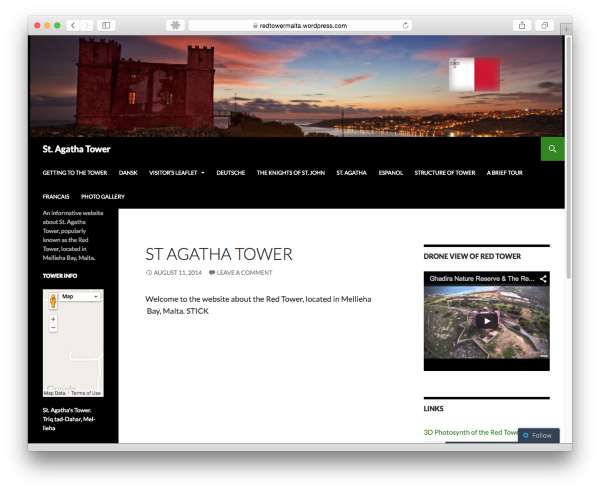
Can you please try clearing out your browser’s cache?
If you are still having a problem, let me know, and we can take the next troubleshooting step, once I get more feedback.
-
Hi Thanks for your rapid reply, perhaps I did not express myself well, the RIGHT side of the blog, as well as the content header have a white background as opposed to the header and the LEFT sidebar. I believe that when I first downloaded the template they were both black in background. Is it possible for this to be done? Thanks
-
This is what the Twenty Fourteen theme looks like, by default:
https://twentyfourteendemo.wordpress.com/
Your site looks comparable:
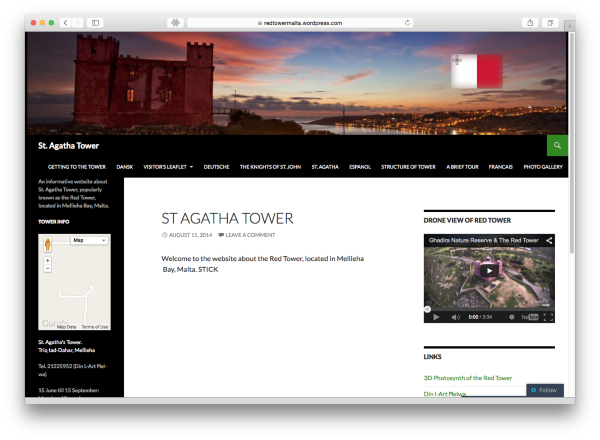
You can change your site’s appearance, but the type of change you have in mind will require the use of CSS, which is part of the WordPress.com Premium Plan.
WordPress.com Premium includes the following upgrades:
– Domain Name & Mapping
– Space Upgrade
– No Ads
– Custom Design
– VideoPressYou can read more about each feature here:
Let us know if you have any more questions.
-


- The topic ‘widget background’ is closed to new replies.
 WordPress.com Forums