

Widgets on my blog sidebar not behaving properly.
-
My Twitter, Instagram and image slide show widgets are not working properly when viewing my blog on my IPad. They work fine on my PC laptop, though. I’ve gone into each widget several times to see if there’s a problem I can fix but find nothing wrong. Has anyone had this problem where these widgets “vibrate” and move up and down rapidly?
The blog I need help with is: (visible only to logged in users)
-
Hi there, thanks for posting over here where we can troubleshoot together more easily.
I haven’t yet been able to replicate this on my test site running Yoko, but I wonder if some of your widgets may be conflicting. Could you try temporarily moving your Instagram widget into the Inactive Widgets area (drag it down to that area in the widgets management page in WP Admin) and let’s see if the vibration effect stops?
-
It seems to be coming from the Twitter widget. Whenever a new Tweet is added t flickers and makes all the other widgets flicker.
-
Thanks for that clue. I still haven’t been able to reproduce this on my test site running Yoko with a Twitter widget. As a troubleshooting step, could you please let me know if temporarily removing the Instagram widget (by moving it to Inactive) stops the vibration? If it does, then I can continue investigating from there.
-
-
Thanks for doing that. I refreshed your site on my iPad and am no longer seeing the vibration anywhere. Can you confirm that on your end too?
-
New Tweets didn’t cause the flickering. Maybe it is the Instagram widget? Although it’s just a photo with a link. So that’s weird.
-
Yes, it seems to be a conflict between the Instagram widget and some of your other widgets. I’ll report this to our developers so they can have a look and will keep you posted here.
-
Thank you very much. Should I keep the Instagram widget inactive? I refreshed the blog on my IPad and didn’t see the flickering either.
-
I would suggest keeping it in inactive for now until our developers find a solution for the vibration.
-
-
One last note for the developers to check on: when I refreshed my blog just now, on my Ipad, all my recent Tweets are no longer showing up in the widget. So it could actually be a problem with the Twitter widget. Thanks again.
-
I’m seeing your tweets normally both on my desktop Mac as well as on the iPad. Are you still unable to see them?
-
Hi again – we weren’t able to replicate this issue in testing, and so I moved your Image widget (with the link to your Instagram account) back to where it was before. I’m no longer seeing the strange resizing effect – could you please confirm that everything looks normal on your iPad? Thanks!
-
-
If it happens again, you can move the widget back to Inactive Widgets area and reply again here, or start a new thread in the Themes forum and we’ll have another look:
https://en.forums.wordpress.com/forum/themes#postform
Glad it’s back to normal – I’m not sure what that was all about but hopefully it was a unique occurrence. :)
-
-
-
Hi again! We’ve come across another report of this issue on someone else’s site and in their case, we found that un-checking the “No Scrollbar” box on the Twitter widget solved the issue:
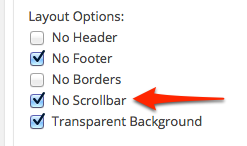
There seems to be a known issue with continuous scrolling on iOS if that option is checked in the Twitter timeline; it’s been reported and our developers are looking into it.
You could either do that now, or only if the issue crops up again, it’s up to you!
-
Hi Kathryn,
Wanted to let you know my Twitter widget is not working at all. I’ve recreated a brand new one to see if that would fix the problem but that didn’t help. None of my Tweets show up in the widget timeline. I’ve selected three to be shown without a scroll bar. Also there is no active link to my Twitter feed in the widget.
Thanks ~ Rhonda


- The topic ‘Widgets on my blog sidebar not behaving properly.’ is closed to new replies.
 WordPress.com Forums