Widgets overlap poll texts.
-
Hello,
I have a problem with my polls which I’ve done through polldaddy. The widgets overlap the texts. However this is otherwise not a problem. Anyone got a solution to this?
Check here:
The blog I need help with is: (visible only to logged in users)
-
I do not see any overlapping using Firefox 28. I’ll tag this thread for Staff assistance. Please take screenshots http://en.support.wordpress.com/make-a-screenshot/ and upload them into your Media Library and return to this thread to provide the file names for Staff. After you do that subscribe to the thread so you are notified when they respond and please be patient while waiting.
-
I’ve tried with two different poll layouts but both are bad although one is better. I’ve also noticed that it looks good in the mobil – suppose it’s cause there are no widgets there.
The file names are Overlap 1 and Overlap 2
Thank you,
Wilhelm Osterman -
-
In order for Staff to help you they need to know your specific computing environment details. Please work through what follows and report back.
1. If you are not running one of the browsers and versions listed at http://browsehappy.com/ please try upgrading or switching first.
2. If you are using an IE browser in compatibility mode please disable that mode. http://www.sevenforums.com/tutorials/1196-internet-explorer-compatibility-view-turn-off.html
3. If you are running one of the browsers and versions listed at http://browsehappy.com/
(a) Try clearing your browser’s cache http://www.google.com/support/accounts/bin/answer.py?hl=en&answer=32050
If applicable see here for instructions on how to clear the cache for Chrome and Safari on the iPad:
http://browsers.about.com/od/howtousemobilebrowser1/ss/safari-ipad-clear-cache.htm
http://browsers.about.com/od/howtousemobilebrowser1/ss/How-To-Clear-Browsing-Data-In-Chrome-For-Ipad_6.htm(b) Make sure that you have both third-party cookies enabled and JavaScript enabled
http://en.support.wordpress.com/third-party-cookies/
http://www.google.com/adsense/support/bin/answer.py?answer=12654(c) Disable all browser extensions or add-ons temporarily.
(d) Try enabling HTTPS: http://en.support.wordpress.com/https/
Add both *.wordpress.com and *.wp.com to your list of trusted sites under the Security tab. Make sure to uncheck the box for “Require server verification (https:) for all sites in this zone.” http://en.support.wordpress.com/https/#frequently-asked-questions
4. You can use this link to see if your flash is up to date. http://www.adobe.com/software/flash/about/ If it’s not then go to http://www.adobe.com/products/flashplayer/ and download and install the latest version of flash.
5. Try using another browser.
6. If you are not successful let us know:
(a) Exactly what kind of device you are using to connect to the internet and to WordPress.com.
(b) Exactly which browser (and version of it) you’re using by checking here if necessary http://www.whatbrowser.org/
(c) Exactly what you experience including what any error reports you receive state.
(d) Please also post screenshots, upload them to your Media Library, and return to this thread to provide the file names so Staff can examine them. -
I’ve emptied the chache, I ‘m using different browsers on different computers via Mozilla Firefox and Internet explorer. Many of my friends visiting on the site have complained about that they can’t read my questions.
Screenshots are made and in my libabry as “Overlap 1” and “Overlap 2”
Best,
Wilhelm -
Hi Wilhelm,
Thanks so much for posting the screenshots for Staff to view. Please subscribe to this thread so you are notified when they reply and be patient while waiting for their help. -
Hi there,
For WordPress.com sites you must use the shortcode as seen here:
http://en.support.wordpress.com/polls/
Please let me know if this does not work for you!
Thank you!
-
Hi Grace,
Sorry for not being able to reply quicker to you – I’ve just left for Borneo and have had problems to always have access.
It is shortlinks which I use…so this is basically what is not working.
Best
Wilhelm -
Hi Wilhelm,
I’m sorry about that! I have reported this to our team. I will update you as soon as possible!
-
Howdy Wilhelm,
Thanks for bringing this to our attention!
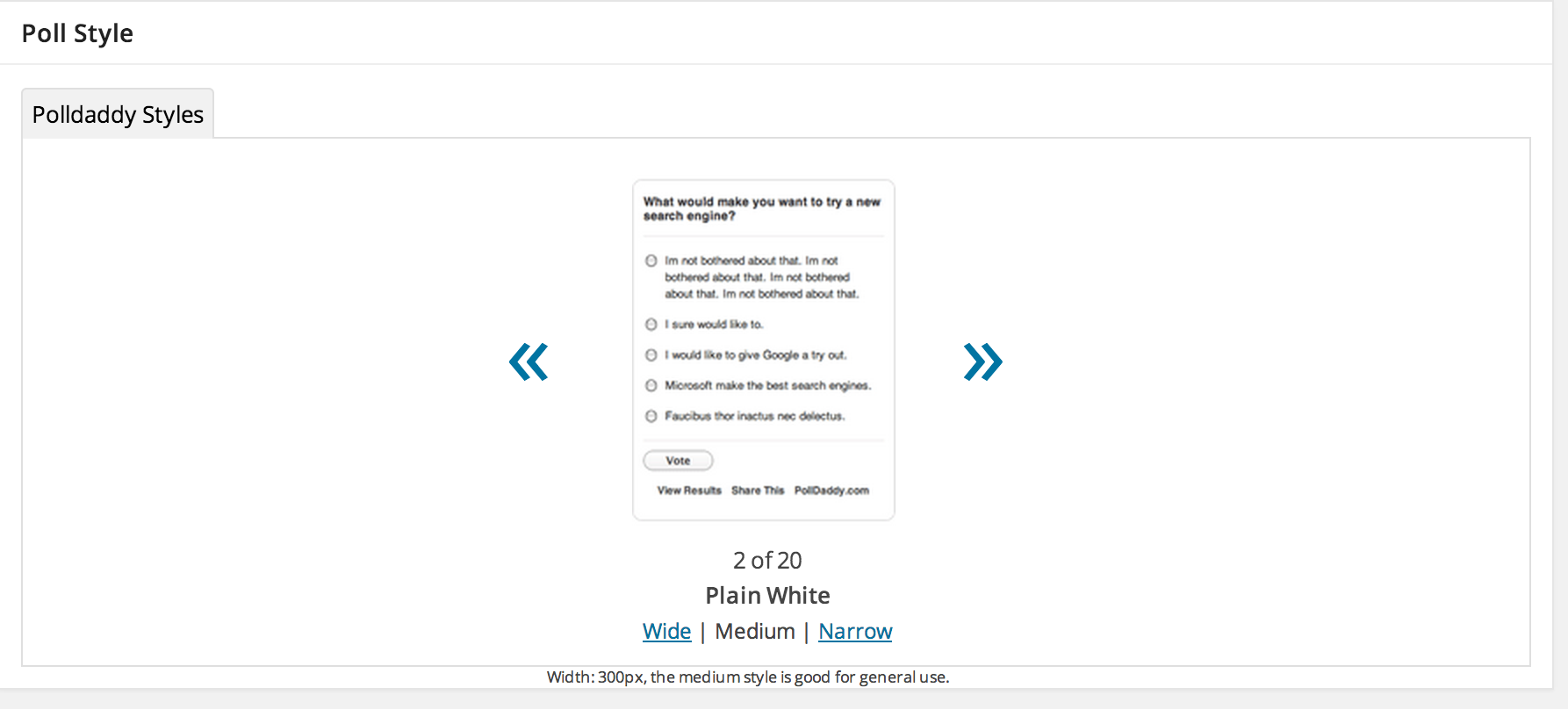
It looks like the poll layout you’ve chosen is too wide for the content area in Suits. I would suggest either choosing a theme with a wider content area (Hemingway Rewritten is similar to Suits, but has a wide content area, for example) or select the Medium size when you create your poll, as seen here:
https://cloudup.com/cXV7lF4ot6AI hope this helps!
Cheers,
Caroline -
Dear sixhours,
I got no such option as shown in the link you sent me. Is this a feature you get from paying, cause I don’t have it.
At the moment I got no possiblities of changing team due to almost no internet access :( Thank you for your help and concern!
Best
Wilhelm -
When you create a new poll, you should get a window that looks like this:
https://i.cloudup.com/UoNjlZEASW.pngIf the medium width poll is still too wide, you might try the narrow option instead.


- The topic ‘Widgets overlap poll texts.’ is closed to new replies.
 WordPress.com Forums