

With my own domain, it no longer shows a summary in a tweet.
-
I recently upgraded to my own domain. Now I’m finding that when I put the address in a tweet, it no longer shows the “summary” for it. Is there a way for the tweet to still show the summary? It seems like a small punishment for purchasing my domain name. : (
The blog I need help with is: (visible only to logged in users)
-
Hi there.
Ha! No punishment on our end :) We’re happy you decided to upgrade your domain, of course!
Have you used Twitter’s Card Validator for your new URL? Give it a try. I think you’ll find it alleviates the missing summary issue.
Please do let me know if I can help with anything else, or answer any other questions. Thank you very much!
-
Hi, Robyn, thanks for your response. I’m not sure what a Twitter Card Validator is. It sounds intriguing. What is it, and how does it work?
-
Hey! Instead of giving you a dry, long-winded response, I think we should go straight to the horse’s mouth about Twitter Cards:
https://dev.twitter.com/docs/cards
I think you’ll really like the way they work, when your WordPress.com posts publish to Twitter.
Give it a go — let me know if you need assistance with the setup, or testing :)
-
Robyn,
Your suggestion is probably a good one, but all that code stuff makes me nervous lol. Previous to my domain, I could just put in the webpage, and the summary would populate for me. For this, I have to alter HTML code and all that spooky stuff.
Essentially, there is no way to have what I had before with my own domain, right?
-
Hey there!
Let’s give one bit of troubleshooting a try, before we send you into the world of HTML :)
Please disconnect your Publicize connection to Twitter, clear the browser on your cache, and then reconnect Publicize.
http://en.support.wordpress.com/publicize/#reconnecting-services
You can also add the excerpt you’d like to appear on Twitter by adding a custom message. This, of course, may be more manual than you’d like, but it’s worth a try.
Next time you Publish, in the Post editor’s right-hand column, you’ll see the Publish box. Next to “Publicize,” click Edit. You’ll now see a box where you can add a custom message. Fill that in with a brief excerpt, and that should appear on Twitter when you post next.
I’m looking forward to hearing how this testing goes for you! Cheers!
-
Robyn,
The service that you’re speaking of doesn’t seem like what I’m referring to. I’ve actually never been connected to Publicize or twitter via my wordpress blog. Apparently what I was doing before populated the summary without my being connected to twitter.I don’t think I would want to be connected to twitter because I actually don’t want a tweet sent out as soon as I hit publish. I like to send out the tweets manually so that I can coordinate the timing of it.
Is there a way for a summary to populate (like how it did before) without being connected to twitter via publicize? It didn’t require publicize before.
-
Hi Ryan!
It looks like you’ll need to validate your site before the Twitter cards will appear. You can do that at Twitter here:
https://dev.twitter.com/docs/cards/validation/validator
You’ll need to run an example URL through the validator and have that type of card approved for your site.
You can find the exact steps at the bottom of the page here:
https://dev.twitter.com/docs/cards
Let me know if you have any trouble!
-
Jeremey,
Either I’m an idiot, or you’re not understanding. Those instructions are the same that Robyn had mentioned, but I don’t think we’re quite on the same page.
Unless I’m wrong (which is very possible), your solution populates a card for my website in its entirety. That’s not what I’m aiming for. What I’m aiming for is a summary of just that one blog post, when I tweet out the link to that particular blog post.
Before I had my own domain, all I had to do was copy and paste the url into the tweet, and a one paragraph “summary” and picture would auttomatically populate without my having to validate anything. It seems like now that I have my own domain, I no longer have access to that feature. Am I wrong somewhere?
Thank you in advance. I’m entirely confused.
-
Hey Ryan!
I definitely understand. Even though you only want that one URL to generate a Twitter card, you will need to validate that card for your site.
We include all the markup on your site for your posts to produce Twitter cards automatically on Twitter. However, in order for Twitter to generate a card for your posts, you have to validate your site on their service.
When you run a post from your site through the Twitter validator, you’ll see this:
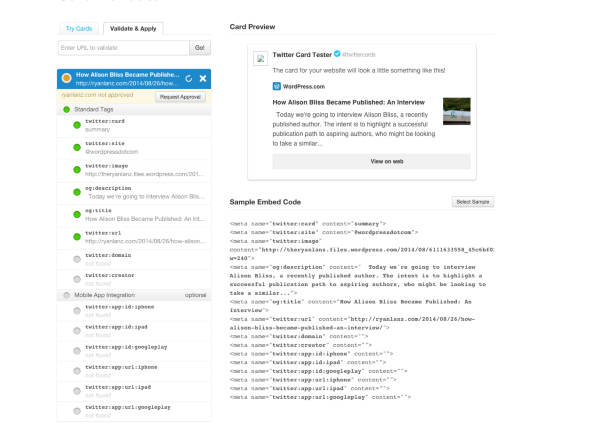
Basically, the info there is saying “You have the right markup on your site, but your site hasn’t been approved for summary cards”. If you click “Request Approval” there and fill out the form, Twitter cards will appear for your tweets.
I actually didn’t know this process was required either for Twitter cards. I just went through it this morning, and my site was approved pretty quickly. When I published this tweet, I didn’t have Twitter cards. That changed within 30 minutes:
-
Jeremey,
I see your point. I didn’t intend offense that you didn’t know what you were talking about. I just wasn’t feeling clear on whether the card would change for different blog posts.
It looks good. I’ll probably shoot for it.
My last question is, will it still prominently say “WordPress” across the middle of the summary card, or is that just there because you created the demo?
I only ask because now with my own domain, I wanted some slight association distance from the free version of wordpress.
Thank you.
-
From what I’ve seen, it shouldn’t have the WordPress.com wording across the middle of the card. I’ve looked at several WordPress.com sites that have this setup, and I couldn’t find the wording on theirs. Please let me know if you experience something different!
-
-
Not a problem! Please do let me know if this doesn’t work.
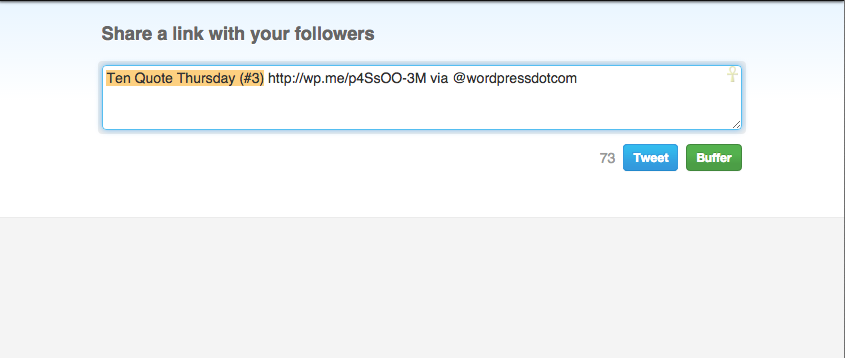
Also, one other thing I wanted to mention. Can you set your Twitter username on your Sharing settings here (Specifically, under the setting for “Twitter username to include in tweets when people share using the Twitter button.”)?
https://theryanlanz.wordpress.com/wp-admin/options-general.php?page=sharing
This way, when someone clicks the sharing button for Twitter from your site, your username will display instead of @wordpressdotcom as shown in this example from your latest post:
-
Wow thanks. I dont think I would have spotted that otherwise. I think I found it? Does it show that I have?
Also, is there anything else you suggest I do or turn on?
-
Yep! That looks great now. Here’s what I see when I try to tweet one of your posts:
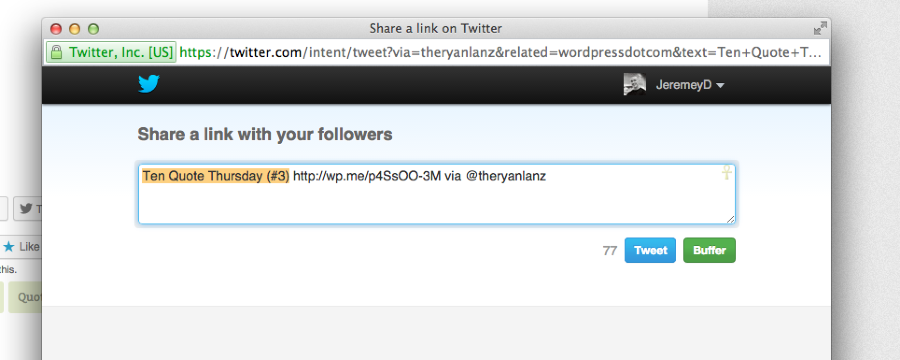
That was the only main thing I noticed!


- The topic ‘With my own domain, it no longer shows a summary in a tweet.’ is closed to new replies.
 WordPress.com Forums