

Word Press Cities is a nightmare
-
So I go to the WordPress.com/cities in order to try and build a demo site for my local government, and there’s all this great stuff about how they have this prepackaged template with all the standard features that most municipal websites use, and when you sign-up and get your site, its a blog! The features they talked about are nowhere to be seen! Nowhere to be found. I have followed the directions and tried this 4 times now and all I have for my efforts is four useless blogs. This is SOOOOOOOO frustrating. And I’ve setup WordPress sites before. Just extremely poor work.
If anyone can give me any help as to how I can actually get one of these municipal templates, I would appreciate it.The blog I need help with is: (visible only to logged in users)
-
I believe you are referring to this http://wordpress.com/cities/ I’ll tag this thread for Staff assistance because I do not know how to help you. Another Volunteer may answer prior to Staff but I tagged the thread so it will not fall through the cracks and escape attention. Please subscribe to the thread so you are notified when they respond and please be patient while waiting.
I also believe you have a basic misunderstanding about templates ie. themes, websites and blogs.
… prepackaged template with all the standard features that most municipal websites use, and when you sign-up and get your site, its a blog!
A blog is a website. This is all semantics and blog structure. A blog is a post based website designed for interactive communication. As the posts are frequently updated and appear on the front page of the site it’s very attractive to search engines.
What most people call a website is merely a page based site that functions as a one way noticeboard. As the structure is page based and as pages are for static content that rarely changes, and as pages do not have RSS feeds it is not as attractive to search engines as a post based blog structured site is. When it also has a static front page that compels visitors to click through a static front page every time they visit the site then the blogger has made a traffic killing choice.
Any WordPress blog can be restructured from being post based to being page based – no upgrade required. For greater clarity read >
http://en.support.wordpress.com/using-wordpress-to-create-a-websiteThe only themes we can use on free hosted WordPress.com blogs are found here http://wordpress.com/themes/
On one hand, none of the characteristic “blog” features like categories, tags, authors, dates, etc. can be removed from a free hosted WordPress.com blog, without purchasing an annually renewable custom design upgrade and doing the required CSS editing.
http://en.support.wordpress.com/custom-design/
http://en.support.wordpress.com/custom-design/#frequently-asked-questions
http://en.support.wordpress.com/custom-design/editing-css/On the other hand, one can edit a WordPress.org theme free of charge. Read the comparison > WordPress.com and WordPress.org: The Differences http://support.wordpress.com/com-vs-org/
-
Thanks Timethief, for your response. So you know, I have worked with WordPress and am aware that blogs and websites are the same thing and that WordPress templates are editable. But my point is that on the WordPress/Cities site, they say this:
Easy SetupWhen you signup, we automatically fill your site with the pages a city typically needs, like Property Taxes and Parks & Recreation. You just fill in the blanks.
Yet when you go through the setup wizard, nothing like this populates your newly created site, nor is there anything in the available templates that is even remotely similar to a municipal site! Don’t tell me you have this great preconfigured website for municipalities and then just give me a generic blog and expect me to fundamentally reconfigure it. That’s blatant incompetence or lying. This (http://en.wordpress.com/cities/) is an abandoned, orphaned page. I would love to use it and even perhaps purchase a template but it amazes me that this is a complete dead-end. It makes me seriously question the professionalism of WordPress.
-
-
@mdl1958
akash0517 is a spammer that has been reported to Staff.As for your issue, I’ll tag this thread for Staff assistance because I do not know how to help you. Another Volunteer may answer prior to Staff but I tagged the thread so it will not fall through the cracks and escape attention. Please subscribe to the thread so you are notified when they respond and please be patient while waiting.
-
Have I been forgotten? Is there nobody who can help me navigate the obtuseness of WordPress/cities?
-
Hi there,
Sorry for the delay! After looking into your account, I found that WordPress.com Cities is working as it should. I looked into Pages in your Dashboard and found that there were pre-made pages. I also created a test WordPress.com cities blog and found that I got the same as seen here:
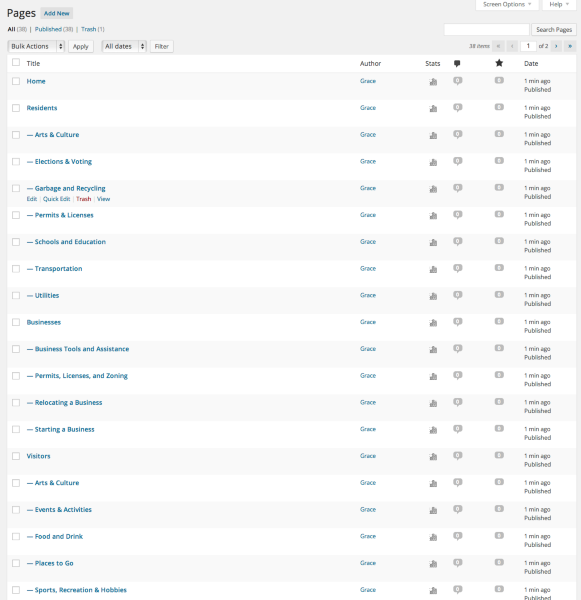
Please note the pages are empty, we just add the titles. This allows you to customize the pages as you wish.
Can you please tell me exactly what you would like to do? That would help me troubleshoot some of the issues you are having.
Thank you!
-
Gracejiyoung,
Thanks for getting back to me. I looked at the link you sent, and I have made 4 or 5 sites using Cities and NONE of the sites looks anything like your link. They are just standard blog sites.
Thanks again for getting back to me. Any ideas? -
What, specifically, would you like the website to do and to look like? Have you read this:
http://en.support.wordpress.com/how-to-make-a-government-website/
http://en.support.wordpress.com/using-wordpress-to-create-a-website/ -
What I provided you was the Pages page in the Dashboard. I found that it’s the same as your Pages of both your site here:
https://bridgetontwp.wordpress.com/wp-admin/edit.php?post_type=page
They are standard blog sites, but we created these pages for you to fill in. Once you start publishing those pages, it should end up looking similar to what you saw on the Cities page. So on that page I took a part each element to help you start customizing your site:
Easy Setup
When you signup, we automatically fill your site with the pages a city typically needs, like Property Taxes and Parks & Recreation. You just fill in the blanks.If you go into your Pages page in your Dashboard (the link I gave you above) you see that the Page titles have been pre-written for you. Please note the content of the pages is empty. That we leave up to you.
Simple Sharing
Automatically share city news on Facebook, Twitter, Tumblr, and Yahoo! with one clickAs for sharing, you can set that up by going to Settings > Sharing in your Dashboard. There you can connect any social media accounts you have using Publicize and also add sharing buttons to all your posts/pages. Here’s more information on getting that set up:
Event Calendar
Display a list of upcoming community events, pulled from a Google Calendar feed.Here’s a link on embedding a Google Calendar if you have one:
Budget Friendly
We take care of all of the hosting and maintenance, so you can focus on communicating with your constituents — no IT staff needed.So, hosting is free on WordPress.com. All you need to do is create your own content – such as pages, posts, etc.
Streamlined Communications
Let anyone subscribe to your city’s announcements and regularly receive e-mail updates — it’s the 21st-century phone tree.I would recommend adding the Follow Blog widget. This allows readers to subscribe to your site, so whenever you make a new post, all your subscribers will receive an email notification about it. Instead of Follow Blog you can change the title to whatever you want, such as: Subscribe to XXXXX’s Announcements.
Photo and Video
Easily create stunning galleries showcasing your city and city events.You can add photos to any post and page and put them into galleries using this link:
http://en.support.wordpress.com/images/gallery/
As for things like custom domains, adding videos, customizing your site with custom fonts/colors and edit CSS, you will need certain upgrades. We have a WordPress.com Premium upgrade that bundles all those upgrades into one for $99/year. If that’s not what you are looking for you can still customize your site as mentioned in the WordPress.com Cities page.
You mentioned your had 4 or 5 other Cities pages. Could you please specify exactly what it is that you wanted? Was it a certain page or a certain feature that is not showing up on your current site?
If there are other things you would like to do, please let me know and I’d be happy to see what we can do!
-
Ah ha! Well, thank-you for unraveling that. I apologize for my frantic exclamations, but this was both important, time-sensitive and VERY frustrating.
Frankly, though, the way it is portrayed on the Sites for Cities leads one to expect to see a homepage like what is presented in the slideshow under the Plenty of Design Options heading. There is no explanation that you will be presented with a regular blog template that you have to go to Pages in Dashboard to get the advertised look. I think you should seriously consider making some changes in the website to make it clearer for people coming to it. Most will have less experience than I do, and will probably just give up.
That said, thank-you for getting to me and responding to my pleas and frustrations. I’m thrilled to get this cleared up and am very excited about what this can do for my municipality.
I do have a couple questions, which maybe you can help me with. We presently have a half-built, hand-coded website, whose URL we would want to retain. It is hosted at Network Solutions, from which we purchased the domain. What are my options as I build this site, in terms of it’s final publication? How would I retain my present domain name but still use what I create on WordPress/Cities? Am I able to download the site and move it to our present host? Conversely, is there some way I can change the domain name on my WordPress site to our present URL (bridgetontwp.org)?
If you can answer those, that will allow me to go forward with a clear path to getting this built and published.
Tank-you very much for your patience and help! -
Hi there,
I’m glad I was able to clear it up for you. I’m so sorry for the confusion. I’ll take this suggestion back to our team to hopefully clear this up for future users. I can completely understand why the confusion took place.
As for these questions:
We presently have a half-built, hand-coded website, whose URL we would want to retain. It is hosted at Network Solutions, from which we purchased the domain. What are my options as I build this site, in terms of it’s final publication? How would I retain my present domain name but still use what I create on WordPress/Cities? Am I able to download the site and move it to our present host? Conversely, is there some way I can change the domain name on my WordPress site to our present URL (bridgetontwp.org)?
So I’ll first start with the domain: bridgetontwp.org. You can absolutely use this domain and point it to your WordPress.com site: bridgetontwp.wordpress.com with the Domain Mapping upgrade ($13/year).
Please note that domains are sort of like mailing addresses. They have absolutely nothing to do with the actual content of the site – it’s just the address of which content can be found. So, you can move this domain to point to and site content you want.
Therefore, by adding the domain mapping upgrade you will be pointing your own domain: bridgetontwp.org to your WordPress.com site: bridgetontwp.wordpress.com. This will allow readers to view your site at bridgetontwp.org and even if they were to somehow go to bridgetontwp.wordpress.com they would be automatically redirected to bridgetontwp.org. Please note that adding domain mapping would also mean that you would have to change the nameservers at your registrar. Please go to Network Solutions and ask them to change the nameservers to:
- NS1.WORDPRESS.COM
- NS2.WORDPRESS.COM
- NS3.WORDPRESS.COM
Please note once this is done your previous site will no longer be found at that URL. When you add the domain mapping upgrade your WordPress.com site will be viewable at the domain usually within a few hours. So you can wait until your WordPress.com site is complete before you change the domain.
As for downloading your current site and importing it to WordPress.com, it would be difficult, and most likely I don’t think it would be possible. I took a look at the site, and I think it would be best to recreate your site on WordPress.com using our Posts and Pages and Menu features. It wouldn’t take very long to re-create what you have on your current site on WordPress.com.
Here are support guides that will help you create your site.
Difference between posts and pages:
Here’s a support guide for creating a custom menu:
If you get stuck, please reach out and I’d be happy to help!
-
Thanks again! And you, too, raincoaster! One quick question: I want to have a Calendar page. It looks like to me that I really can’t do that with this Free version, that I need to upgrade so I can install a plug-in. Is that correct? I need a page to show municipal meetings, events, etc..
Also, while I’m here, I want to have forms, like building permits, etc, instead of just downloadable PDFs. Can I do that on WordPress?
Thanks again for your help! -
Hi there,
I provided you to a link to embedding a Google Calendar here:
Please create your Google Calendar and you can embed it using the guide above for free.
As for the forms, that wouldn’t be possible on WordPress.com. It would be best to add the PDFs instead.
Please note that it is not possible to install plugins on WordPress.com, for security reasons. Plugins can only be installed on self-hosted WordPress blogs. If you are wondering how WordPress.com differs from WordPress.org, this support article explains the distinction:


- The topic ‘Word Press Cities is a nightmare’ is closed to new replies.


 WordPress.com Forums