word-wrap: break-word no longer working with updated Google Chrome browser
-
Hi.
I have just noticed that word-wrap: break-word appears to no longer be working with the latest update of Google Chrome.
Links here seem to support this theory:
https://productforums.google.com/forum/#!topic/chrome/mBjDYhWb-FU
http://googlechromereleases.blogspot.co.uk/2016/03/stable-channel-update.htmlThis is a huge problem for me, as my site makes heavy use of this feature. Without it, the vast majority of the key points made at my site are rendered unintelligible by virtue of their being extended off the edge of the page, as opposed to being wrapped, as previously.
The issue does not occur in IE, though has always been present in Firefox. However, I (perhaps naively) assumed that I could cope with my site being unviewable in just one browser (Firefox). Now that this also applies to Chrome, however, I simply cannot allow the issue to go unresolved.
Can somebody please let me know of a fix to this issue? Also, assuming that there is a fix, how am I to apply it to the entire collection of historical posts I have so far made on my site? Will bulk editing (find and replace of certain code) within each individual post be the only option? Or is there some way that this can be applied across all posts so that such a time-consuming task is not necessary?
Regards
The blog I need help with is: (visible only to logged in users)
-
Hi there, after doing some research, it appears that this is a known bug in Chrome and it has been logged. I tried a few CSS tweaks, but nothing has worked, so it will have to wait for the Chrome dev team to fix it.
There is not global find and replace in the WordPress system, and bulk edit does not have that sort of functionality either.
I looked through a few of your pages/posts and don’t see any word break or word wrap code in the ones I checked. If you can point me place in a page or post, I can look again and see if I can get something to work, but given the nature of the issue you may just have to wait on Chrome devs to fix the issue.
-
Hi and thanks a lot for your replying.
I take it then that this was not an intended change by the Google team?
Actually, that code appears dozens of times in each of my posts. For example, here:
http://excelxor.com/2016/03/07/molecular-weights/
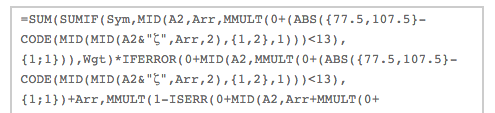
in which any of the formulas within grey boxes have this code applied to them. The first such in that post does not actually require wrapping, as you can see, though the second clearly does (and is now undesirably extending off the page, rendering it unreadable).
If it turns out that Google revert the latest issue of Chrome such that this is no longer an issue, then great. But how long might that take, in your opinion?
Also, I probably should fix this issue in any case, since it is (and always has been) an issue for any readers who attempt to view my site using Firefox (by some naive reasoning I assumed that they would be so few that I could avoid resolving the issue).
Indeed, I have received several complaints in the past to this effect from readers using that browser. One of them was kind enough to suggest an improvement, i.e. to use:
<pre style=”white-space: pre-wrap;”>Your Code Here
which did indeed resolve the word-wrap issue in Firefox, though rendered the alignment of the resulting text not as I would wish.
Many thanks and regards
-
I take it then that this was not an intended change by the Google team?
Given Google has always been near the forefront on standards support, I would doubt this was intentional, but then again, who knows the mind of Google? :)
I’ve looked at your post, and don’t see anything that I could add to your code to make things work in Chrome. Unfortunately, we are going to have to wait for the Chrome Developers to fix this.
-
Hit the reply button too quickly. Take a look at this support page on Posting Source Code and then perhaps try it in a draft post and see if it might work for you.
-
Thanks, but that appears to simply result in one long, unwrapped line with a horizontal scrollbar. What’s more, the contents of that line include all my original code, which is obviously undesirable.
I appreciate your help, though I’m not sure I’ve managed to convey just how serious an issue this is for my blog. At the moment, this change means that my posts are, for all intents and purposes, completely unreadable. It’s these very parts which are left unwrapped which are the crucial points of my posts; without them, a post simply does not make sense.
The only reason I asked whether Google had made this change intentionally was because Firefox also has this property of not being compatible with word-wrap: break-word. And I assume that Firefox must have their own, valid reasons for that.
Anyway, I’ll continue to research possible workarounds. Thanks for your time.
Regards
-
You may want to take a look at this, which I found by Googling for css word-break cross browser: http://snipplr.com/view/10979/css-cross-browser-word-wrap/ . Another worth a look would be this one: https://gist.github.com/argyleink/5463021
I wish I could offer a fix for Chrome, but I’m afraid this is on them and we’ll just have to wait for them to fix it. The stuff at the above link should cover all browsers, and you may want to incorporate it all into your inline styling to make sure everything is covered. Sadly, this is one of those cases where all browsers do not support the CSS3 standards and have their own implementations or requirements. Hopefully one day, they the -webkit, -moz, -o, -ms will be a think of the past.
-
I’m digging around and trying some things on this. Can you tell me which of these breaks as it should?
Firefox screenshot
Chrome screenshotI checked in Safari as well, and it matches what is showing for the Chrome screenshot.
-
Hi.
Thanks for the continued interest. Of the two samples you posted, neither is precisely as I would want, since the text is not justified. Previously I was able to have the ideal situation of having word-wrapping AND justified text within the pre-tags.
It appears that, with word-wrap: break-word no longer available in Chrome, I will have to settle for a set-up in which text is wrapped, though not justified. In fact, I have already implemented this across all my blog posts and comments at the weekend (which took many hours!), since, although it is not what I want, I simply had to get something in place so as not to risk losing readers. I achieved this by adding:
white-space:pre-wrap;
to my existing code.
However, I have not yet looked at either of the linked suggestions you posted, which I will do now.
Many thanks.
-
Yes – neither of those suggestions gives me quite what I want in Chrome. If I don’t include:
white-space:pre-wrap
then no wrapping is achieved.
However, including the above means that I no longer appear to be able to justify the text, as I was previously using simply:
word-wrap: break-word
Regards
-
I’ve not checked this out, but when thinking about it, I don’t know that full justification can be applied to text with a pre element (text-align: justify;) since the very nature of the pre tag is to preserve the spaces/tabs/etc., that was in the original text when inserted into the pre, and justify would mean spacing would not be preserved.
-
Perhaps “justified” is not the correct term, then. In any case, for an example of what I cannot seem to avoid now, see the very foot of this post:
https://excelxor.com/2016/02/16/criteria-with-statistical-functions-growth-linest-logest-trend/
The text in the box immediately after the text “As such, we might construct something like:” was “justified” previously, in the sense that the portion:
{1,1}*ROW…
was on the top line, i.e. the comma after the “X” did not cause the text to break onto the next line.
In fact, previously, text in these boxes would always fill to the very end of a line prior to beginning a new one.
Does that help explain what I mean by “justified”?
Regards
-
The software does its best to break things, and the main thing it looks for is spaces in a line of text, or something like a comma and will break after those. Since after the comma, there is this
{1,1}*ROW(B2:B11)))))),...it does’t find a logical place to break things, so it pushes it to the next line. If there was a space between {1,1} and * it very likely would have broken there.The web still has a great many limitations. I wish I had some idea of how to fix this for you, but with the HTML pre tag, I think this is just something you are going to have to live with.
I’m actually quite impressed with the development and changes that have happened, and are happening with HTML5 and CSS3. We have capabilities now that many probably never dreamed of, but we still have some limitations. It could well be that there will be another look at the pre standard give there is discussion going on in the Chrome and Firefox development forums, and it could be that this will be changed at some point. I would suggest adding your voice to those threads. The more people that voice on this issue the more likely it is that something will get done about it.
-
Many thanks. I think I’m beginning to understand. However, if you could just answer one final question I’d be very grateful.
And that is: why was I able to previously override this property of “breaking things”? Why did word-wrap: break-word give me precisely what I wanted up until a few weeks ago? In fact, why didn’t the break-word part do exactly as you describe, i.e. look for spaces, commas, etc. and break the text there?
It seems rather that it is the white-space: pre-wrap line which I have now had to include which follows the behaviour you describe, though I imagine I’m simply not understanding things here.
Many thanks again.
-
You know, it is all up to the standards and the CSS interpreter as to where they break things and how. Commas are higher up on the list, as are spaces. If they find no comma or space, then they keep going down the list until they find a place to break things. I’ve yet to find any list that gives the hierarchical order on the different characters/punctuation/letters/letter pairs.


- The topic ‘word-wrap: break-word no longer working with updated Google Chrome browser’ is closed to new replies.
 WordPress.com Forums