

wordpress
-
-
How do i do that? i hit the create a free site button but it goes to the pick a domain screen soon after and does not allow me to try word press to see if i like it?
I want a sandbox where i can test the features h=out and see if it has what i need?
Go central, wix and shopify do not.
Ed Hayden
-
There has to be a way to evaluate the product without buying and publishing to a new domain i don’t want???
-
Hi there,
If you’re ok with not using your own domain then a subdomain is provided with the free plan on WordPress.com so you can create a free site and test it out. Other than that as mentioned above you would have to transfer your domain over to WordPress or use domain mapping and I believe for both of those you will need a paid plan.
For testing purposes I would suggest using the subdomain WordPress provides in their free plan and trying it out that way.
-
Hi there,
To add to what @gwensmithx mentioned, you can also check out WordPress.org (self-hosted) WordPress which can be installed on a localhost. You’ll find the difference between WordPess.com and WordPress.com here:https://en.support.wordpress.com/com-vs-org/
This forum is where we provide support for WordPress.com sites. Support for self-hosted sites is available on the WordPress.org forums:
https://wordpress.org/support/forums/
You’ll need a free WordPress.org account to post and if you don’t already have one, you can register here:
-
I’m sorry if i’m being thick here but i clicked on start a free website, and it still brings me to step 2 which i have to buy a domain i don’t want….
here is the url i’m at,
https://wordpress.com/start/domains
how do i get past this point?
-
also i tried installing WordPress at wordpress.org. but there is not exe file and i dont know how to deal with the PHP file it has. i opened it and it looks like just code not a file the runs?
-
Hi there,
Once you are on the “Give your site an address” page, look for the domain name with “FREE” right next to the select button. It should be right under the 2 featured domains. The free domain looks like xxxxxx.wordpress.com with xxxxxx being the domain you want to use.
-
yeah, that’s not an option and i don’t see how to restart. every time I hit the MY Site button on the top left hand corner it always brings me back to a bunch of options that done include xxxxx.wordpress.com
All options say “included in paid plans”……
-
Hmmm… I am not able to replicate it. No matter what I tried, I always see a free domain option. Two things I would try 1) clear your browser cache and try again or 2) try using a different browser
-
Hi there,
On the Choose a domain step, are you typing in a full domain or only a key word? If you type in a full domain, like example.com, you won’t see the option for a free address in the suggestions. To see free address options, search only for the key word, e.g. “example”.
-
wow this is really frustrating. i just typed in the word “word” and it still only offeres paid domain name options for me to choose from. i tried signing in with another browser with no data cached and it sends me a link to log in. when i press the link it does do anything. it doesn’t open a browser up nothing i Ctrl click and that doesn’t open either? what gives Basically there is no way to log in in another browser now
????That it insult to injury?
anyone tell me how to get the verification email to work or how to get it to show an url so i can cut and paste so i can try logging in with another browser????
-
here is a cut and paste form the email with a link that doesn’t work
Hello! Here’s the link you requested from WordPress.com.
Log in to WordPress.com
For extra security, the link can only be used one time and expires in one hour.
If you didn’t request a login link, you can just delete this email.the words “log on to wordpress.com” are shaded in blue and are a hyperlink that does not do anything….
frustration after frustration just getting to ground zero and i guess no company supplied customer support?
-
i just typed in the word “word” and it still only offeres paid domain name options for me to choose from.
Here is what I see when I create a new site and search for a key word on the domains step. See the free domain highlighted:
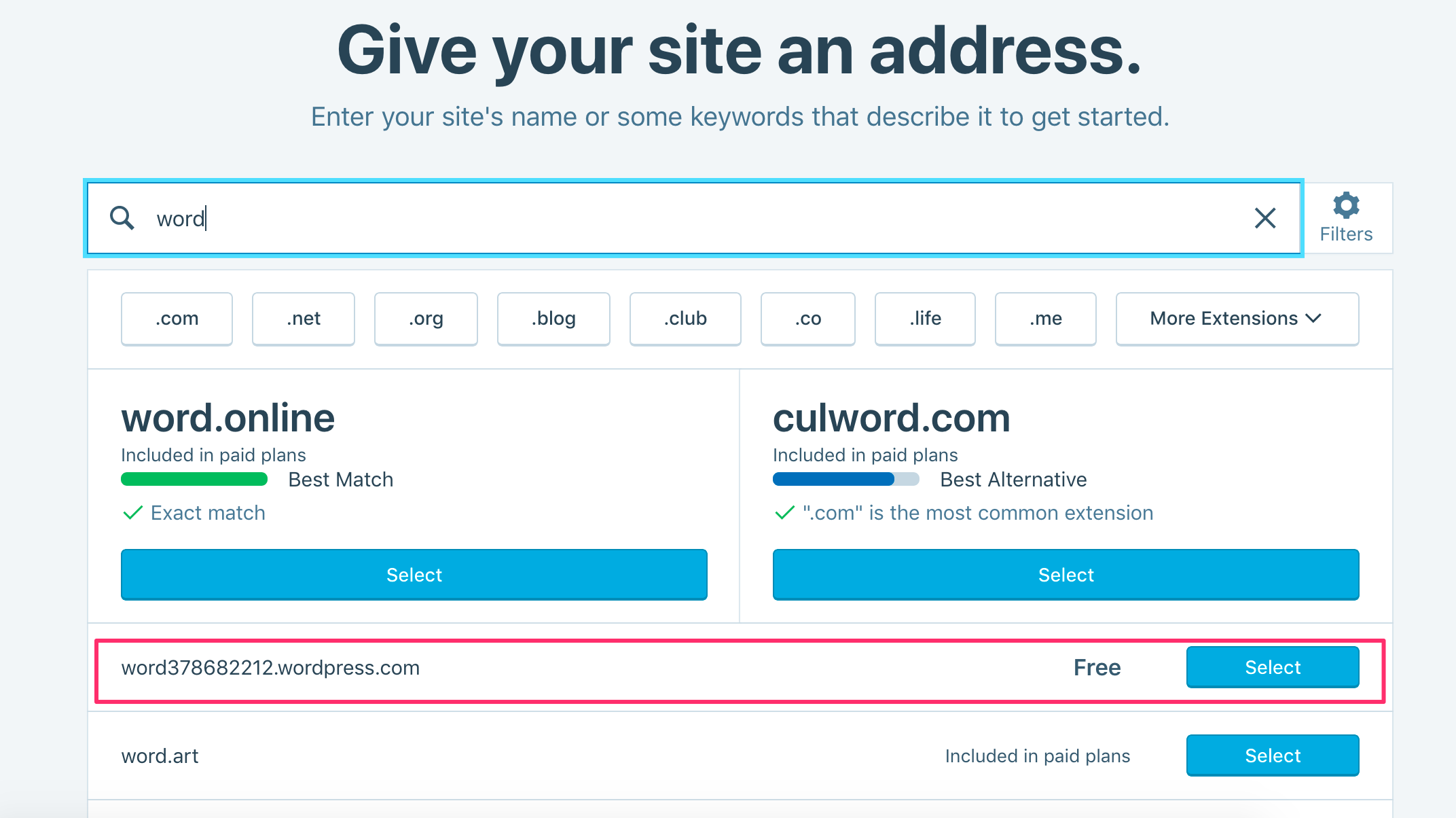
If that’s not what you see, can you please take a screen shot on your end upload it to a site like snag.gy, then paste the URL here so I can see it?
i tried signing in with another browser with no data cached and it sends me a link to log in. when i press the link it does do anything. it doesn’t open a browser up nothing i Ctrl click and that doesn’t open either?
In what browser is this? Do you have any browser extensions running in that browser?
If you want the option to log in without using a link, go to https://wordpress.com/me/security/ and set a password for your account. Then you’ll be able to log in directly using your username/email and password instead.
-
here is a screen shot showing no free options. https://snag.gy/qhlamc.jpg
I tried using edge and I tried using chrome, it doesn’t matter what browser though because the hyperlink in outlook doesn’t open any browser. its the hyperlink that’s not working to log me in. -
hey,, thanks, your changing the password idea worked. no it lets me log in and now the free site option shows up!
-
Excellent! Thanks for letting me know.
Thanks for the screen shot as well, as it does actually contain a clue. See that grey box under the two recommended domains? That’s the free address. That grey box means something was preventing that line from loading properly. So the option was there, but it was not working as it should.
I’ll keep an eye out for similar reports from other people, in case this is a bug somewhere.


- The topic ‘wordpress’ is closed to new replies.
 WordPress.com Forums
