

WordPress android App
-
Alslamu Alikum.. When i paste text from Google docs into WordPress android app’s text editor it is pasted plain without any formatting even though when i paste the same text into WordPress web’s text editor using Chrome it’s pasted correctly with all the formatting applied to it which is really frustrating because using the visual editor through Chrome on my mobile phone can be a bit heavy and not easy to deal with unlike the mobile App, so how can i fix it?
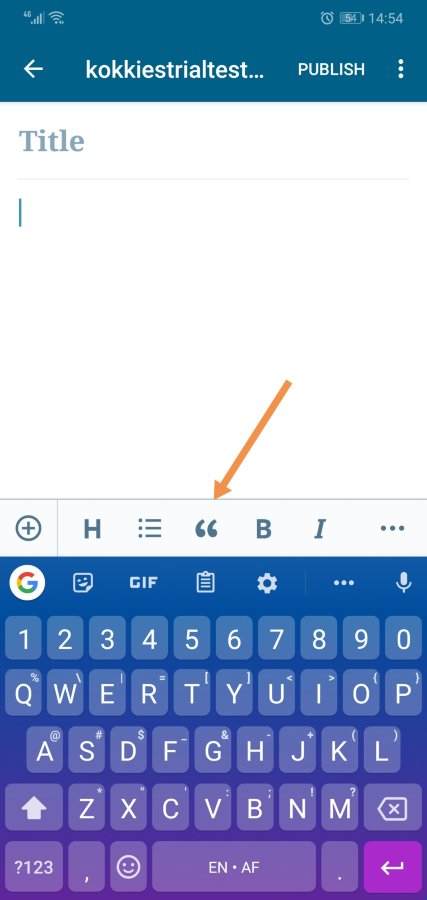
The second issue is that i can’t find the (Quote) button in the text editor in the mobile app so where is it?
I appreciate your help and thanks in advance. Have a pleasant day en shaa Allah.
The blog I need help with is: (visible only to logged in users)
-
Hi there,
I’m not able to replicate what you’re describing. If I paste content from a Google doc into the Android app, all formatting is preserved for me.
What version of the Android app are you using?
Make sure that when you’re pasting, you’re tapping the
Pasteoption, and not thePaste as plain textoption. The second option is an Android option, not part of the app, and is designed to strip out all formatting.The second issue is that i can’t find the (Quote) button in the text editor in the mobile app so where is it?
I see the button on my end:
-
Alslamu Alikum.. Thank you for taking the time to look into my questions, i really appreciate it.
My WordPress app’s version is 12.9 and my android version is 5.0.2 and my phone is HTC Desire 820s dual sim.
I’m not sure how to turn off pasting plain text option yet as you mentioned i tape the editors space and when i see the paste bar on top if my screen i press the pasting button same as i do in chrome yet the result still the same, a plain text. So how can i turn off the plain text option?
And thank you for the tip about “Quote” button, i was experimenting when i realized that i was using the block editor while it can be easier to use the classic editor which makes it visible on the toolbar and it enables me to select multiple passages and turn them into quotes right away like in the desktop version which i had a hard time doing using block editor on the app which could be easily done through the block editor on the desktop version.
One thing i can’t also find in block editor in the Android app is to locate the “block option” which could be used to change the background of the text, the text color and size in paragraph block while it’s available on Android web version through chrome. How can i get to this option through Android app?
I know that the description of my problem seems a bit confusing so thank you for bearing with me on that.
Have a pleasant day ahead en shaa Allah.. :)
-
Also i can’t find the other available block types in my block editor in the android app such as creating a button for instance. I have 9 block types available which are the everyday use so to speak but the other types are not to be found there under the (+) button. Were can i find them?
-
@modatherabozaid not all blocks are available in Android yet — that’s still a work in progress.
About pasting from Google Docs, I’m actually seeing something similar here. But I checked the code, and the formatting is there, just not displaying. If you preview do you see the formatting there?
-
Also, I just realized I wasn’t on block editor on that site. With the block editor, when I paste some formatted text, it really does paste as plain text for me, too. I’ll chat with @kokkieh to test a bit on our side… maybe he’s got a setting enabled that I don’t have, for example. We’ll follow up with you soon.
-
Alslamu Alikum @supernovia
Honestly i haven’t thought about checking the preview since i couldn’t see the formatting yet surprisingly when i did paste it in the classic editor the preview showed the original formatting my text had in Google doc even though it’s still not visible in the editor itself.I tried it as well using the block editor yet the results were not the same as the text was plain as you mentioned in both the editor and the preview.
Thank you for explaining why i can’t see other block types in the android app. I really appreciate.
Yet there are two more issues i’m experiencing while using the android app which is:
1- With large text (this one i’m working on is approximately 11 pages long) while switching between classic and block editor the app seems to struggle with it for maybe 10-15 seconds.
And when it finally opened the classic editor i tried to continue editing yet unfortunately it kept lagging so much so i would type and the words would appear on screen maybe 6-10 seconds later and sometimes longer even though it didn’t lag at all when i switched back to the block editor and it worked smoothly.2- When i managed to finally highlight a passage and then applied (Quote) formatting to it in the classic editor then switch back to the block editor i found the passage plain without the quote formatting and before and after it a bluish box saying something to the extent that the format isn’t correct or compatible or something of that sort.
3- After a while of editing using the block editor it starts to lag when i scroll up in the text editor and keeps jumping to random places along the text instead of scrolling up normally yet when i scroll down it scrolls perfectly fine.
4- I can’t highlight two passages in the text using the block editor if each passage is in a different block (meaning i can’t highlight 2 paragraphs in two blocks at at all)
5- I can’t convert a paragraph block to a quote block which sometimes i would need to do if i decided later on that a certain text is better be in a quote format instead of a regular paragraph, and by adding a new (quote) block then cut and paste the text i lose all the formatting the text had even though it was done in the android app not Google doc.
These are the issues i’m dealing with so far using the Android app and hopefully you would help me work around them somehow en shaa Allah.
Thank you for your patience and for your time going through my post. Have a pleasant day ahead en shaa Allah.
-
My WordPress app’s version is 12.9 and my android version is 5.0.2
I’m not sure how to turn off pasting plain text option yet as you mentioned
I actually think your Android version might be the problem here. Android 5 dates from 2014, and the “paste as plain text” option has only existed since Android 8, at which point we added support for it in the mobile app. So you won’t see that option when you try to paste.
What type of formatting exactly are not pasting as expected? And are you pasting into the block editor or the classic editor in the app?
1- With large text (this one i’m working on is approximately 11 pages long) while switching between classic and block editor the app seems to struggle with it for maybe 10-15 seconds.
It looks like this is a known issue, being investigated in https://github.com/wordpress-mobile/gutenberg-mobile/issues/714
2- When i managed to finally highlight a passage and then applied (Quote) formatting to it in the classic editor then switch back to the block editor i found the passage plain without the quote formatting and before and after it a bluish box saying something to the extent that the format isn’t correct or compatible or something of that sort.
The two editors use different kinds of markup for formatting, and content created in the classic editor should appear in a classic block if/when you switch. So a blockquote should still appear as a regular blockquote in the classic block. It’s not supposed to be automatically converted to a blockquote block.
If you switch to the HTML view after switching to the classic editor, do you still see blockquote HTML tags around the content?
3- After a while of editing using the block editor it starts to lag when i scroll up in the text editor and keeps jumping to random places along the text instead of scrolling up normally yet when i scroll down it scrolls perfectly fine.
Can you give a link to a specific post where you’ve seen this in the editor? I want to check how much content and what type of blocks you’re using to try and replicate this on a test site.
4- I can’t highlight two passages in the text using the block editor if each passage is in a different block (meaning i can’t highlight 2 paragraphs in two blocks at at all)
I can replicate this. Reported to our developers in https://github.com/wordpress-mobile/gutenberg-mobile/issues/1287
5- I can’t convert a paragraph block to a quote block
It does not look like the ability to convert blocks is available in the app block editor yet. If you need to do that, please use the web editor instead. You should still be able to do this on your mobile device – just use the mobile browser to edit the post instead of the WordPress app.
-
What type of formatting exactly are not pasting as expected? And are you pasting into the block editor or the classic editor in the app?
Thank you for explaining it to me.
The formattings are:
– bold.
– italic.
– numbered and un-numbered lists.
– quotes.
– hyperlinks.
– Footnotes.And i’m pasting it to the block editor. Now i’m working around it by posting it through the mobile web version 1st then start to edit the text through the app which makes it a bit overwhelming because i have to toggle between 3 different apps back and forth while edit my text and posting it.
Basically it’s the formatting used in Qoura because i’m copying my Qoura’s blog to my website.
Which reminds me that sometimes i have the same problem with Qoura’s app or website if that would help assess the problem somehow.If you switch to the HTML view after switching to the classic editor, do you still see blockquote HTML tags around the content?
Yes i find it but it is empty and on top of the text which would have a paragraph code at that point.
In the visual mode the boxes before and after the text says (unsupported) with electronic outlet icon.On the other hand now i experimented a little and i found that if i wrote the text in the WordPress app directly instead of pasting it and did the same thing switching to the classic editor, converted the text to quote and switched back to the block editor the quoted text show in a blue box, and i see the block code around it in html mode yet when i preview it i view mode i find it plain text with a regular paragraph style and the quote format is lost. The only difference is that it’s a bit indented to the right than the regular paragraph.
Can you give a link to a specific post where you’ve seen this in the editor?
Of course. I finally managed to post my post yesterday and now you can find it through here en shaa Allah:
Post– I can replicate this. Reported to our developers in https://github.com/wordpress-mobile/gutenberg-mobile/issues/1287
Thank you.
use the mobile browser to edit the post instead of the WordPress app.
Yes i do so.
Thank you for your help and for everything you guys do to making it easier for us to build our websites. I really appreciate it. Have a pleasant day ahead en shaa Allah.
-
I found a report about pasting formats. Looks like they’re working on some fixes for that. I’d imagine that could especially apply to things copied and pasted from some other site, as their formatting methods might be non-standard. Thank you for the report.
Regarding switching back and forth a lot between block and classic, while we can use this for troubleshooting, it’s possible to lose some styles in the process, mainly because blocks can do some things that the classic editor can’t. And, the block editor might not be able to parse all possible html you add. So generally I recommend against it. If you’re running into an issue where you need to convert from block to html and back again, let us know the post link and what you’re trying to do.
-
I found a report about pasting formats. Looks like they’re working on some fixes for that. I’d imagine that could especially apply to things copied and pasted from some other site, as their formatting methods might be non-standard. Thank you for the report.
That’s really good to hear @supernovia thank you for the heads-up. Hopefully they manage to fix it soon en shaa Allah.
For me i find no issues when i copy text from other websites and paste it in the block editor’s mobile version through Chrome or the android app. And also when i copy text from my WordPress website to a Ms word file except losing space between few words here and there that’s all Alhamdu llah.I Kinda found a temporary solution around it by pasting the text i’m copying from Ms word or Google doc to into the mobile web version of the block editor 1st using Chrome then save it as a draft then move to continue editing it through the app or maybe edit it using Chrome if it’s just a simple edit.
Regarding switching back and forth a lot between block and classic, while we can use this for troubleshooting, it’s possible to lose some styles in the process, mainly because blocks can do some things that the classic editor can’t. And, the block editor might not be able to parse all possible html you add. So generally I recommend against it. If you’re running into an issue where you need to convert from block to html and back again, let us know the post link and what you’re trying to do.
Honestly i don’t know how to use html or to make changes in it. The reason why i would need to switch between the classic and block editor right now is to be able to highlight more text in more than one block and delete it or move it along the post or even copying it to another place in the post without having to move a block at a time which can be a painful process specially if we are talking about moving more than one block before/after many blocks or deleting them for instance which can’t be done also through mobile web version.
This is really important from a user’s experience point because while i really like the visibility of the delete and moving block buttons in the app there is no question about how important it is to be able to use them on multiple blocks at the same time.
Maybe if i press and hold a certain block i would get the option to select multiple blocks as well before deleting/copy or move the one i’m currently holding.As for converting a block for another type, i kinda found my way around it as well Alhamdu llah by creating a new block above the one i want to convert then backspace the down block up to the new block which works for the list blocks and quotes as well.
-
Glad you’ve got something working well for you.
Regarding changing HTML, just changing back and forth between the block and classic editor could potentially change the code for you because the older editor doesn’t have all of the same blocks that the newer one does. I do think they’re trying to minimize that, though.
We’ll make note of the request to be able to select multiple blocks, as well as of your suggestion to select them by long tapping on mobile. Thanks!
-
Hi, are you still running into any errors with pasting?
If so, could you
– let us know exactly what it is you’re pasting currently, and from what
– open your JS console and screenshot any errors that appear there? Here’s how to open the console:
And you know how to get screenshots. Thank you!
-
Alslamu Alikum @supernovia, thank you for checking out on this issue.
As a matter of fact yes there is still issues with pasting text into block editors and it’s as follows:
Text copied from Google doc to App block editor when pasted lost all its format (bold, italic, sup text) while kept (listing format) for the 2 numerical points yet broke the indented bullet point from under the second numerical point into a separate list block with bullet point aligned with the numerical points above it without indentation.Text copied from Google doc to mobile web block editor when pasted kept all its format (bold, italic, hyperlink, sup text) yet also kept the line break after the 1st paragraph in the 1st paragraph’s block instead of using it as an indication to start the second paragraph block directly, and also kept (listing format) for the 2 numerical points yet broke the indented bullet point from under the second numerical point into a separate list block with bullet point aligned with the numerical points above it without indentation.
Text copied from MS word to both App and mobile web block editor when pasted lost all its format (bold, italic, hyperlink, sup text) while kept (listing format) perfect (with 2 numerical points and one bullet point indenting under the second point).
So the conclusion is that the best results of the 4 attempts was from copying text from Google doc to mobile web block editor yet you should keep an eye for line breaks and any indenting points in a list.
As for copying from a website:
To mobile web block editor: it works perfectly ma shaa Allah except for losing space between couple words here and there.To Android app: Now It also works perfectly ma shaa Allah. Yet as it’s the 1st time I paste text I copied from a website directly to it since I posted this thread I’m not sure if it also loses space between some words like the mobile web block editor or not yet if I experienced it later I would make sure to update this thread with it en shaa Allah and tell you about it.
As for copying from the block editor to the editor within the same post:
In mobile web block editor: it seems to lose (color, underline, align text and quote) and keeps (bold, italic, lists, heading and hyperlinks).In Apps’s block editor: it seems to lose (lists, heading, and quote) and keeps (bold, italic and hyperlinks).
Here you can find a the Google doc text sample I pasted and the screenshots for the JS console, i didn’t find errors but i found warnings: pasting text folder
Note that i’m currently using App version: 13.0.1
If there anything else i can do to help please let me know.
Have a pleasant day ahead en shaa Allah.
-
Ah, I see now there were no console errors. Thank you for that. We’ll let the developers know.
-
You are welcome, i’m glad i can help Alhamdu llah.. :)
If there anything else that can be more of help please don’t hesitate to let me know en shaa Allah.Thank you for following up on this issue. Have a pleasant day ahead en shaa Allah.


- The topic ‘WordPress android App’ is closed to new replies.
 WordPress.com Forums