

WordPress.com Support is unable to help me
-
I first contacted WordPress.com Support to get help restoring my domain, on 16 Feb 2024. It’s been five days, and I’ve had many promises that I would be helped, but so far, they have not helped me. I have an old email address on file with the domain, that no longer exists. Support seems unable to update the email associated with the domain to one that works for me, so that I can verify the domain and restore it to functioning again. In the meantime, I am missing many customer emails. I have pleaded with support many, many times over the past five days to have this fixed, and so far they have not been able to help. I think it’s ridiculous they are unable to help me with such a simple thing that I’m sure occurs regularly.
WP.com: Yes
Jetpack: Yes
Correct account: YesThe blog I need help with is: (visible only to moderators and staff)
-
I have tried the standard method of updating my email address via the method that WordPress.com Support states, namely going to the contact box for the domain in the WordPress.com admin. When I attempt to update the email address via that Edit box, I get the error message “Unable to update WHOIS details” and the change does not take effect. I am at my wit’s end trying to get help on this seemingly easy update so that I can restore my domain to working once again. A domain that I’ve had for 12 years. PLEASE HELP ME WordPress.com. PLEASE PLEASE PLEASE PLEASE. IT’S BEEN FIVE DAYS!
-
Here is the first response I got from WordPress.com:
Amin.P (Automattic)
Feb 18, 2024, 17:47 UTC
Hello,
Thanks for reaching out to WordPress.com support.
I’m Amin and I will guide you through.Hi there! ICANN has suspended my domain (xxxxxxxx.com) because my email address on file for the domain ((email visible only to moderators and staff)) no longer exists, and therefore I can’t receive an email to verify it. I’ve tried all of the help instructions here at wordpress.com, and I am still unable to update the email address for that domain. Please update to: (email visible only to moderators and staff) as the email address for the domain xxxxxxxx.com. I am happy to provide any type of verification needed for this update as I would like to get the domain back working asap. Thank you!
Have you had the chance to try updating the domain contact information through your WordPress.com dashboard yet? We would like to understand what specific issues you encountered if the update process did not work for you.
To update your domain contact information, please follow these instructions:
1. Access your WordPress.com dashboard.
2. Go to ‘Upgrades‘ and then ‘Domains‘.
3. Select your domain, squirreltrenchaudio.com, to access the domain settings.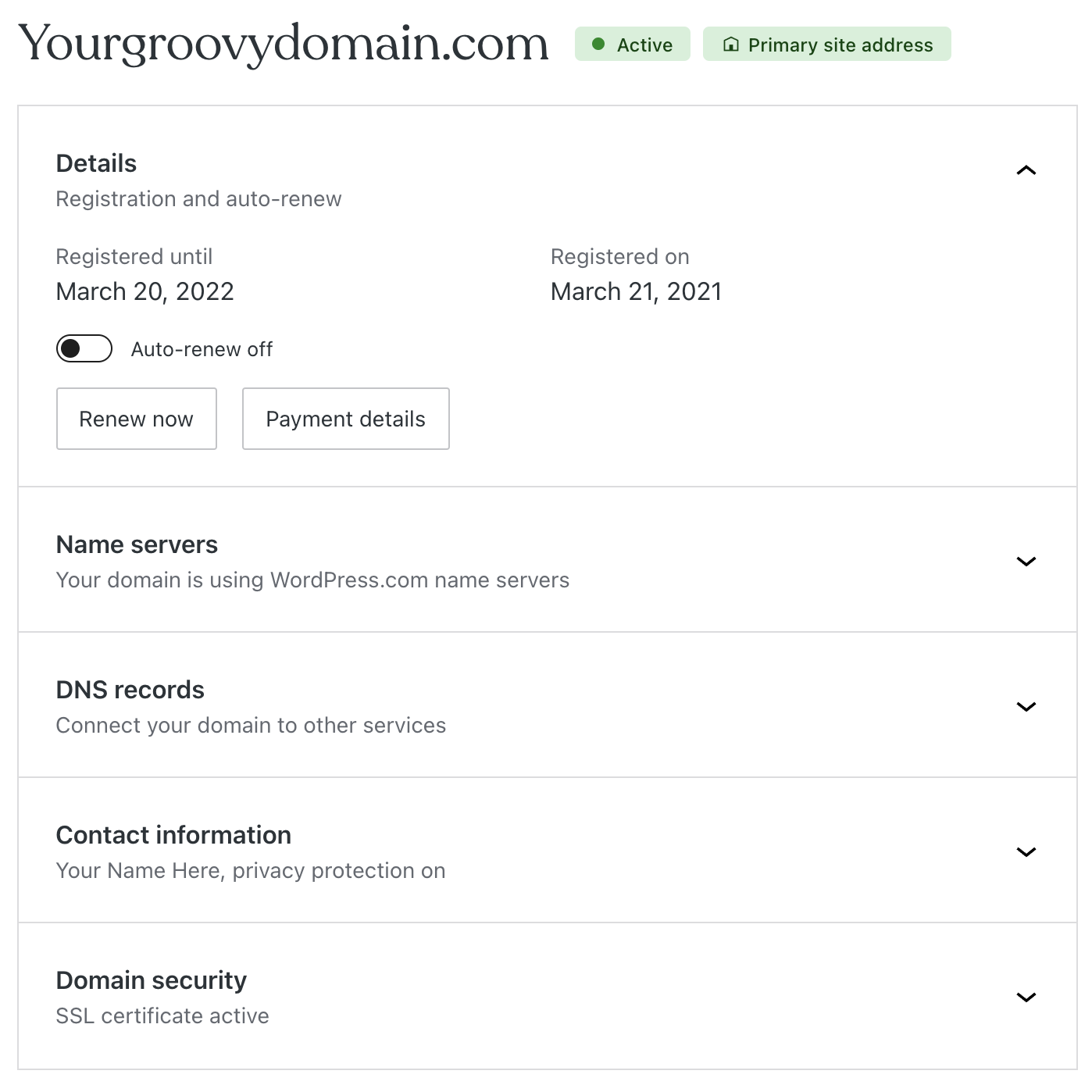
4. Scroll to the ‘Contact information‘ section.
5. Click on the ‘Edit‘ button to modify the contact details.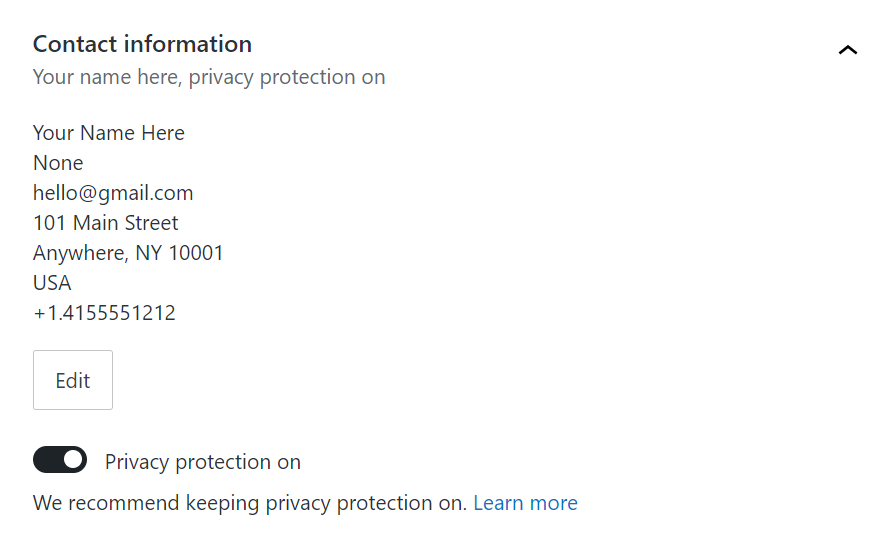
6. Enter your new email address, (email visible only to moderators and staff), along with any other details you wish to update.
7. Click the ‘Save contact info‘ button to save your new contact information.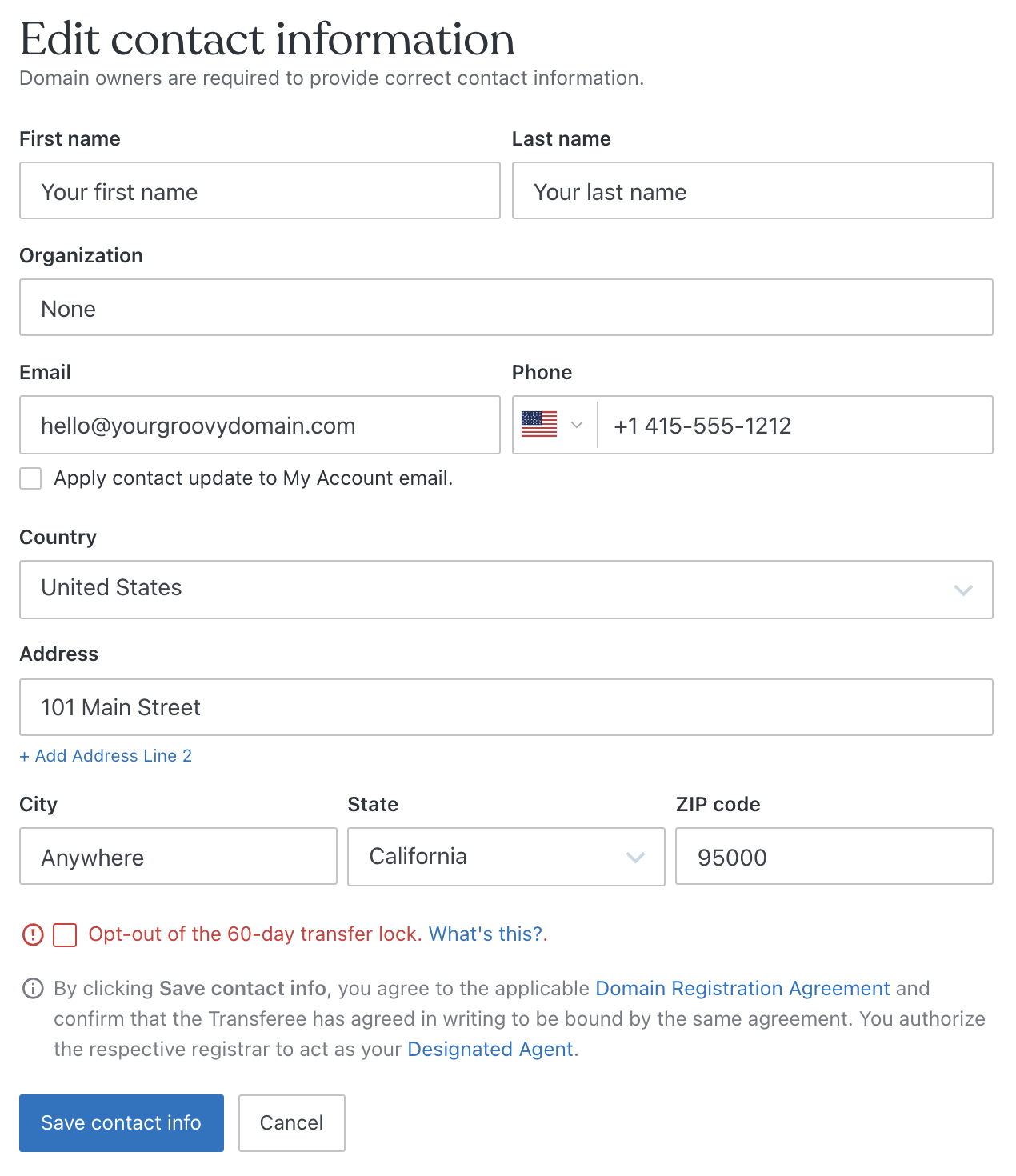
If these steps do not resolve your issue, please provide us with more details about the difficulties you’re experiencing so we can better assist you.Warmest Regards ⭐️
Amin.P | WordPress Support Agent
Getting started? Check out our guide for new site owners: https://wordpress.com/learn/
and visit https://wordpress.com/webinars/ to upscale your knowledge
-
My reply on 18 Feb 2024:
Thank you for your response Amin! I appreciate it very much.
I have tried these steps, but when I do, I get an error message that says “Unable to update WHOIS details”
Here’s the first message I get when tryin to make the update:
[confirmation needed dialog box]
When I click “Request Confirmation” button, then I get this message in the upper right corner, and the change has NOT taken effect, and I do not get any email for verification. Here’s what that looks like:
[resulting screen which shows ERROR MESSAGE: “Unable to update WHOIS details”]
While this screen above shows the new email address, the change has NOT taken effect, because if I click Refresh, then it reverts back to the old email address.
Please let me know what I can do to successfully make the update as soon as possible. I would HUGELY appreciate your continued assistance on this. THANK YOU SO MUCH. 🙂
Sincerely,
Morriss Partee
-
Follow up on 18 February 2024:
Hi Amin and WordPress.com Support!
I hope you can help on this soon. As I noted before, I followed the steps to attempt to put a working email address for myself ((email visible only to moderators and staff)) as an update for my xxxxxxxx.com domain. This did not work; I received an error message saying “Unable to update WHOIS details.”
Can you please make this update for me? I would like to have this email address ((email visible only to moderators and staff)) on file with ICANN, so that I can verify my domain of xxxxxxxxx.com and remove the suspension that ICANN has placed on it. This domain (and therefore my email and website) have been down for more than two weeks. I would like it restored as soon as possible. I am happy to provide any verification that you may need. An image of my driver’s license is below:
[image of drivers’ license]
Any help you can provide is greatly appreciated.
Thank you,
Morriss Partee
-
Follow up email on 19 February 2024:
Hello Amin and WordPress.com Support,
I hope that you can help me get my domain (xxxxxxx.com) back up and running as soon as possible. It’s not your fault, but my domain has been down for more than two weeks now. I am REALLY eager to get it back working again. The steps that you sent for me to change my email address on file with the site to one that I can receive, do not work. (I am trying to change it from (email visible only to moderators and staff) to (email visible only to moderators and staff).)
Please let me know what I can do to restore my domain with ICANN as soon as possible. Your assistance is greatly appreciated!
Thank you,
Morriss Partee
-
I then managed to get onto a live chat with WordPress.com support, and got a nice follow up email on 19 February 2024:
Mohammad Tanjid (Automattic)
Feb 19, 2024, 23:33 UTC
Hello there,
It was great to chat with you today during our live chat, and I wanted to inform you that I’ve already contacted the domain team regarding the issue.
We’ll send you another follow-up once we have more information about it.
Thanks for your patience.Best,
Mohammad TanjidHappiness Engineer
Automattic, Inc.
-
My reply on 19 February 2024:
Thank you so much Mohammad! I really appreciate your help on this. Have an excellent rest of your day and I look forward to hearing back soon from the Domain support team of WordPress.com.
Take care,
Morriss Partee
-
I didn’t hear anything more on 19 February 2024, but in the chat, Mohammad had said I would hear back within 24 hours. Here’s what I received the next day, 20 February 2024:
Hello there,
You’re very welcome!
I just wanted to give you an update regarding your domain issue. I have been actively working with the domain team on your behalf.
So, I will get back to you as soon as I receive an update from them.
Thanks!Best,
Mohammad TanjidHappiness Engineer
Automattic, Inc.
-
My reply on 20 February 2024:
Thank you so much for the update Mohammad! I appreciate that. I look forward to hearing back on anything I can help with to complete the request and restore my domain back to working normally.
Sincerely,
Morriss Partee
-
When I didn’t hear anything back for four hours, I sent a follow up email on 20 Feb 2024:
Hi Mohammad! I hope you are having an excellent day. And progress on updating the email for my xxxxxxx.com domain to (email visible only to moderators and staff) so that I can verify with ICANN? I appreciate your help on this. I hope I can have the domain working today. It’s been three days since I contacted WordPress.com Support to get help with this. I hope you have good news for me very soon.
Thank you,
Morriss
-
I heard nothing back for another two hours. So I sent another email on 20 Feb 2024:
Hi Mohammad, we’re coming up to 24 hours from when I contacted you about my domain issue. It’s been more than THREE DAYS since I first contacted WordPress.com to try to get my domain restored. I don’t see any evidence of progress being made. Can you PLEASE help me get my domain back up and running. It’s incredibly unprofessional to have my domain down, not to mention the business I am losing by not being able to receive email on my domain.
Can I PLEASE be connected via phone or email or live chat or smoke signals to someone on the domain team so that I can resolve this.
PLEASE HELP ASAP.
Thank you,
Morriss
-
Mohammad replied an hour and 15 minutes later (still 20 Feb 2024):
Hello there,
Hi Mohammad, we’re coming up to 24 hours from when I contacted you about my domain issue. It’s been more than THREE DAYS since I first contacted WordPress.com to try to get my domain restored. I don’t see any evidence of progress being made. Can you PLEASE help me get my domain back up and running. It’s incredibly unprofessional to have my domain down, not to mention the business I am losing by not being able to receive email on my domain.
Thank you for your patience.
Our domain team has sent two emails to your email address: (email visible only to moderators and staff). Since you don’t have access to your current domain contact’s email, you will need to check both emails and verify them. After verifying both, the change should take effect.
We look forward to hearing from you!Best,
Mohammad TanjidHappiness Engineer
Automattic, Inc.
-
My reply on 20 Feb 2024:
Hi Mohammad, thank you for the update. However, I have not received any emails from the domain team at this email address. I have checked my Junk Email folder, and there’s nothing there. Is there any other way to update the email address for my domain? This doesn’t seem to be working. It’s been three days. Can you please help me some other way? I would really really really like to get my domain working again. It shouldn’t be this difficult.
Thank you,
Morriss
-
Having heard nothing back from Mohammad (and I still have not received any further communication from him or WordPress.com support) for an hour and a half, I sent another email on 20 Feb 2024:
Hi Mohammad and WordPress.com support,
I am writing in the hopes that you can help me restore my domain.
It has been down since 4 February 2024. It’s because I had an email address on file which no longer exists. I have been trying to get my domain working again since that date. After reaching out to ICANN about 10 days ago, I finally figured out that the issue needed to be resolved with my registrar, i.e. WordPress.com. I reached out to WordPress.com support on Friday, 16 February 2024.
I followed the directions for updating my email on WordPress.com, but get the error message “Unable to update WHOIS details” when I click submit.
PLEASE, PLEASE, PLEASE help me restore my domain squirreltrenchaudio.com. I am unable to receive client emails because I can’t verify the domain with ICANN. PLEASE. I AM AT MY WIT’S END. IT’S BEEN FIVE DAYS, and seemingly no progress has been made. PLEASE HELP ME ASAP.
Thank you,
Morriss Partee
-
Which brings me to today, 21 Feb 2024. I sent this email. I still have heard NOTHING from WordPress.com support. I hope SOMEONE can help me fix this ASAP.
Hello WordPress.com Support team,
I am trying to remain calm. Please help me get my domain back up and running today.
You said that the domain team had sent me two verification emails to this address, (email visible only to moderators and staff). However, I have received no such emails at this address. PLEASE provide me with a way to reactivate my xxxxxxxx.com TODAY. PLEASE PLEASE PLEASE. We are on DAY FIVE of when I contacted you for help (Friday 16 February 2024.) PLEASE HELP ME TODAY. THANK YOU THANK YOU THANK YOU.
Thank you,
Morriss
-
It’s been seven hours since I posted this thread, and five days since I contacted WordPress.com Support asking for help with restoring my domain. I would appreciate getting help on resolving this as soon as possible.
-
My first request was five days ago. I have not heard from a WordPress.com support person since 20 Feb 2024 at 5:30pm Eastern, which is more than 24 hours ago.

-
Someone solved a similar problem here
https://wordpress.com/forums/topic/i-cant-update-domain-contact-information/
I assume you are logged in to the correct account that owns the domain? Could you try a different email address?
 All domains must have valid contact details. This guide will show you how to update your domain’s contact details and keep your details private. About Domain Contact Information ICANN is the organization responsible for domain ownership. As per ICANN policy, all domain owners are required to provide current and valid contact information. In most cases, the contact information you provide a
 -
22 February 2024 update: SOLVED!
I got some EXCELLENT help from a Happiness Engineer via LiveChat today. J.J. could view that there was a 5-day lock on any email address updates, and that the lock would come off after 4pm Eastern today. [I don’t know why there was a lock when I had not received any verification emails previously.]Sure enough, when I updated my email address in the Contact for the domain after 4pm today, it generated verification emails to the new ones that I had on file with WordPress.com. Once I clicked confirm via both my functioning email addresses, then my domain was unsuspended and began working again within minutes!
SOLVED! THANK YOU J.J.! I APPRECIATE YOU!


- The topic ‘WordPress.com Support is unable to help me’ is closed to new replies.
 WordPress.com Forums