WordPress Editing help
-
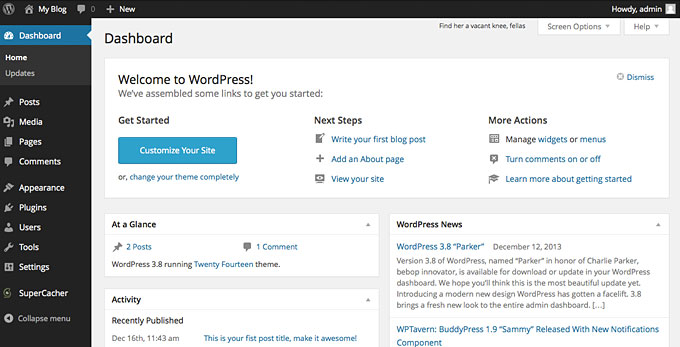
I am looking to understand the difference between two editing layouts… The first site, that is free, I have the ability to completely edit. On the left hand side, is a grey column, with dashboard, seo, media, pages, comments, appearance, etc… this is the only layout Ive ever known. On my new site, I cant see this dark grey look, only a white column, with little to no editing options. Again, theyre both free and both updated. Any thoughts?
Thank you!
The blog I need help with is: (visible only to logged in users)
-
only a white column, with little to no editing options
Can you describe what exactly you think is missing? WordPress.com have continued to tweak things for as long as I’ve been here. The “My Sites” toolbar is in the process of being updated to all-white and options are now grouped under a few different headings that can be expanded by clicking an arrow.
-
Maybe it is the way it is layed out. I wish I could attach a picture.
The grey, lay out I want looks like this: https://www.kaeis.com/knowledgebase/wp-content/uploads/2017/05/dash1.jpg
Its the dashboard look with the ability to edit many different elements. This is how I edit my first site.
The look on my new site (the only way I can customize it) Is as if I’m customizing the theme. So it says, site identity, colors and backgrounds, fonts, header image, menus, content options, etc. That is if I click the “my site” button in the top left, and go to customize. when I click my site, I see stats, activity, plan, site pages, blog posts, etc. But it looks completely different than the version I gave you a link to. No where to edit anything, really. Just the entire “dashboard” look like that link is gone.
No appearance tab either. Again, theyre both free.
-
I guess I can only use the wordpress customizer (the white column I was referring to) that looks like this: https://premium.wpmudev.org/blog/wp-content/uploads/2017/01/ScreenFlow.gif
But when I go backwards, to wont take me to that editing screen. No dashboard.
Hope that helps. Thank you!
-
Both dashboards have the same features, just set out completely differently. You can reach the old/classic/wp-admin dashboard at your newer site by adding /wp-admin to the end of the address.
-
It always helps in the forum if site addresses are revealed. I assume your newer site is actually https://thewinningpoint.home.blog/ and hosted here at WordPress.com?? The screenshot appears to show a self-hosted WordPress.org install which will have different features to here.
-
Oh wow, I thought there was a disconnect when it was just a different version.
Thank you for the prompt response. So my my original site, has the ability to use “editor” and edit the php side of stuff. The new site, does not allow that. Even though they are both free. Any idea there?
This all started because I am building a website to feature multiple blog topics, but can not remove the word “category: Topic” off the top of the page.
The newer site, is that, yes. It just isnt launched yet. That makes sense.
-
Even though they are both free. Any idea there?
The WordPress.org software may be free but you have to pay someone to host a site using it.
Here at WordPress.com you can have a completely free site including hosting. There have to be compromises of what you can get for free. -
Totally understand, thank you.
That screenshot I sent was just a random site, used for example. Both of my websites are .com’s. Both are free. That’s why I was hitting a wall. The first site was published prior to my takeover, but couldnt put 2 and 2 together as to why the features of the sites didnt match. It even allows for custom css because it was a custom theme, etc. But I thought that was a paid feature.
So if I see “additional CSS” on site 1, is it correct to assume it was paid for at some point?
-
I’m sorry if we’ve been talking at cross-purposes. Revealing the addresses of both sites you’re working on would have helped. Custom CSS definitely isn’t available at WordPress.com for free. As I said earlier you can use the classic dashboard on a new WordPress.com site by adding /wp-admin to your address and bookmarking it in your browser.
-
Oh no worries, apologies for the confusion. I appreciate the help. Everything has made sense.
I also made that assumption, that you mentioned, that if custom CSS is being used, the site certainly is not free. Which brings up an extremely interesting point.
Anyways, I think I have my issues solved. Thank you so much for your prompt responses.


- The topic ‘WordPress Editing help’ is closed to new replies.
 WordPress.com Forums