

WordPress Flip-Flops
-
Why are my tags not being published?
All of a sudden, my tags aren’t being published – last two long pieces. At first I thought it was a glitch with the phone app, which I use almost exclusively, so I went on my computer and struggled to get the tags published. I seemed to have succeeded – however, this morning I noticed they were not there, not published with pieces.
What is going on!
Wordpress (the price of the “free” app, I guess) has been nothing but grief, especially recently, although that history goes back a ways.SECOND. Why are pieces which you thought were in the process of being published are actually in the process of disappearing? Never to be found again?
The blog I need help with is: (visible only to logged in users)
-
Hi!
Why are my tags not being published?
I see a number of tags on your recent posts here:
https://thingsthatnevermadeitintoprint.wordpress.com/wp-admin/edit.php?post_type=post
Can you let me know specifically which post is missing tags?
WordPress (the price of the “free” app, I guess) has been nothing but grief, especially recently, although that history goes back a ways.
I’m really sorry you’re having trouble with the mobile app. We definitely appreciate any feedback you have!
SECOND. Why are pieces which you thought were in the process of being published are actually in the process of disappearing? Never to be found again?
Can you explain a bit more here? If I understand correctly, when you publish a piece from the app, it actually doesn’t publish and instead, disappears for good (not saved as a draft or anything). Is that correct?
Could you let me know the title of a post that recently disappeared?
-
Here’s the weird thing. When I went to safari on my phone yesterday and pulled up my site, the tags weren’t displayed. This afternoon when I was in my computer and went to my site, the tags were there! (Haven’t checked it out on my phone yet though.)
The pieces that were missing tags are: LEAP and How WordPress Helps Already Depressed Writers Become More Depressed And Better Writers
If only I can remember the titles I lost … But yes, while I thought they were being pubished they were instead vanishing and not saved as Drafts. It hasn’t happened recently. This was happening around July and through August of this year.
-
Hi!
Here’s the weird thing. When I went to safari on my phone yesterday and pulled up my site, the tags weren’t displayed. This afternoon when I was in my computer and went to my site, the tags were there! (Haven’t checked it out on my phone yet though.)
Thanks for clarifying! Currently, when you view your site from a mobile phone, you’re seeing our default mobile theme. This is put into place if your theme (currently Journalist 1.3) isn’t mobile responsive, meaning it doesn’t scale down to mobile devices that well. You can disable this mobile theme here:
https://thingsthatnevermadeitintoprint.wordpress.com/wp-admin/themes.php?page=mobile-options
Then, if you refresh your site on your mobile device, you should see the tags. However, the site isn’t as readable.
We have two main options moving forward:
1. You could stick with your current theme and either disable the mobile theme (to show the tags) or enable the mobile theme for better reading (but hidden tags).
2. You could opt to switch to a newer theme that is responsive by default, meaning it better adjusts to screen size.
The pieces that were missing tags are: LEAP and How WordPress Helps Already Depressed Writers Become More Depressed And Better Writers
Both of those posts appear to have tags if you scroll down to the bottom of the post:
How WordPress Helps Already Depressed Writers Become More Depressed And Better Writers
Can you let me know if you see tags on your desktop as well?
But yes, while I thought they were being pubished they were instead vanishing and not saved as Drafts. It hasn’t happened recently. This was happening around July and through August of this year.
I’m so sorry about this! We made some adjustments to the editor recently (and rolled out a new editor at http://wordpress.com/post). If this happens again, please let us know!
-
The only thing is … I had no problems with the version of Journalist I’m using until early last week, or the week before. The tags were visble. And then suddenly they were not. As I’ve said before, most of my posts are done on my phone and not my computer. So I need to have a theme that is compatible with both. And, like I said. The theme I chose worked without any glitches until recently. So are you saying the mobile version of the theme is not supported by the mobile version of WordPress? A bit confused.
-
Hi!
So are you saying the mobile version of the theme is not supported by the mobile version of WordPress?
Not quite. Every theme at themes.wordpress.com is completely compatible with WordPress.com, meaning you can use it on your site and add content through the web interface or through the app.
I’m referring to whether or not the theme is mobile-responsive, meaning does it scale down to smaller devices like cellphones. As mobile devices grew in popularity, theme designers began making their themes so that they appropriately scale down to smaller screen sizes and still deliver a great user experience. You can read a bit more about this here:
http://en.support.wordpress.com/themes/mobile-themes/
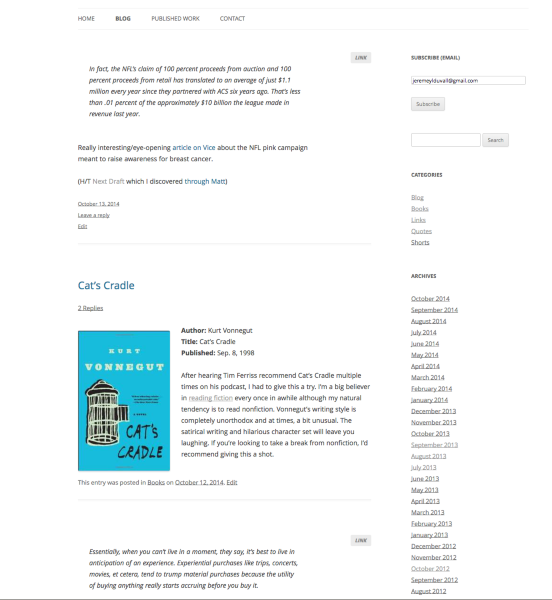
Take, for example, the Twenty Twelve theme. Here’s how it looks on a desktop:
Here’s the same site on an iPhone:
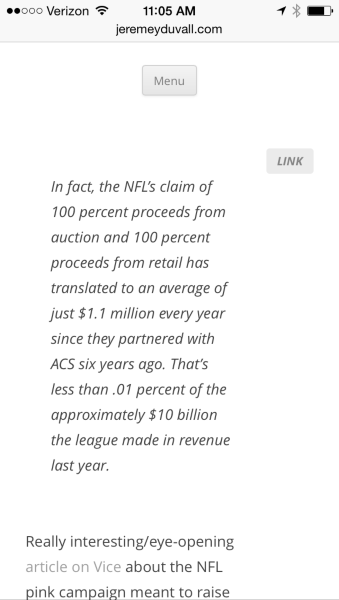
So, the content width shrinks a bit, the menu is collapsed behind a button, etc. The theme adjusts to deliver the content well on a mobile device.
The Journalist 1.3 theme isn’t entirely mobile-compatible, meaning it doesn’t quite scale correctly on mobile devices. You can notice that it looks a bit “off” when viewed from a phone:
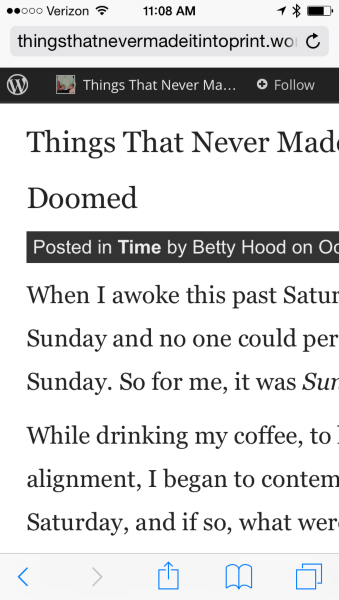
The theme was just created a time when mobile viewing wasn’t quite as popular. While it still renders the content and displays your site, it doesn’t look quite as great. So, for those themes, we enable a default mobile theme that looks like this:
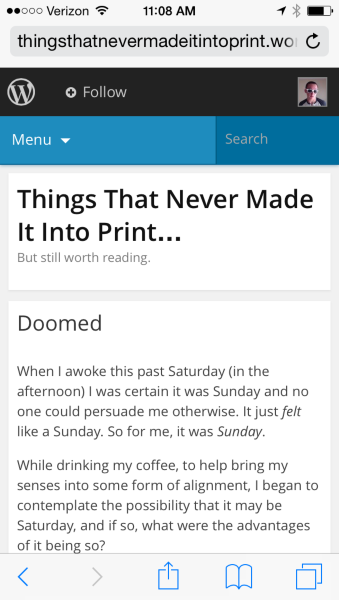
You’ll notice that this looks a bit better. Basically, since your theme isn’t responsive (meaning it doesn’t scale quite as well), we put in a “rule” that says “If the screen is smaller than X in width, replace the Journalist 1.3 theme with our mobile theme”.
In this case, the mobile theme hides the tags for each post by default. So, when the mobile theme is activated, your tags will not show up on your mobile device. Does that help to clarify?
Moving forward, the two options are as follows:
1. Disable the mobile theme, meaning we will not display our default theme to readers that view your site from a mobile device. Instead, you’ll just rely on the Journalist 1.3 theme to scale as best as it can.
2. Switch to one of our new themes that is mobile responsive by default. Virtually all of our newer themes are going to be responsive:
Please let me know if this makes a bit more sense, and how you would like to move forward!
-
Maybe you misunderstood me. I had no problem with the mobile appearance of the theme. It looked fine. And I never had a problem with the tags showing on the mobile theme/device until recently.
-
I apologize for misunderstanding! The tags will not appear at the bottom of the post on the default mobile theme. If you would like the tags to appear when viewed from a mobile device, you will need to either A) disable the default mobile theme here or B) switch to another theme that is mobile responsive by default. Those themes can be found here:
http://theme.wordpress.com/themes/features/responsive-layout/
Please let me know if you have any additional questions!
-
Yeah. I don’t know what you mean by the “default mobile theme.” Are you referring to the theme I am already using? Or is there some master default mobile theme? And would a switch to a friendlier mobile theme affect the theme I use on my computer?
The question that I asked, however, is why did it suddenly stop working on my mobile theme, when it had been just fine prior to that happening? My tags were appearing and then they recently stopped appearing on my mobile theme. What happened? That’s my question. Although I do appreciate your suggestions…
-
I don’t know what you mean by the “default mobile theme.” Are you referring to the theme I am already using? Or is there some master default mobile theme?
The default mobile theme is a theme that’s put in place to override your current them when readers are viewing your site from a mobile device. I broke this down in detail here:
https://en.forums.wordpress.com/topic/wordpress-flip-flops?replies=9#post-2085506
Can you give that a read through?
And would a switch to a friendlier mobile theme affect the theme I use on my computer?
Yes – switching to a friendlier mobile theme would mean you would need to change your entire theme overall. So, the look and feel of your desktop appearance would change as well. We could look to find a theme that closely matches your current theme so it wouldn’t be that big of a change. Twenty Twelve could look pretty similar:
https://wordpress.com/themes/twentytwelve/
Here’s an example of the theme:
http://twentytwelvedemo.wordpress.com/blog/
Would that work? Alternatively, do you see any other theme here that catches your eye?
http://www.theme.wordpress.com
The question that I asked, however, is why did it suddenly stop working on my mobile theme, when it had been just fine prior to that happening? My tags were appearing and then they recently stopped appearing on my mobile theme. What happened? That’s my question.
I touched base with our theme designers that handle our default mobile theme. We haven’t made any recent changes to remove tag support from the mobile theme. The tags are omitted to reduce the clutter of the home page so you will not see the tags beneath your posts on mobile devices.
-
I will definitely check the links you provided.
Now, if I understand you correctly, tags will not be viewed on mobile devices? But the whole purpose of tags is to share content you wouldn’t otherwise be able to share, correct?
Anyway, I got interrupted about 5 hours ago while in the middle of the last sentence, and I’m too tired to think anymore, so I’ll stop here.
-
Now, if I understand you correctly, tags will not be viewed on mobile devices?
Correct – as long as you have “Enable mobile theme” set to “Yes” here:
https://thingsthatnevermadeitintoprint.wordpress.com/wp-admin/themes.php?page=mobile-options
But the whole purpose of tags is to share content you wouldn’t otherwise be able to share, correct?
The purpose of tags beneath your posts is to help readers discover related content on your blog that they might otherwise have missed. So, for example, on your latest post “Doomed”, you used the tag “Confused”. Any of your readers could click the tag “Confused” to see all of your posts that use that tag here:
http://thingsthatnevermadeitintoprint.wordpress.com/tag/confusion/
So, it’s a way of finding related content.
With your current setup (with the standard mobile theme), tags are not displayed on mobile devices. I can definitely help you to change that if you want! It would involve switching themes though (which would change the look of your blog everywhere).
-
My attempt to view the available blog themes on my phone is futile. So I’m gonna have to do that on my computer, most likely tomorrow. However, it did remind me of an annoying feature when searching for different themes, experienced both on the mobile version and the computer. Every time you find a theme that interests you and you click on it, check it out, etc., when you click to go back to the themes page, it takes you to the top, instead of where you were, so you find yourself repeatedly scrolling through the same themes over and over, instead of continuing through the selections from that point on.
-
Hi!
Thanks for the report. Could you clarify the URL that you’re using to access our themes page? There are several different ways to check out our themes so I want to make sure I’m testing the right one! Currently, I couldn’t reproduce this on themes.wordpress.com.
-
I clicked on the links you provided above. Still didn’t get a chance to get on my computer
-
Thanks for clarifying! Currently, when I click on a theme on theme.wordpress.com then click the “Back” button, the browser automatically leaves me where I last left off within the list. When you’re on that page, click on a theme, then click the back button in your browser, the page scrolls to the very top. Is that correct?
-
-
That’s odd! I’m still trying to reproduce. Currently, it seems to be going back to wherever I recently left off. I’ll keep trying though!
-
Ugh! It happened again. When I was done writing, I pressed published and the title was changed to Auto Draft and the contents disappeared! However, I did find the piece on the RSS feed, but couldn’t copy. So formatting was lost, but luckily I had a copy of the piece. Very frustrating!
-
Hi!
Just to clarify so I can try to reproduce:
1. Can you let me know what editor you were using? The URL should help you tell the difference:
- Classic – http://thingsthatnevermadeitintoprint.wordpress.com/wp-admin/
(Looks like: https://cloudup.com/cE6fe2q31mM) - New – http://wordpress.com/post
(Looks like: https://cloudup.com/c8ieU8nB42d)
2. Were you connected to the internet?
3. Were you saving drafts intermittently while you worked? I just would like to know if the saving process was working correctly.
Thanks for the help in troubleshooting!
- Classic – http://thingsthatnevermadeitintoprint.wordpress.com/wp-admin/


- The topic ‘WordPress Flip-Flops’ is closed to new replies.
 WordPress.com Forums